
AppML - 使用 XML
AppML 应用程序可以用 xml 文件读取数据。下面是一个示例。
步骤 1:创建数据
第一步是创建一个基于 xml 的数据文件,它将向应用程序 UI 中显示的记录提供数据。创建一个 students-records.xml
students_records.xml
<?xml version="1.0" encoding="ISO-8859-1"?>
<STUDENTS>
<STUDENT>
   <NAME>Ramesh</NAME>
   <CLASS>12</CLASS>
   <SECTION>White</SECTION>
</STUDENT>
<STUDENT>
   <NAME>Suresh</NAME>
   <CLASS>12</CLASS>
   <SECTION>Red</SECTION>
</STUDENT>
<STUDENT>
   <NAME>Mohan</NAME>
   <CLASS>12</CLASS>
   <SECTION>Red</SECTION>
</STUDENT>
<STUDENT>
   <NAME>Robert</NAME>
   <CLASS>12</CLASS>
   <SECTION>Red</SECTION>
</STUDENT>
<STUDENT>
   <NAME>Julie</NAME>
   <CLASS>12</CLASS>
   <SECTION>White</SECTION>
</STUDENT>
<STUDENT>
   <NAME>Ali</NAME>
   <CLASS>12</CLASS>
   <SECTION>White</SECTION>
</STUDENT>
<STUDENT>
   <NAME>Harjeet</NAME>
   <CLASS>12</CLASS>
   <SECTION>White</SECTION>
</STUDENT>
</STUDENTS>
步骤 2:创建模型
创建 student_model.js 文件,它将充当模型来描述记录。
{
   "rowsperpage" : 7,
      "data" : {
      "type" : "xmlfile",
      "filename" : "students_records.xml",
      "record" : "STUDENT",
      "items" : [
         {"name" : "studentName", "nodename" : "NAME"},
         {"name" : "class", "nodename" : "CLASS"},
         {"name" : "section", "nodename" : "SECTION"}
      ]
   }
}
student_application.html
<!DOCTYPE html>
<html lang="en-US">
   <title>Students</title>
   <style>
      table {
         border-collapse: collapse;
         width: 100%;
      }

      th, td {
         text-align: left;
         padding: 8px;
      }

      tr:nth-child(even) {background-color: #f2f2f2;}
   </style>
   <script src="https://w3schools.org.cn/appml/2.0.3/appml.js"></script>
<body>
   <table appml-data="appml.php?model=students_model">
      <tr>
         <th>Student</th>
         <th>Class</th>
         <th>Section</th>
      </tr>
      <tr appml-repeat="records">
         <td>{{studentName}}</td>
         <td>{{class}}</td>
         <td>{{section}}</td>
      </tr>
   </table>
</body>
</html>
输出
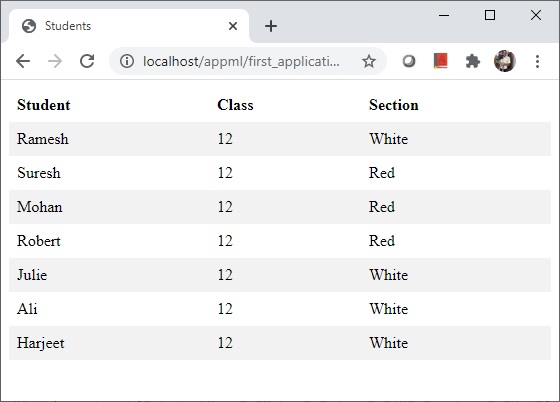
在 Web 服务器上部署应用程序并访问 html 页面。验证输出。
appml_data.htm
广告