
 数据结构
数据结构 网络
网络 关系数据库管理系统 (RDBMS)
 操作系统
操作系统 Java
Java MS Excel
 iOS
iOS HTML
HTML CSS
CSS Android
 Python
 C语言编程
C语言编程 C++
C++ C#
C# MongoDB
 MySQL
MySQL Javascript
 PHP
PHP 物理
物理 化学
化学 生物
生物 数学
数学 英语
英语 经济学
经济学 心理学
心理学 社会研究
社会研究 时尚研究
时尚研究 法律研究
法律研究使用Python中的OpenCV进行图像算术运算
在本教程中,我们将学习如何使用**OpenCV**进行图像算术运算。我们可以应用诸如**加法、减法、位运算**等操作……让我们看看如何对图像执行运算。
我们需要OpenCV模块来对图像执行运算。使用终端或命令行中的以下命令安装**OpenCV**模块。
pip install opencv-python==4.1.1.26
如果运行以上命令,您将收到以下成功消息。
Collecting opencv-python==4.1.1.26
Downloading https://files.pythonhosted.org/packages/1f/51/e0b9cef23098bc31c77b0e0
6221dd8d05119b9782d4c2b1d1482e22b5f5e/opencv_python-4.1.1.26-cp37-cp37m-win_amd64.w
hl (39.0MB)
Requirement already satisfied: numpy>=1.14.5 in c:\users\hafeezulkareem\anaconda3\l
ib\site-packages (from opencv-python==4.1.1.26) (1.16.2)
Installing collected packages: opencv-python
Successfully installed opencv-python-4.1.1.26
加法
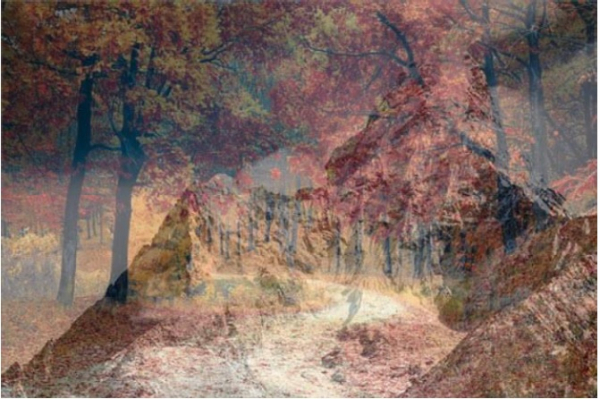
我们可以使用**cv2.addWeighted()**添加两张图像。它接受五个参数:两张图像、两张图像对最终图像的权重以及最终图像的亮度值。
图像一

图像二

现在我们将这两张图像添加到一张图像中。
示例
# importing cv2 module
import cv2
# reading the images and storing in variables
image_one = cv2.imread('_1.jpg')
image_two = cv2.imread('_2.jpg')
# adding two images
result_image = cv2.addWeighted(image_one, 0.5, image_two, 0.5, 0)
# displaying the final image
cv2.imshow('Final Image', result_image)
# deallocating the memory
if cv2.waitKey(0) & 0xff == 27:
   cv2.destroyAllWindows()
输出
最终图像
减法
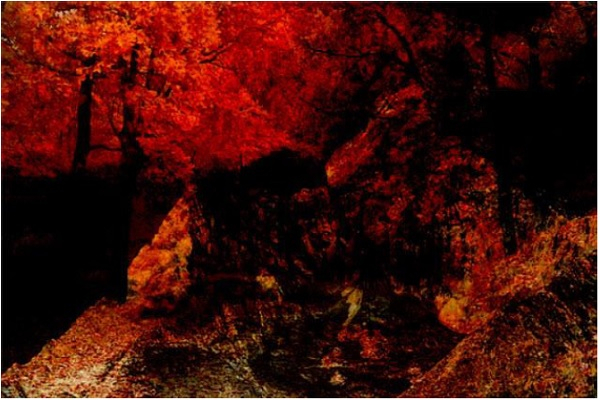
我们有一种叫做**cv2.subtract(image_one, image_two)**的方法来对两张图像进行减法运算。我们将使用与加法相同的图像。让我们看看代码。
示例
# importing cv2 module
import cv2
# reading the images and storing in variables
image_one = cv2.imread('_1.jpg')
image_two = cv2.imread('_2.jpg')
# substracting two images
result_image = cv2.subtract(image_one, image_two)
# displaying the final image
cv2.imshow('Final Image', result_image)
# deallocating the memory
if cv2.waitKey(0) & 0xff == 27:
   cv2.destroyAllWindows()
输出
最终图像
结论
如果您对本教程有任何疑问,请在评论区提出。

更新于:2019年11月1日
757 次浏览

广告