- AWT 教程
- AWT - 首页
- AWT - 概述
- AWT - 环境
- AWT - 控件
- AWT - 事件处理
- AWT - 事件类
- AWT - 事件监听器
- AWT - 事件适配器
- AWT - 布局
- AWT - 容器
- AWT - 菜单
- AWT - 图形
- AWT 有用资源
- AWT - 快速指南
- AWT - 有用资源
- AWT - 讨论
AWT 按钮类
简介
按钮是一个带有标签的控制组件,按下时会生成一个事件。当按钮被按下并释放时,AWT 通过调用按钮上的 processEvent 方法向按钮发送一个 ActionEvent 实例。按钮的 processEvent 方法接收按钮的所有事件;它通过调用自己的 processActionEvent 方法传递操作事件。后者方法将操作事件传递给任何已注册对该按钮生成的事件感兴趣的操作监听器。
如果应用程序希望根据按钮被按下并释放执行某些操作,它应该实现 ActionListener 并注册新的监听器以接收来自该按钮的事件,方法是调用按钮的 addActionListener 方法。应用程序可以利用按钮的操作命令作为消息传递协议。
类声明
以下是java.awt.Button类的声明
public class Button
   extends Component
      implements Accessible
类构造函数
| 序号 | 构造函数 & 描述 |
|---|---|
| 1 | Button() 使用空字符串作为其标签构造一个按钮。 |
| 2 | Button(String text) 使用指定的标签构造一个新的按钮。 |
类方法
| 序号 | 方法 & 描述 |
|---|---|
| 1 | void addActionListener(ActionListener l) 添加指定的动作监听器以接收来自此按钮的动作事件。 |
| 2 | void addNotify() 创建按钮的同级。 |
| 3 | AccessibleContext getAccessibleContext() 获取与此按钮关联的 AccessibleContext。 |
| 4 | String getActionCommand() 返回此按钮触发的操作事件的命令名称。 |
| 5 | ActionListener[] getActionListeners() 返回在此按钮上注册的所有操作监听器的数组。 |
| 6 | String getLabel() 获取此按钮的标签。 |
| 7 | <T extends EventListener> T[] getListeners(Class<T> listenerType) 返回当前在此按钮上注册为 FooListeners 的所有对象的数组。 |
| 8 | protected String paramString() 返回表示此按钮状态的字符串。 |
| 9 | protected void processActionEvent(ActionEvent e) 通过将事件分派到任何已注册的 ActionListener 对象来处理在此按钮上发生的事件。 |
| 10 | protected void processEvent(AWTEvent e) 处理此按钮上的事件。 |
| 11 | void removeActionListener(ActionListener l) 移除指定的动作监听器,以便它不再接收来自此按钮的动作事件。 |
| 12 | void setActionCommand(String command) 设置此按钮触发的操作事件的命令名称。 |
| 13 | void setLabel(String label) 将按钮的标签设置为指定的字符串。 |
继承的方法
此类继承自以下类的方法
java.awt.Component
java.lang.Object
按钮示例
使用您选择的任何编辑器创建以下 Java 程序,例如在D:/ > AWT > com > tutorialspoint > gui >
AwtControlDemo.javapackage com.tutorialspoint.gui;
import java.awt.*;
import java.awt.event.*;
public class AwtControlDemo {
private Frame mainFrame;
private Label headerLabel;
private Label statusLabel;
private Panel controlPanel;
public AwtControlDemo(){
prepareGUI();
}
public static void main(String[] args){
AwtControlDemo awtControlDemo = new AwtControlDemo();
awtControlDemo.showButtonDemo();
}
private void prepareGUI(){
mainFrame = new Frame("Java AWT Examples");
mainFrame.setSize(400,400);
mainFrame.setLayout(new GridLayout(3, 1));
mainFrame.addWindowListener(new WindowAdapter() {
public void windowClosing(WindowEvent windowEvent){
System.exit(0);
}
});
headerLabel = new Label();
headerLabel.setAlignment(Label.CENTER);
statusLabel = new Label();
statusLabel.setAlignment(Label.CENTER);
statusLabel.setSize(350,100);
controlPanel = new Panel();
controlPanel.setLayout(new FlowLayout());
mainFrame.add(headerLabel);
mainFrame.add(controlPanel);
mainFrame.add(statusLabel);
mainFrame.setVisible(true);
}
private void showButtonDemo(){
headerLabel.setText("Control in action: Button");
Button okButton = new Button("OK");
Button submitButton = new Button("Submit");
Button cancelButton = new Button("Cancel");
okButton.addActionListener(new ActionListener() {
public void actionPerformed(ActionEvent e) {
statusLabel.setText("Ok Button clicked.");
}
});
submitButton.addActionListener(new ActionListener() {
public void actionPerformed(ActionEvent e) {
statusLabel.setText("Submit Button clicked.");
}
});
cancelButton.addActionListener(new ActionListener() {
public void actionPerformed(ActionEvent e) {
statusLabel.setText("Cancel Button clicked.");
}
});
controlPanel.add(okButton);
controlPanel.add(submitButton);
controlPanel.add(cancelButton);
mainFrame.setVisible(true);
}
}
使用命令提示符编译程序。转到D:/ > AWT并键入以下命令。
D:\AWT>javac com\tutorialspoint\gui\AwtControlDemo.java
如果没有错误,则表示编译成功。使用以下命令运行程序。
D:\AWT>java com.tutorialspoint.gui.AwtControlDemo
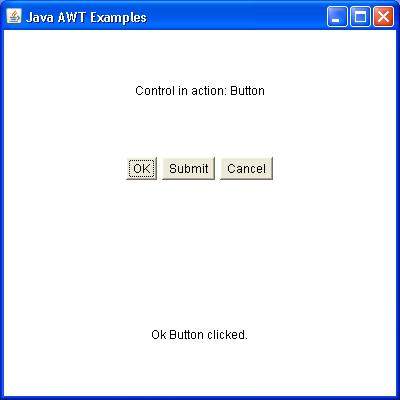
验证以下输出