- AWT 教程
- AWT - 首页
- AWT - 概述
- AWT - 环境
- AWT - 控件
- AWT - 事件处理
- AWT - 事件类
- AWT - 事件监听器
- AWT - 事件适配器
- AWT - 布局
- AWT - 容器
- AWT - 菜单
- AWT - 图形
- AWT 有用资源
- AWT - 快速指南
- AWT - 有用资源
- AWT - 讨论
AWT CubicCurve2D 类
简介
CubicCurve2D 类定义了 (x,y) 坐标空间中的三次参数曲线段。
类声明
以下是java.awt.geom.CubicCurve2D类的声明
public abstract class CubicCurve2D
   extends Object
      implements Shape, Cloneable
类构造函数
| 序号 | 构造函数 & 描述 |
|---|---|
| 1 | protected CubicCurve2D()
这是一个抽象类,不能直接实例化。 |
类方法
| 序号 | 方法 & 描述 |
|---|---|
| 1 | Object clone() 创建一个与该对象相同类的新对象。 |
| 2 | boolean contains(double x, double y) 测试指定的坐标是否在 Shape 的边界内。 |
| 3 | boolean contains(double x, double y, double w, double h) 测试 Shape 的内部是否完全包含指定的矩形区域。 |
| 4 | boolean contains(Point2D p) 测试指定的 Point2D 是否在 Shape 的边界内。 |
| 5 | boolean contains(Rectangle2D r) 测试 Shape 的内部是否完全包含指定的 Rectangle2D。 |
| 6 | Rectangle getBounds() 返回一个完全包围 Shape 的整数 Rectangle。 |
| 7 | abstract Point2D getCtrlP1() 返回第一个控制点。 |
| 8 | abstract Point2D getCtrlP2() 返回第二个控制点。 |
| 9 | abstract double getCtrlX1() 以双精度返回第一个控制点的 X 坐标。 |
| 10 | abstract double getCtrlX2() 以双精度返回第二个控制点的 X 坐标。 |
| 11 | abstract double getCtrlY1() 以双精度返回第一个控制点的 Y 坐标。 |
| 12 | abstract double getCtrlY2() 以双精度返回第二个控制点的 Y 坐标。 |
| 13 | double getFlatness() 返回此曲线的平坦度。 |
| 14 | static double getFlatness(double[] coords, int offset) 返回由在指定索引处指定数组中存储的控制点指定的立方曲线的平坦度。 |
| 15 | static double getFlatness(double x1, double y1, double ctrlx1, double ctrly1, double ctrlx2, double ctrly2, double x2, double y2) 返回由指定的控制点指定的立方曲线的平坦度。 |
| 16 | double getFlatnessSq() 返回此曲线的平坦度的平方。 |
| 17 | static double getFlatnessSq(double[] coords, int offset) 返回由在指定索引处指定数组中存储的控制点指定的立方曲线的平坦度的平方。 |
| 18 | static double getFlatnessSq(double x1, double y1, double ctrlx1, double ctrly1, double ctrlx2, double ctrly2, double x2, double y2) 返回由指定的控制点指定的立方曲线的平坦度的平方。 |
| 19 | abstract Point2D getP1() 返回起点。 |
| 20 | abstract Point2D getP2() 返回终点。 |
| 21 | PathIterator getPathIterator(AffineTransform at) 返回一个迭代器对象,该对象定义形状的边界。 |
| 22 | PathIterator getPathIterator(AffineTransform at, double flatness) 返回一个迭代器对象,该对象定义扁平化形状的边界。 |
| 23 | abstract double getX1() 以双精度返回起点的 X 坐标。 |
| 24 | abstract double getX2() 以双精度返回终点的 X 坐标。 |
| 25 | abstract double getY1() 以双精度返回起点的 Y 坐标。 |
| 26 | abstract double getY2() 以双精度返回终点的 Y 坐标。 |
| 27 | boolean intersects(double x, double y, double w, double h) 测试 Shape 的内部是否与指定的矩形区域的内部相交。 |
| 28 | boolean intersects(Rectangle2D r) 测试 Shape 的内部是否与指定的 Rectangle2D 的内部相交。 |
| 29 | void setCurve(CubicCurve2D c) 将此曲线的端点和控制点的位置设置为与指定的 CubicCurve2D 中的位置相同。 |
| 30 | void setCurve(double[] coords, int offset) 将此曲线的端点和控制点的位置设置为指定数组中指定偏移量处的双精度坐标。 |
| 31 | abstract void setCurve(double x1, double y1, double ctrlx1, double ctrly1, double ctrlx2, double ctrly2, double x2, double y2)
将此曲线的端点和控制点的位置设置为指定的双精度坐标。 |
| 32 | void setCurve(Point2D[] pts, int offset) 将此曲线的端点和控制点的位置设置为指定数组中指定偏移量处 Point2D 对象的坐标。 |
| 33 | void setCurve(Point2D p1, Point2D cp1, Point2D cp2, Point2D p2) 将此曲线的端点和控制点的位置设置为指定的 Point2D 坐标。 |
| 34 | static int solveCubic(double[] eqn) 求解系数在 eqn 数组中的三次方程,并将非复数根放回同一数组中,返回根的数量。 |
| 35 | static int solveCubic(double[] eqn, double[] res) 求解系数在 eqn 数组中的三次方程,并将非复数根放入 res 数组中,返回根的数量。 |
| 36 | void subdivide(CubicCurve2D left, CubicCurve2D right) 细分此三次曲线并将生成的两个细分曲线存储到左曲线和右曲线参数中。 |
| 37 | static void subdivide(CubicCurve2D src, CubicCurve2D left, CubicCurve2D right) 细分由 src 参数指定的立方曲线并将生成的两个细分曲线存储到左曲线和右曲线参数中。 |
| 38 | static void subdivide(double[] src, int srcoff, double[] left, int leftoff, double[] right, int rightoff) 细分由 src 数组中从 srcoff 到 (srcoff + 7) 的索引存储的坐标指定的立方曲线,并将生成的两个细分曲线存储到两个结果数组中的相应索引处。 |
继承的方法
此类继承自以下类的方法
java.lang.Object
CubicCurve2D 示例
使用您选择的任何编辑器创建以下 Java 程序,例如在D:/ > AWT > com > tutorialspoint > gui >
AWTGraphicsDemo.javapackage com.tutorialspoint.gui;
import java.awt.*;
import java.awt.event.*;
import java.awt.geom.*;
public class AWTGraphicsDemo extends Frame {
public AWTGraphicsDemo(){
super("Java AWT Examples");
prepareGUI();
}
public static void main(String[] args){
AWTGraphicsDemo awtGraphicsDemo = new AWTGraphicsDemo();
awtGraphicsDemo.setVisible(true);
}
private void prepareGUI(){
setSize(400,400);
addWindowListener(new WindowAdapter() {
public void windowClosing(WindowEvent windowEvent){
System.exit(0);
}
});
}
@Override
public void paint(Graphics g) {
CubicCurve2D shape = new CubicCurve2D.Float();
shape.setCurve(250F,250F,20F,90F,140F,100F,350F,330F);
Graphics2D g2 = (Graphics2D) g;
g2.draw (shape);
Font font = new Font("Serif", Font.PLAIN, 24);
g2.setFont(font);
g.drawString("Welcome to TutorialsPoint", 50, 70);
g2.drawString("CubicCurve2D.Curve", 100, 120);
}
}
使用命令提示符编译程序。转到D:/ > AWT
并键入以下命令。D:\AWT>javac com\tutorialspoint\gui\AWTGraphicsDemo.java
如果没有错误,则表示编译成功。使用以下命令运行程序。
D:\AWT>java com.tutorialspoint.gui.AWTGraphicsDemo
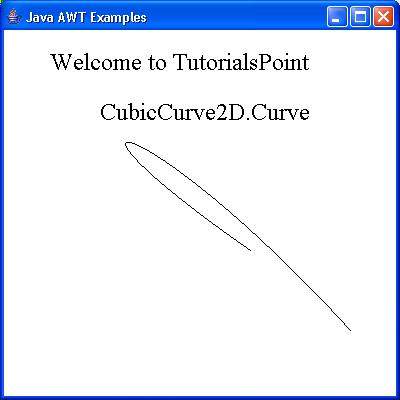
验证以下输出