- AWT 教程
- AWT - 首页
- AWT - 概述
- AWT - 环境
- AWT - 控件
- AWT - 事件处理
- AWT - 事件类
- AWT - 事件监听器
- AWT - 事件适配器
- AWT - 布局
- AWT - 容器
- AWT - 菜单
- AWT - 图形
- AWT 有用资源
- AWT - 快速指南
- AWT - 有用资源
- AWT - 讨论
AWT 文本字段类
介绍
textField 组件允许用户编辑单行文本。当用户在文本字段中键入一个键时,事件将发送到 TextField。键事件可能是键按下、键释放或键入。键事件传递给已注册的 KeyListener。如果在文本字段上启用了 ActionEvent,则按下回车键也可能会触发 ActionEvent。
类声明
以下是java.awt.TextField类的声明
public class TextField
   extends TextComponent
类构造函数
| 序号 | 构造函数 & 描述 |
|---|---|
| 1 | TextField() 构造一个新的文本字段。 |
| 2 | TextField(int columns) 构造一个新的空文本字段,并指定列数。 |
| 3 | TextField(String text) 构造一个新的文本字段,并用指定的文本初始化。 |
| 4 | TextField(String text, int columns) 构造一个新的文本字段,用指定的文本进行初始化以显示,并且宽度足以容纳指定的列数。 |
类方法
| 序号 | 方法 & 描述 |
|---|---|
| 1 | void addActionListener(ActionListener l) 添加指定的动作监听器,以接收来自此文本字段的动作事件。 |
| 2 | void addNotify() 创建 TextField 的对等体。 |
| 3 | boolean echoCharIsSet() 指示此文本字段是否已设置用于回显的字符。 |
| 4 | AccessibleContext getAccessibleContext() 获取与此 TextField 关联的 AccessibleContext。 |
| 5 | ActionListener[] getActionListeners() 返回在此文本字段上注册的所有动作监听器的数组。 |
| 6 | int getColumns() 获取此文本字段中的列数。 |
| 7 | char getEchoChar() 获取要用于回显的字符。 |
| 8 | <T extends EventListener> T[] getListeners(Class<T> listenerType) 返回当前在此 TextField 上注册为 FooListeners 的所有对象的数组。 |
| 9 | Dimension getMinimumSize() 获取此文本字段的最小尺寸。 |
| 10 | Dimension getMinimumSize(int columns) 获取具有指定列数的文本字段的最小尺寸。 |
| 11 | Dimension getPreferredSize() 获取此文本字段的首选大小。 |
| 12 | Dimension getPreferredSize(int columns) 获取此文本字段的首选大小,并指定列数。 |
| 13 | Dimension minimumSize() 已弃用。从 JDK 版本 1.1 开始,由 getMinimumSize() 替换。 |
| 14 | Dimension minimumSize(int columns) 已弃用。从 JDK 版本 1.1 开始,由 getMinimumSize(int) 替换。 |
| 15 | protected String paramString() 返回表示此 TextField 状态的字符串。 |
| 16 | Dimension preferredSize() 已弃用。从 JDK 版本 1.1 开始,由 getPreferredSize() 替换。 |
| 17 | Dimension preferredSize(int columns) 已弃用。从 JDK 版本 1.1 开始,由 getPreferredSize(int) 替换。 |
| 18 | protected void processActionEvent(ActionEvent e) 通过将此文本字段上发生的动作事件分派到任何已注册的 ActionListener 对象来处理这些事件。 |
| 19 | protected void processEvent(AWTEvent e) 处理此文本字段上的事件。 |
| 20 | void removeActionListener(ActionListener l) 删除指定的动作监听器,使其不再接收来自此文本字段的动作事件。 |
| 21 | void setColumns(int columns) 设置此文本字段中的列数。 |
| 22 | void setEchoChar(char c) 设置此文本字段的回显字符。 |
| 23 | void setEchoCharacter(char c) 已弃用。从 JDK 版本 1.1 开始,由 setEchoChar(char) 替换。 |
| 24 | void setText(String t) 将此文本组件显示的文本设置为指定的文本。 |
继承的方法
此类继承自以下类的方法
java.awt.TextComponent
java.awt.Component
java.lang.Object
TextField 示例
使用您选择的任何编辑器创建以下 Java 程序,例如在D:/ > AWT > com > tutorialspoint > gui >
AwtControlDemo.javapackage com.tutorialspoint.gui;
import java.awt.*;
import java.awt.event.*;
public class AwtControlDemo {
private Frame mainFrame;
private Label headerLabel;
private Label statusLabel;
private Panel controlPanel;
public AwtControlDemo(){
prepareGUI();
}
public static void main(String[] args){
AwtControlDemo awtControlDemo = new AwtControlDemo();
awtControlDemo.showTextFieldDemo();
}
private void prepareGUI(){
mainFrame = new Frame("Java AWT Examples");
mainFrame.setSize(400,400);
mainFrame.setLayout(new GridLayout(3, 1));
mainFrame.addWindowListener(new WindowAdapter() {
public void windowClosing(WindowEvent windowEvent){
System.exit(0);
}
});
headerLabel = new Label();
headerLabel.setAlignment(Label.CENTER);
statusLabel = new Label();
statusLabel.setAlignment(Label.CENTER);
statusLabel.setSize(350,100);
controlPanel = new Panel();
controlPanel.setLayout(new FlowLayout());
mainFrame.add(headerLabel);
mainFrame.add(controlPanel);
mainFrame.add(statusLabel);
mainFrame.setVisible(true);
}
private void showTextFieldDemo(){
headerLabel.setText("Control in action: TextField");
Label namelabel= new Label("User ID: ", Label.RIGHT);
Label passwordLabel = new Label("Password: ", Label.CENTER);
final TextField userText = new TextField(6);
final TextField passwordText = new TextField(6);
passwordText.setEchoChar('*');
Button loginButton = new Button("Login");
loginButton.addActionListener(new ActionListener() {
public void actionPerformed(ActionEvent e) {
String data = "Username: " + userText.getText();
data += ", Password: " + passwordText.getText();
statusLabel.setText(data);
}
});
controlPanel.add(namelabel);
controlPanel.add(userText);
controlPanel.add(passwordLabel);
controlPanel.add(passwordText);
controlPanel.add(loginButton);
mainFrame.setVisible(true);
}
}
使用命令提示符编译程序。转到D:/ > AWT并输入以下命令。
D:\AWT>javac com\tutorialspoint\gui\AwtControlDemo.java
如果没有任何错误,则表示编译成功。使用以下命令运行程序。
D:\AWT>java com.tutorialspoint.gui.AwtControlDemo
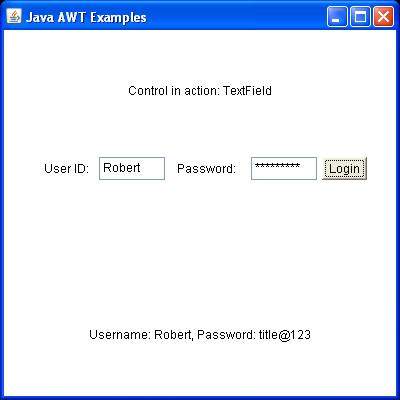
验证以下输出