
 数据结构
数据结构 网络
网络 RDBMS
RDBMS 操作系统
操作系统 Java
Java MS Excel
 iOS
iOS HTML
HTML CSS
CSS Android
 Python
 C 编程语言
 C++
C++ C#
C# MongoDB
 MySQL
MySQL Javascript
 PHP
PHP 物理
物理 化学
化学 生物
生物 数学
数学 英语
英语 经济学
经济学 心理学
心理学 社会学
社会学 时尚学
时尚学 法律研究
法律研究我们可以通过在 Java 中从用户请求输入来从 JOptionPane 读取吗?
是的,我们可以从 JOptionPane 读取。在此,我们将在一个字符串变量中获取 showInputDialog() 的结果 −
String input = JOptionPane.showInputDialog("Enter the C++ lessons you covered till now?");在获取结果后,我们将使用 parseInt() 将其转换为整数,然后在控制台中显示它 −
int res = Integer.parseInt(input);
System.out.println("Lessons covered = "+res);
以下是一个通过从用户请求输入来从 JOptionPane 读取的示例 −
示例
package my;
import java.awt.BorderLayout;
import java.awt.Color;
import java.awt.GridBagLayout;
import java.awt.GridLayout;
import java.net.URL;
import javax.swing.ImageIcon;
import javax.swing.JLabel;
import javax.swing.JOptionPane;
import javax.swing.JPanel;
public class SwingDemo {
   public static void main(String[] args) throws Exception {
      ImageIcon icon = new ImageIcon(new URL("http −//tutorialspoint.com/images/C-PLUS.png"));
      JLabel label = new JLabel(icon);
      JPanel panel = new JPanel(new GridBagLayout());
      panel.add(label);
      panel.setOpaque(true);
      panel.setBackground(Color.ORANGE);
      JPanel textPanel = new JPanel(new GridLayout(10, 5));
      for (int i = 0; i < 20; i++) {
         textPanel.add(new JLabel("Learn C++"));
      }
      JPanel panel2 = new JPanel(new BorderLayout());
      panel2.add(textPanel);
      panel2.add(panel, BorderLayout.EAST);
      JOptionPane.showMessageDialog(null, panel2, "Course",JOptionPane.DEFAULT_OPTION);
      String input = JOptionPane
      .showInputDialog("Enter the C++ lessons you covered till now?");
      int res = Integer.parseInt(input);
      System.out.println("Lessons covered = "+res);
   }
}
输出
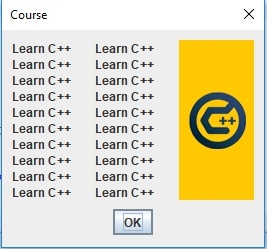
如果单击上面的确定,将如下图所示从用户请求输入 −
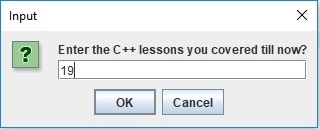
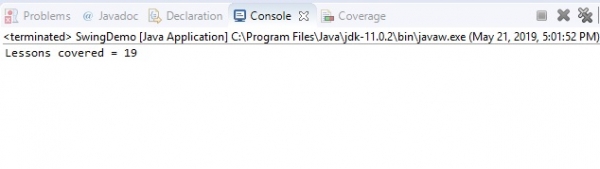
现在,当按 ENTER 时,上面添加的课程编号将如下图所示显示在控制台中 −

更新于: 30-Jul-2019
206 次浏览

广告