
- Cassandra 教程
- Cassandra - 首页
- Cassandra - 简介
- Cassandra - 架构
- Cassandra - 数据模型
- Cassandra - 安装
- Cassandra - 参考 API
- Cassandra - Cqlsh
- Cassandra - Shell 命令
- Cassandra Keyspace 操作
- Cassandra - 创建 Keyspace
- Cassandra - 修改 Keyspace
- Cassandra - 删除 Keyspace
- Cassandra 表操作
- Cassandra - 创建表
- Cassandra - 修改表
- Cassandra - 删除表
- Cassandra - 清空表
- Cassandra - 创建索引
- Cassandra - 删除索引
- Cassandra - 批处理
- Cassandra CURD 操作
- Cassandra - 创建数据
- Cassandra - 更新数据
- Cassandra - 读取数据
- Cassandra - 删除数据
- Cassandra CQL 类型
- Cassandra - CQL 数据类型
- Cassandra - CQL 集合
- CQL 用户定义数据类型
- Cassandra 有用资源
- Cassandra - 快速指南
- Cassandra - 有用资源
- Cassandra - 讨论
Cassandra - Shell 命令
除了 CQL 命令,Cassandra 还提供了已记录的 shell 命令。下面是 Cassandra 已记录的 shell 命令。
帮助
HELP 命令显示所有 cqlsh 命令的摘要和简要描述。以下是 help 命令的用法。
cqlsh> help

Documented shell commands:
===========================
CAPTURE COPY DESCRIBE EXPAND PAGING SOURCE
CONSISTENCY DESC EXIT HELP SHOW TRACING.

CQL help topics:
================
ALTER           CREATE_TABLE_OPTIONS       SELECT
ALTER_ADD       CREATE_TABLE_TYPES         SELECT_COLUMNFAMILY
ALTER_ALTER     CREATE_USER                SELECT_EXPR
ALTER_DROP      DELETE                     SELECT_LIMIT
ALTER_RENAME    DELETE_COLUMNS             SELECT_TABLE
捕获
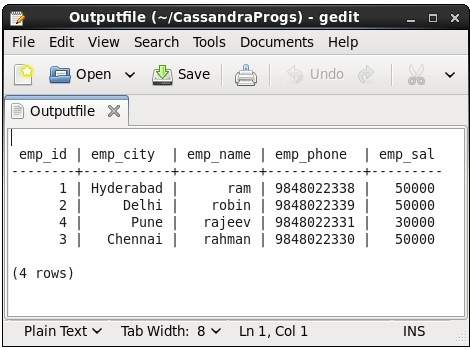
此命令捕获命令的输出并将其添加到文件中。例如,请查看以下捕获输出到名为 Outputfile 文件的代码。
cqlsh> CAPTURE '/home/hadoop/CassandraProgs/Outputfile'
当我们在终端中输入任何命令时,输出将被给定的文件捕获。以下是使用的命令和输出文件的快照。
cqlsh:tutorialspoint> select * from emp;
您可以使用以下命令关闭捕获。
cqlsh:tutorialspoint> capture off;
一致性
此命令显示当前一致性级别,或设置新的一个一致性级别。
cqlsh:tutorialspoint> CONSISTENCY
Current consistency level is 1.
复制
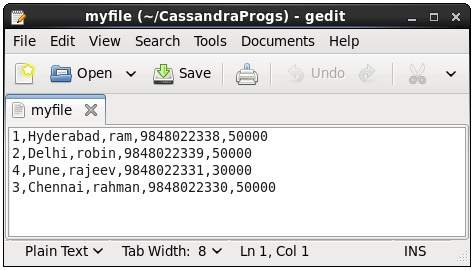
此命令将数据从 Cassandra 复制到文件或从文件复制到 Cassandra。以下是一个将名为 emp 的表复制到 myfile 文件的示例。
cqlsh:tutorialspoint> COPY emp (emp_id, emp_city, emp_name, emp_phone,emp_sal) TO ‘myfile’;
4 rows exported in 0.034 seconds.
如果您打开并验证给定的文件,您可以找到如下所示的复制数据。
描述
此命令描述 Cassandra 的当前集群及其对象。此命令的变体在下面解释。
描述集群 - 此命令提供有关集群的信息。
cqlsh:tutorialspoint> describe cluster;

Cluster: Test Cluster
Partitioner: Murmur3Partitioner

Range ownership:
                  -658380912249644557 [127.0.0.1]
                  -2833890865268921414 [127.0.0.1]
                  -6792159006375935836 [127.0.0.1]
描述 Keyspaces - 此命令列出集群中的所有 Keyspaces。以下是此命令的用法。
cqlsh:tutorialspoint> describe keyspaces;

system_traces system tp tutorialspoint
描述表 - 此命令列出 Keyspace 中的所有表。以下是此命令的用法。
cqlsh:tutorialspoint> describe tables;
emp
描述表 - 此命令提供表的描述。以下是此命令的用法。
cqlsh:tutorialspoint> describe table emp;

CREATE TABLE tutorialspoint.emp (
   emp_id int PRIMARY KEY,
   emp_city text,
   emp_name text,
   emp_phone varint,
   emp_sal varint
) WITH bloom_filter_fp_chance = 0.01
   AND caching = '{"keys":"ALL", "rows_per_partition":"NONE"}'
   AND comment = ''
   AND compaction = {'min_threshold': '4', 'class':
   'org.apache.cassandra.db.compaction.SizeTieredCompactionStrategy',
   'max_threshold': '32'}

   AND compression = {'sstable_compression':
   'org.apache.cassandra.io.compress.LZ4Compressor'}

   AND dclocal_read_repair_chance = 0.1
   AND default_time_to_live = 0
   AND gc_grace_seconds = 864000
   AND max_index_interval = 2048
   AND memtable_flush_period_in_ms = 0
   AND min_index_interval = 128
   AND read_repair_chance = 0.0
   AND speculative_retry = '99.0PERCENTILE';
CREATE INDEX emp_emp_sal_idx ON tutorialspoint.emp (emp_sal);
描述类型
此命令用于描述用户定义的数据类型。以下是此命令的用法。
cqlsh:tutorialspoint> describe type card_details;

CREATE TYPE tutorialspoint.card_details (
   num int,
   pin int,
   name text,
   cvv int,
   phone set<int>,
   mail text
);
描述类型
此命令列出所有用户定义的数据类型。以下是此命令的用法。假设有两个用户定义的数据类型:card 和 card_details。
cqlsh:tutorialspoint> DESCRIBE TYPES;

card_details card
扩展
此命令用于扩展输出。在使用此命令之前,您必须打开 expand 命令。以下是此命令的用法。
cqlsh:tutorialspoint> expand on;
cqlsh:tutorialspoint> select * from emp;

@ Row 1
-----------+------------
    emp_id | 1
  emp_city | Hyderabad
  emp_name | ram
 emp_phone | 9848022338
   emp_sal | 50000

@ Row 2
-----------+------------
    emp_id | 2
  emp_city | Delhi
  emp_name | robin
 emp_phone | 9848022339
   emp_sal | 50000

@ Row 3
-----------+------------
    emp_id | 4
  emp_city | Pune
  emp_name | rajeev
 emp_phone | 9848022331
   emp_sal | 30000

@ Row 4
-----------+------------
    emp_id | 3
  emp_city | Chennai
  emp_name | rahman
 emp_phone | 9848022330
   emp_sal | 50000
(4 rows)
注意 - 您可以使用以下命令关闭 expand 选项。
cqlsh:tutorialspoint> expand off;
Disabled Expanded output.
退出
此命令用于终止 cql shell。
显示
此命令显示当前 cqlsh 会话的详细信息,例如 Cassandra 版本、主机或数据类型假设。以下是此命令的用法。
cqlsh:tutorialspoint> show host;
Connected to Test Cluster at 127.0.0.1:9042.

cqlsh:tutorialspoint> show version;
[cqlsh 5.0.1 | Cassandra 2.1.2 | CQL spec 3.2.0 | Native protocol v3]
源
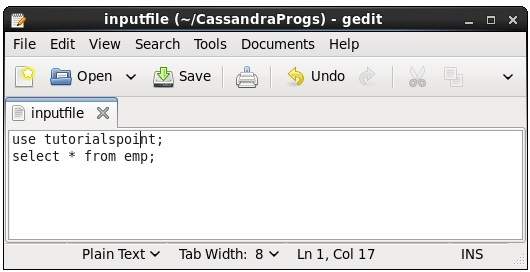
使用此命令,您可以执行文件中的命令。假设我们的输入文件如下所示 -
然后,您可以执行包含命令的文件,如下所示。
cqlsh:tutorialspoint> source '/home/hadoop/CassandraProgs/inputfile';

 emp_id |  emp_city | emp_name |  emp_phone | emp_sal
--------+-----------+----------+------------+---------
      1 | Hyderabad |   ram    | 9848022338 | 50000
      2 | Delhi     |   robin  | 9848022339 | 50000
      3 | Pune      |   rajeev | 9848022331 | 30000
      4 | Chennai   |   rahman | 9848022330 | 50000
(4 rows)