
- CatBoost 教程
- CatBoost - 首页
- CatBoost - 概述
- CatBoost - 架构
- CatBoost - 安装
- CatBoost - 特性
- CatBoost - 决策树
- CatBoost - Boosting 过程
- CatBoost - 核心参数
- CatBoost - 数据预处理
- CatBoost - 处理类别特征
- CatBoost - 处理缺失值
- CatBoost - 分类器
- CatBoost - 回归器
- CatBoost - 排序器
- CatBoost - 模型训练
- CatBoost - 模型评估指标
- CatBoost - 分类指标
- CatBoost - 过拟合检测
- CatBoost 与其他 Boosting 算法的比较
- CatBoost 有用资源
- CatBoost - 有用资源
- CatBoost - 讨论
CatBoost - 模型训练
CatBoost 是一种用于机器学习应用的高性能梯度提升方法,特别是那些需要结构化输入的应用。梯度提升构成了其主要过程的基础。通常,CatBoost 从对目标变量均值的假设开始。
下一阶段是逐步构建决策树的集成,其中每棵树都试图消除前一棵树的残差或误差。CatBoost 在处理类别特征的方式上有所不同。CatBoost 使用一种称为“有序提升”的技术来直接评估类别输入,从而提高模型性能并简化训练。
此外,还使用正则化方法来防止过拟合。CatBoost 将每棵树计算出的值组合起来生成预测,从而生成高度精确和稳定的模型。此外,它还提供特征相关性评分,有助于理解特征和模型选择。CatBoost 是许多机器学习问题的宝贵工具,例如回归和分类。
因此,让我们在本节中了解如何训练 CatBoost 模型 -
使用 CatBoost 实现
要使用 CatBoost,您需要在系统中安装它。要安装,您可以使用“pip install catboost”。在您的终端中键入此命令,软件包将自动安装。
导入所需的库和数据集
因此,您必须导入构建模型所需的库。此外,我们正在使用 placement 数据集在本节中构建模型。因此,我们将数据加载到 pandas 数据框中,并使用 pd.read_csv() 函数显示它。让我们看看如何做到这一点 -
import pandas as pd
import numpy as np
import seaborn as sb
import matplotlib.pyplot as plt

from sklearn.preprocessing import StandardScaler
from sklearn.model_selection import train_test_split
from catboost import CatBoostClassifier
from sklearn.metrics import roc_auc_score as ras

import warnings
warnings.filterwarnings('ignore')

# Load you dataset here
df = pd.read_csv('placementdata.csv')
print(df.head())
输出
此代码将产生以下结果 -
   StudentID  CGPA  Internships  Projects  Workshops/Certifications  \
0          1   7.5            1         1                         1
1          2   8.9            0         3                         2
2          3   7.3            1         2                         2
3          4   7.5            1         1                         2
4          5   8.3            1         2                         2

   AptitudeTestScore  SoftSkillsRating ExtracurricularActivities  \
0                 65               4.4                        No
1                 90               4.0                       Yes
2                 82               4.8                       Yes
3                 85               4.4                       Yes
4                 86               4.5                       Yes

  PlacementTraining  SSC_Marks  HSC_Marks PlacementStatus
0                No         61         79       NotPlaced
1               Yes         78         82          Placed
2                No         79         80       NotPlaced
3               Yes         81         80          Placed
4               Yes         74         88          Placed
如果我们花时间查看上面的数据,我们可以看到此数据集包含有关学生学习、培训和就业状况的信息。
数据集的形状和信息
现在让我们找出数据集的结构和信息,以便计算已提供的总数据条目数。可以使用 df.info() 方法查看每个列的内容、其中存在的数据类型以及每个列中存在的空值数量。
# Shape of the dataset
df.shape

# Information of the dataset
df.info()
输出
这将产生以下结果 -
(10000, 12)

<class 'pandas.core.frame.DataFrame'>
RangeIndex: 10000 entries, 0 to 9999
Data columns (total 12 columns):
 #   Column                     Non-Null Count  Dtype
---  ------                     --------------  -----
 0   StudentID                  10000 non-null  int64
 1   CGPA                       10000 non-null  float64
 2   Internships                10000 non-null  int64
 3   Projects                   10000 non-null  int64
 4   Workshops/Certifications   10000 non-null  int64
 5   AptitudeTestScore          10000 non-null  int64
 6   SoftSkillsRating           10000 non-null  float64
 7   ExtracurricularActivities  10000 non-null  object
 8   PlacementTraining          10000 non-null  object
 9   SSC_Marks                  10000 non-null  int64
 10  HSC_Marks                  10000 non-null  int64
 11  PlacementStatus            10000 non-null  object
dtypes: float64(2), int64(7), object(3)
memory usage: 937.6+ KB
df.describe() 函数以统计方式表示 DataFrame df。为每个数值列提供了关键统计信息,例如计数、均值、标准差、最小值和最大值,以初步了解数据分布和主要模式。
df.describe().T
输出
此代码将产生以下结果 -
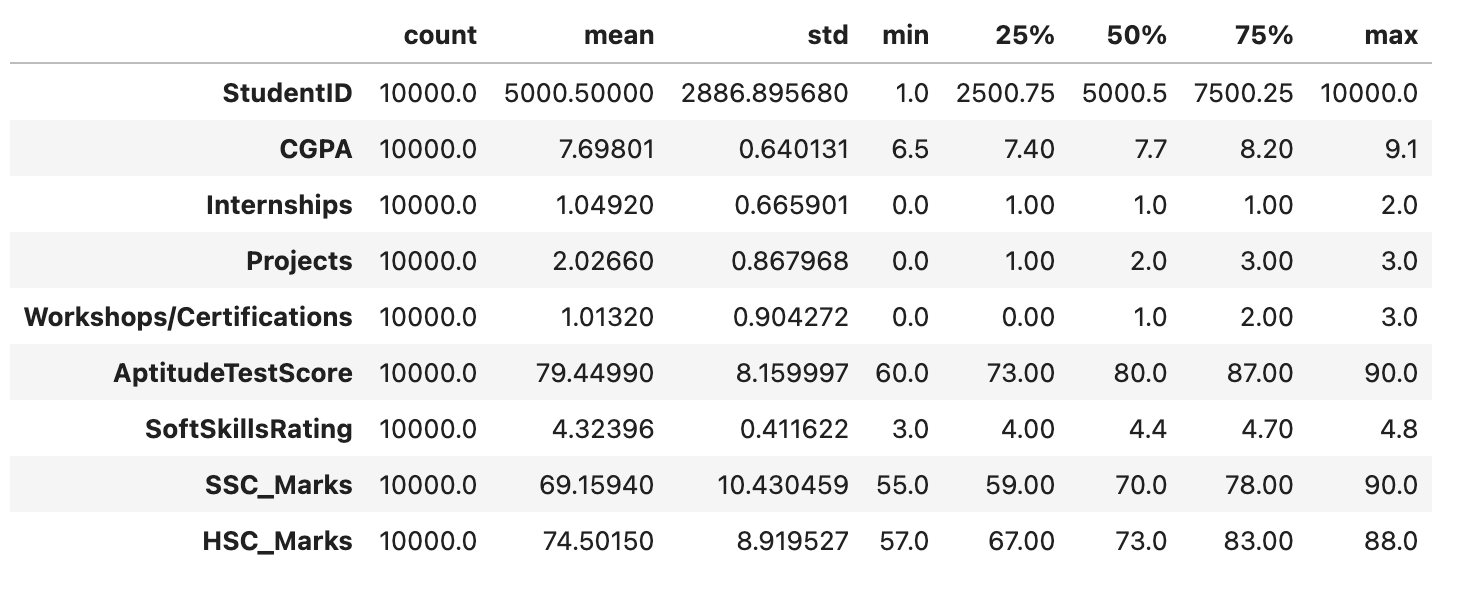
探索性数据分析 (EDA)
EDA 是一种使用可视化的数据分析技术。它用于识别趋势和模式,以及使用统计报告和图形表示来确认结论。在对该数据集执行 EDA 时,我们将尝试找出独立特征之间的关系,即一个特征如何影响另一个特征。
让我们首先快速查看数据框中每一列的空值。
df.isnull().sum()
输出
此代码将生成以下结果 -
StudentID                    0
CGPA                         0
Internships                  0
Projects                     0
Workshops/Certifications     0
AptitudeTestScore            0
SoftSkillsRating             0
ExtracurricularActivities    0
PlacementTraining            0
SSC_Marks                    0
HSC_Marks                    0
PlacementStatus              0
dtype: int64
由于数据集中没有空值,因此我们可以继续进行数据探索。
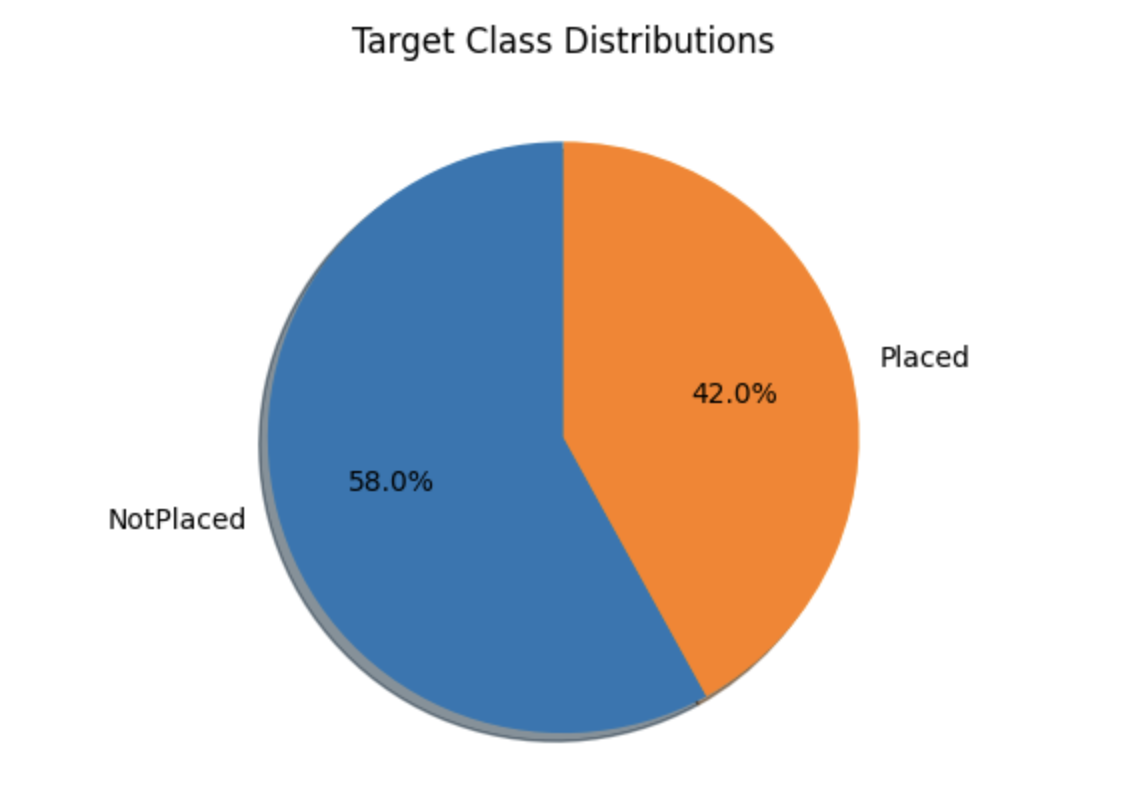
目标类分布
temporary = df['PlacementStatus'].value_counts()

plt.pie(temporary.values, labels=temporary.index.values,
	shadow=True, startangle=90, autopct='%1.1f%%')
plt.title("Target Class Distributions")

plt.show()
输出
下面的饼图显示了数据集的大致平衡的类分布。虽然这可能并不完美,但它仍然是可以接受的。我们可以看到,数据集包含类别列和数字列。在我们查看这些属性之前,让我们将数据集分成两个列表。
划分列
现在我们将把 DataFrame (df) 的列分成两大类 - 类别列和数值列。
categorical_columns, numerical_columns = list(), list()

for col in df.columns:
   if df[col].dtype == 'object' or df[col].nunique() < 10:
      categorical_columns.append(col)
   else:
      numerical_columns.append(col)

print('Categorical Columns:', categorical_columns)
print('Numerical Columns:', numerical_columns)
输出
此代码将产生以下结果 -
Categorical Columns: ['Internships', 'Projects', 'Workshops/Certifications', 'ExtracurricularActivities', 'PlacementTraining', 'PlacementStatus']
Numerical Columns: ['StudentID', 'CGPA', 'AptitudeTestScore', 'SoftSkillsRating', 'SSC_Marks', 'HSC_Marks']
类别列的计数图
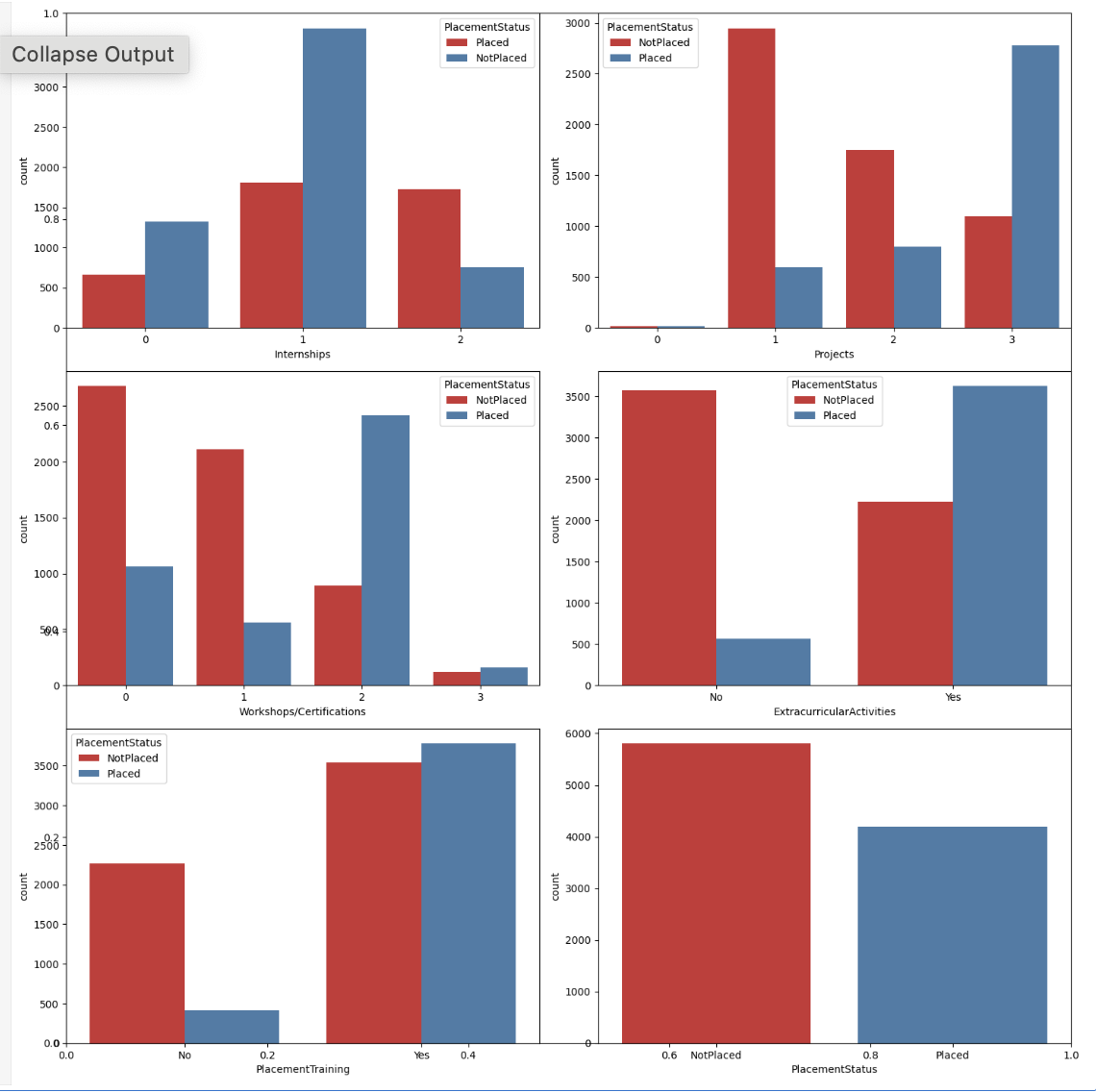
现在,我们将使用 placement 状态的色调,为类别列创建计数图。
plt.subplots(figsize=(15, 15))

for i, col in enumerate(categorical_columns):
   plt.subplot(3, 2, i+1)
   sb.countplot(data=df, x=col, hue='PlacementStatus', palette='Set1')
plt.tight_layout()
plt.show()
输出
下面提供的图表显示了多个模式,这些模式支持以下观点:专注于技能发展肯定会对你的就业有所帮助。虽然确实有一些学生完成了培训课程和项目但仍然没有找到工作,但与那些什么也没做的人相比,这些人数量相对较少。
类别列的标签编码
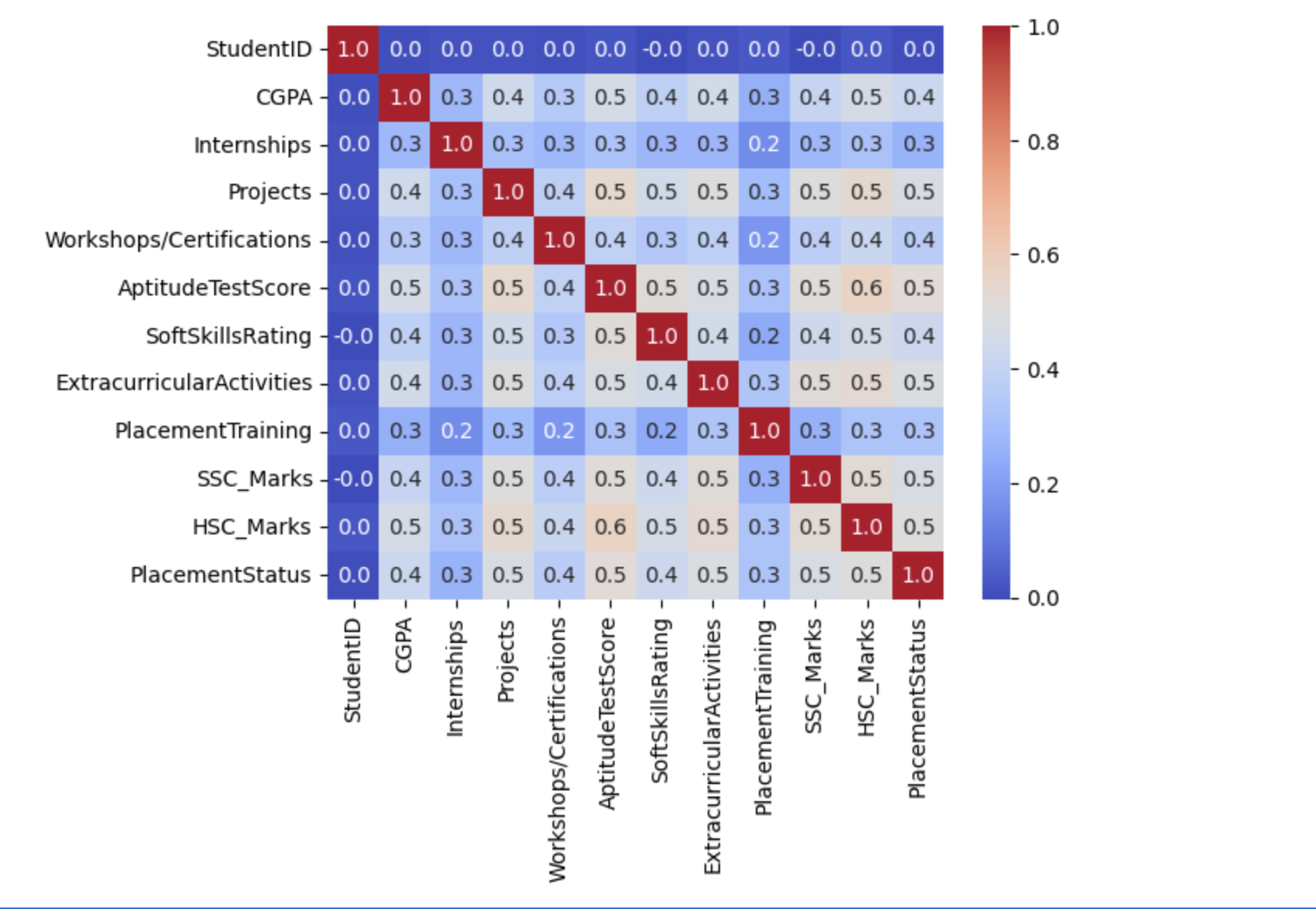
在对数据集的类别特征进行编码后,我们将创建一个热力图,这将有助于识别特征空间中与目标列高度相关的特征。
for col in ['ExtracurricularActivities', 'PlacementTraining']:
   df[col] = df[col].map({'No':0,'Yes':1})

df['PlacementStatus']=df['PlacementStatus'].map({'NotPlaced':0, 'Placed':1})
混淆矩阵
现在我们将为上述数据集创建混淆矩阵。
sb.heatmap(df.corr(), fmt='.1f', cbar=True, annot=True, cmap='coolwarm')
plt.show()
输出
以下结果表明没有数据泄漏,因为数据集不包含任何高度关联或相关的特征。
训练和验证数据分割
让我们以 85:15 的比例划分数据集,以便在训练期间找出模型的性能。这使我们能够使用验证分割的未见过的数据集来评估模型的性能。
features = df.drop(['StudentID', 'PlacementStatus'], axis=1)
target = df['PlacementStatus']

X_train, X_val, Y_train, Y_val = train_test_split(
   features,
   target,
   random_state=2023,
   test_size=0.15)

X_train.shape, X_val.shape
输出
这将带来以下结果 -
((8500, 10), (1500, 10))
特征缩放
此代码将 StandardScaler 拟合到训练数据以计算均值和标准差,从而在两个数据集之间提供一致的缩放。之后,它使用这些计算出的值来转换训练和验证数据。
scaler = StandardScaler()
scaler.fit(X_train)
X_train = scaler.transform(X_train)
X_val = scaler.transform(X_val)
构建和训练模型
现在,我们可以开始使用可用的训练数据训练模型。由于目标列 Y_train 和 Y_val 中只有两个可能的值,因此在这种情况下正在执行二元分类。无论模型是在训练用于二元分类任务还是多类分类任务,都不需要单独的规范。
ourmodel = CatBoostClassifier(verbose=100,
	iterations=1000,
	loss_function='Logloss',
	early_stopping_rounds=50,
	custom_metric=['AUC'])

ourmodel.fit(X_train, Y_train,
	eval_set=(X_val, Y_val))

y_train = ourmodel.predict(X_train)
y_val = ourmodel.predict(X_val)
输出
这将导致以下结果 -
Learning rate set to 0.053762
0:	learn: 0.6621705	test: 0.6623146	best: 0.6623146 (0)	total: 64.3ms	remaining: 1m 4s
100:	learn: 0.3975289	test: 0.4332971	best: 0.4332174 (92)	total: 230ms	remaining: 2.05s
Stopped by overfitting detector  (50 iterations wait)

bestTest = 0.4330066724
bestIteration = 125

Shrink model to first 126 iterations.
评估模型的性能
现在让我们使用 ROC AUC 衡量标准来评估模型在训练和验证数据集上的性能。
print("Training ROC AUC: ", ras(Y_train, y_train))
print("Validation ROC AUC: ", ras(Y_val, y_val))
输出
这将带来以下结果 -
Training ROC AUC:  0.8175316989019953
Validation ROC AUC:  0.7859439713002392