
- CherryPy 教程
- CherryPy - 首页
- CherryPy - 简介
- CherryPy - 环境设置
- CherryPy - 词汇表
- 内置HTTP服务器
- CherryPy - 工具箱
- CherryPy - 一个工作应用程序
- CherryPy - Web服务
- CherryPy - 表现层
- CherryPy - Ajax的使用
- CherryPy - 演示应用程序
- CherryPy - 测试
- 应用程序的部署
- CherryPy 有用资源
- CherryPy - 快速指南
- CherryPy - 有用资源
- CherryPy - 讨论
CherryPy - Ajax的使用
直到2005年,所有Web应用程序都遵循的模式是每个页面管理一个HTTP请求。从一个页面导航到另一个页面需要加载整个页面。这将大大降低性能。
因此,出现了富客户端应用程序,它们会嵌入AJAX、XML和JSON。
AJAX
异步 JavaScript 和 XML(AJAX)是一种创建快速且动态网页的技术。AJAX允许网页通过在后台与服务器交换少量数据来异步更新。这意味着可以更新网页的一部分,而无需重新加载整个页面。
Google Maps、Gmail、YouTube和Facebook是AJAX应用程序的一些示例。
Ajax基于使用JavaScript发送HTTP请求的想法;更具体地说,AJAX依赖于XMLHttpRequest对象及其API来执行这些操作。
JSON
JSON是一种以JavaScript应用程序可以评估它们并将它们转换为以后可以操作的JavaScript对象的方式来携带序列化JavaScript对象的方式。
例如,当用户请求服务器以JSON格式格式化的专辑对象时,服务器将返回以下输出:
{'description': 'This is a simple demo album for you to test', 'author': ‘xyz’}
现在数据是一个JavaScript关联数组,并且可以通过以下方式访问description字段:
data ['description'];
将AJAX应用于应用程序
考虑包含名为“media”的文件夹的应用程序,其中包含index.html和Jquery插件,以及一个包含AJAX实现的文件。让我们将文件命名为“ajax_app.py”
ajax_app.py
import cherrypy
import webbrowser
import os
import simplejson
import sys

MEDIA_DIR = os.path.join(os.path.abspath("."), u"media")

class AjaxApp(object):
   @cherrypy.expose
   def index(self):
      return open(os.path.join(MEDIA_DIR, u'index.html'))

   @cherrypy.expose
   def submit(self, name):
      cherrypy.response.headers['Content-Type'] = 'application/json'
      return simplejson.dumps(dict(title="Hello, %s" % name))

config = {'/media':
   {'tools.staticdir.on': True,
   'tools.staticdir.dir': MEDIA_DIR,}
}

def open_page():
webbrowser.open("http://127.0.0.1:8080/")
cherrypy.engine.subscribe('start', open_page)
cherrypy.tree.mount(AjaxApp(), '/', config=config)
cherrypy.engine.start()
类“AjaxApp”重定向到“index.html”的网页,该网页包含在media文件夹中。
<!DOCTYPE html PUBLIC "-//W3C//DTD XHTML 1.0 Strict//EN"
   " http://www.w3.org/TR/xhtml1/DTD/xhtml1-strict.dtd">

<html xmlns = "http://www.w3.org/1999/xhtml" lang = "en" xml:lang = "en">
   <head>
      <title>AJAX with jQuery and cherrypy</title>
      <meta http-equiv = " Content-Type" content = " text/html; charset = utf-8" />
      <script type = " text/javascript" src = " /media/jquery-1.4.2.min.js"></script>

      <script type = " text/javascript">
         $(function() {

            // When the testform is submitted...
            $("#formtest").submit(function() {

               // post the form values via AJAX...
               $.post('/submit', {name: $("#name").val()}, function(data) {

                  // and set the title with the result
                  $("#title").html(data['title']) ;
               });
               return false ;
            });
         });
      </script>

   </head>

   <body>
      <h1 id = "title">What's your name?</h1>
      <form id = " formtest" action = " #" method = " post">
         <p>
            <label for = " name">Name:</label>
            <input type = " text" id = "name" /> <br />
            <input type = " submit" value = " Set" />
         </p>
      </form>
   </body>

</html>
AJAX函数包含在<script>标签中。
输出
以上代码将产生以下输出:
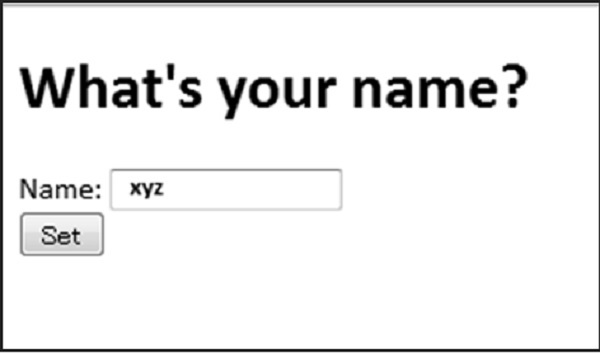
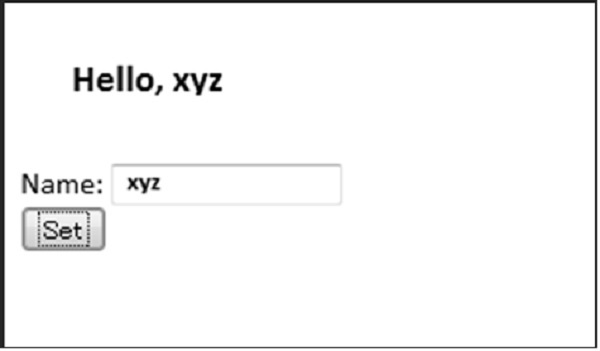
用户提交值后,将实现AJAX功能,屏幕将重定向到如下所示的表单:
广告