
 数据结构
数据结构 网络
网络 关系型数据库管理系统
 操作系统
操作系统 Java
Java MS Excel
 iOS
iOS HTML
HTML CSS
CSS Android
 Python
 C 语言编程
 C++
C++ C#
C# MongoDB
 MySQL
MySQL JavaScript
 PHP
PHP 物理学
物理学 化学
化学 生物学
生物学 数学
数学 英语
英语 经济学
经济学 心理学
心理学 社会科学
社会科学 时尚研究
时尚研究 法律研究
法律研究Tkinter 中的 destroy() 方法——Python
Tkinter 中的 destroy() 方法可销毁一个构件。它对于控制相互依赖的各种构件的行为非常有用。同样,当某个进程在用户操作后完成时,我们需要销毁 GUI 组件以释放内存以及清除屏幕。destroy() 方法可实现所有这些功能。
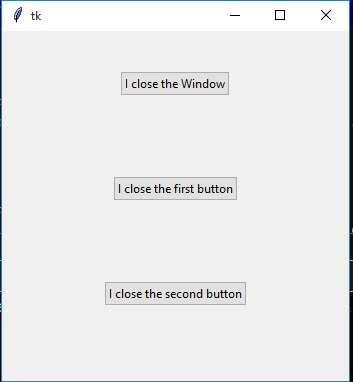
在下面的示例中,我们有一个有 3 个按钮的屏幕。点击第一个按钮会关闭窗口本身,而点击第二个按钮会关闭第一个按钮,依此类推。此行为通过使用 destroy 方法实现,如下面的程序所示。
示例
from tkinter import *
from tkinter.ttk import *
#tkinter window
base = Tk()

#This button can close the window
button_1 = Button(base, text ="I close the Window", command = base.destroy)
#Exteral paddign for the buttons
button_1.pack(pady = 40)

#This button closes the first button
button_2 = Button(base, text ="I close the first button", command = button_1.destroy)
button_2.pack(pady = 40)

#This button closes the second button
button_3 = Button(base, text ="I close the second button", command = button_2.destroy)
button_3.pack(pady = 40)
mainloop()
运行上面的代码会得到以下结果 −
通过点击各个按钮,我们可以观察到程序中提到的不同行为。

更新于:2019 年 12 月 19 日
4K+ 浏览量

广告