
 数据结构
数据结构 网络
网络 关系型数据库管理系统
 操作系统
操作系统 Java
Java MS Excel
 iOS
iOS HTML
HTML CSS
CSS Android
 Python
 C 编程
C 编程 C++
C++ C#
C# MongoDB
 MySQL
MySQL Javascript
 PHP
PHP 物理
物理 化学
化学 生物
生物 数学
数学 英语
英语 经济学
经济学 心理学
心理学 社会学
社会学 时装研究
时装研究 法律研究
法律研究Python Tkinter 中的 after 方法
Tkinter 是一个用于制作 GUI 的 python 库。它提供了许多内置方法来创建和控制 GUI 窗口以及用于展示数据和 GUI 事件的其他小组件。在本文中,我们将了解 after 方法如何在 Tkinter GUI 中使用。
语法
.after(delay, FuncName=FuncName)
This method calls the function FuncName after the given delay in milisecond
显示小组件
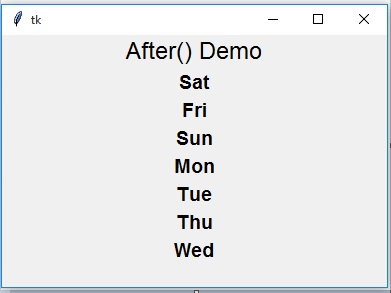
这里我们制作一个框架来随机显示一个单词列表。我们使用 random 库以及 after 方法来调用一个函数,以一种随机方式显示一个给定的文本列表。
示例
import random
from tkinter import *

base = Tk()

a = Label(base, text="After() Demo")
a.pack()

contrive = Frame(base, width=450, height=500)
contrive.pack()

words = ['Mon', 'Tue', 'Wed', 'Thu', 'Fri','Sat','Sun']
#Display words randomly one after the other.
def display_weekday():
   if not words:
   return
   rand = random.choice(words)
   character_frame = Label(contrive, text=rand)
   character_frame.pack()
   contrive.after(500,display_weekday)
   words.remove(rand)

base.after(0, display_weekday)
base.mainloop()
运行以上代码会得到以下结果

再次运行同样的程序,会得到展示单词不同序列的结果。
停止处理
在下一个示例中,我们将看到如何使用 after 方法作为一种延迟机制,等待一个进程运行一段时间,然后停止进程。我们还使用 destroy 方法来停止处理。
示例
from tkinter import Tk, mainloop, TOP
from tkinter.ttk import Button

from time import time

base = Tk()

stud = Button(base, text = 'After Demo()')
stud.pack(side = TOP, pady = 8)

print('processing Begins...')

begin = time()

base.after(3000, base.destroy)

mainloop()

conclusion = time()
print('process destroyed in % d seconds' % ( conclusion-begin))
运行以上代码会得到以下结果
processing Begins...
process destroyed in 3 seconds

更新日期:2020 年 1 月 2 日
2K+ 次浏览

广告