
 数据结构
数据结构 网络
网络 关系数据库管理系统
 操作系统
操作系统 Java
Java MS Excel
 iOS
iOS HTML
HTML CSS
CSS Android
 Python
 C 编程
C 编程 C++
C++ C#
C# MongoDB
 MySQL
MySQL Javascript
 PHP
PHP 物理
物理 化学
化学 生物
生物 数学
数学 英语
英语 经济学
经济学 心理学
心理学 社会学
社会学 时尚研究
时尚研究 法律研究
法律研究Tkinter 中的不同消息 - Python
Tkinter 是 Python 的 GUI 模块。它使用各种消息显示选项,这些选项是对用户操作或正在运行的程序状态更改的响应。消息框类用于显示各种消息,例如确认消息、错误消息、警告消息等。
示例-1
以下示例显示了消息的显示,其背景颜色、字体大小和颜色等都是可自定义的。
import tkinter as tk
main = tk.Tk()

key = "the key to success is to focus on goals and not on obstacles"

message = tk.Message(main, text = key)
message.config(bg='white', font=('times', 32, 'italic'))

message.pack()
tk.mainloop()
运行以上代码,我们将得到以下图像:

示例-2
在以下示例中,我们看到了许多标准操作的显示,例如显示信息或显示错误等。消息框类有不同的函数用于显示各种消息类别。
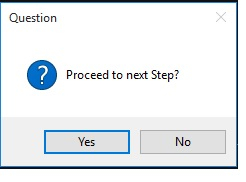
问题框
这是通过使用 **askquestion()** 函数实现的。
示例
from tkinter.messagebox import *
print(askquestion("Question", "Proceed to next Step?"))
运行以上代码,我们将得到以下结果:
重试框
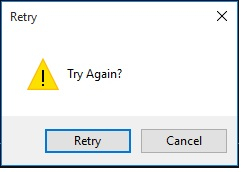
这是通过使用 **askretrycancel()** 函数实现的。
from tkinter.messagebox import *
print(askretrycancel("Retry", "Try Again?"))
运行以上代码,我们将得到以下结果:
错误框
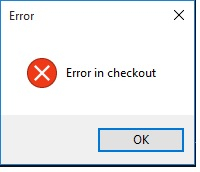
这是通过使用 **showerror()** 函数实现的。
from tkinter.messagebox import *
print(showerror("Error", "Error in checkout"))
运行以上代码,我们将得到以下结果:
警告框
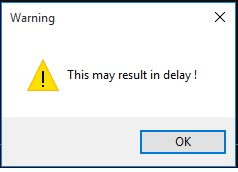
这是通过使用 **askretrycancel()** 函数实现的。
from tkinter.messagebox import *
print(showwarning("Warning", "This may result in delay !"))
运行以上代码,我们将得到以下结果:

更新于: 2019-12-19
318 次浏览

广告