
 数据结构
数据结构 网络
网络 关系型数据库管理系统
 操作系统
操作系统 Java
Java MS Excel
 iOS
iOS HTML
HTML CSS
CSS Android
 Python
 C 语言编程
 C++
C++ C#
C# MongoDB
 MySQL
MySQL Javascript
 PHP
PHP 物理
物理 化学
化学 生物
生物 数学
数学 英语
英语 经济学
经济学 心理学
心理学 社会研究
社会研究 时尚研究
时尚研究 法律研究
法律研究鼠标悬停在 Tkinter Python 中某个内容上方时显示消息
假设我们想要创建一个应用程序,希望在其中为 Tkinter 小组件添加一些描述,以便在悬停在按钮小组件上时显示工具提示文本。可以通过添加工具提示或弹出框来实现。
工具提示对于需要用户交互的应用程序很有用。我们可以通过实例化 Balloon(win) 的构造函数来定义工具提示。之后,我们可以将按钮绑定到应用于该小组件的工具提示消息。
示例
#Import the tkinter library
from tkinter import *
from tkinter.tix import *

#Create an instance of tkinter frame
win = Tk()
#Set the geometry
win.geometry("400x200")

#Create a tooltip
tip= Balloon(win)

#Create a Button widget
my_button=Button(win, text= "Python", font=('Helvetica bold', 20))
my_button.pack(pady=20)

#Bind the tooltip with button
tip.bind_widget(my_button,balloonmsg="Python is an interpreted, high-level
and general-purpose programming language")

win.mainloop()
输出
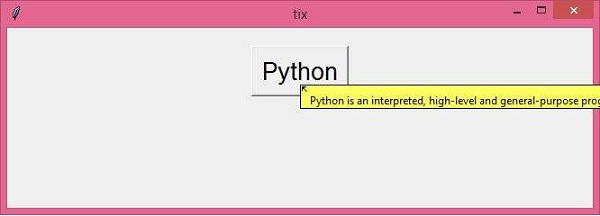
运行上述代码将显示一个带按钮的窗口。现在,将鼠标悬停在 “Python” 按钮上,它将显示一个工具提示文本。

更新于: 2021-03-27
4K+ 次浏览

广告