
 数据结构
数据结构 网络
网络 RDBMS
RDBMS 操作系统
操作系统 Java
Java MS Excel
 iOS
iOS HTML
HTML CSS
CSS Android
 Python
 C 编程
C 编程 C++
C++ C#
C# MongoDB
 MySQL
MySQL Javascript
 PHP
PHP 物理学
物理学 化学
化学 生物
生物 数学
数学 英语
英语 经济学
经济学 心理学
心理学 社会学
社会学 时尚研究
时尚研究 法律研究
法律研究更改 Tkinter 中的鼠标游标
Tkinter 是一个基于 GUI 的 Python 库,用于开发各种类型的功能性和基于 GUI 的应用程序。它提供了许多函数和方法,可用于在开发应用程序时提供可扩展性和各种功能。
在本文中,我们将了解如何使用 cursor 属性在 Tkinter 框架中的按钮上悬停时更改鼠标游标。Tkinter 的按钮库中提供了大量光标映射,可为最终用户提供不同的视觉效果。库中的一些光标为:
"arrow"
"circle"
"clock"
"cross"
"dotbox"
"exchange"
"fleur"
"heart"
"heart"
"man"
"mouse"
"pirate"
"plus"
"shuttle"
"sizing"
"spider"
"spraycan"
"star"
"target"
"tcross"
"trek"
"watch"
让我们先创建一些按钮,然后将其中一些光标应用到鼠标指针上。
示例
from tkinter import *
#Create an instance of window or frame
win= Tk()
#Set the geometry
win.geometry("700x600")
win.resizable(0,0)
win.config(cursor= "fleur")
#Let us create a text label
Label(win, text= "Hover on each of these buttons", font=('Poppins', 20)).pack(pady=20)

#Create some buttons with cursor property
b1= Button(win, text= "Star",cursor="star")
b1.pack(pady=20)
b2= Button(win, text= "Arrow",cursor="arrow")
b2.pack(pady=20)
b3= Button(win, text= "Circle",cursor="circle")
b3.pack(pady=20)
b4= Button(win, text= "Clock",cursor="clock")
b4.pack(pady=20)
b5= Button(win, text= "Heart",cursor="heart")
b5.pack(pady=20)
b6= Button(win, text= "Man",cursor="man")
b6.pack(pady=20)
b7= Button(win, text= "Mouse",cursor="mouse")
b7.pack(pady=20)

#Keep Running the window

win.mainloop()
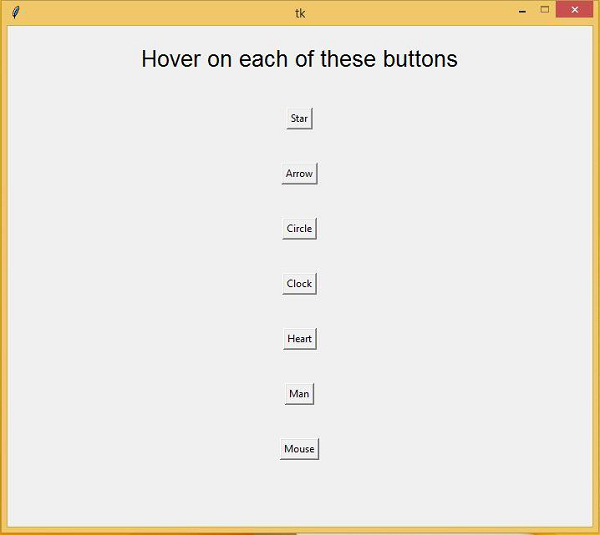
输出
运行以上代码将创建带有不同鼠标指针形状的不同按钮。

更新于: 04-Mar-2021
1K+ 浏览

广告