
 数据结构
数据结构 网络
网络 RDBMS
RDBMS 操作系统
操作系统 Java
Java MS Excel
 iOS
iOS HTML
HTML CSS
CSS Android
 Python
 C 程序设计
 C++
C++ C#
C# MongoDB
 MySQL
MySQL Javascript
 PHP
PHP 物理
物理 化学
化学 生物
生物 数学
数学 英语
英语 经济学
经济学 心理学
心理学 社会学
社会学 时装设计
时装设计 法律研究
法律研究在 Java 中的内部窗格中显示多个组件
首先,在 JDesktopPane 中设置一个内部窗格 -
JDesktopPane desktopPane = new JDesktopPane();
JInternalFrame intFrame = new JInternalFrame("Our Frame", true, true, true, true);
desktopPane.add(intFrame);
现在,设置内部窗格的边界 -
intFrame.setBounds(50, 90, 200, 250);
创建两个组件 -
JLabel label = new JLabel(intFrame.getTitle(), JLabel.CENTER);
JButton button = new JButton("Demo Button");
将两个组件添加到内部窗格 -
intFrame.add(label, BorderLayout.CENTER);
intFrame.add(button, BorderLayout.WEST);
以下是在内部窗格中显示多个组件的一个示例 -
package my;
import java.awt.BorderLayout;
import javax.swing.JButton;
import javax.swing.JDesktopPane;
import javax.swing.JFrame;
import javax.swing.JInternalFrame;
import javax.swing.JLabel;
public class SwingDemo {
   public static void main(final String[] args) {
      JFrame frame = new JFrame();
      frame.setDefaultCloseOperation(JFrame.EXIT_ON_CLOSE);
      JDesktopPane desktopPane = new JDesktopPane();
      JInternalFrame intFrame = new JInternalFrame("Our Frame", true, true, true, true);
      desktopPane.add(intFrame);
      intFrame.setBounds(50, 90, 200, 250);
      JLabel label = new JLabel(intFrame.getTitle(), JLabel.CENTER);
      JButton button = new JButton("Demo Button");
      intFrame.add(label, BorderLayout.CENTER);
      intFrame.add(button, BorderLayout.WEST);
      intFrame.setVisible(true);
      frame.add(desktopPane, BorderLayout.CENTER);
      frame.setSize(600, 500);
      frame.setVisible(true);
   }
}
输出
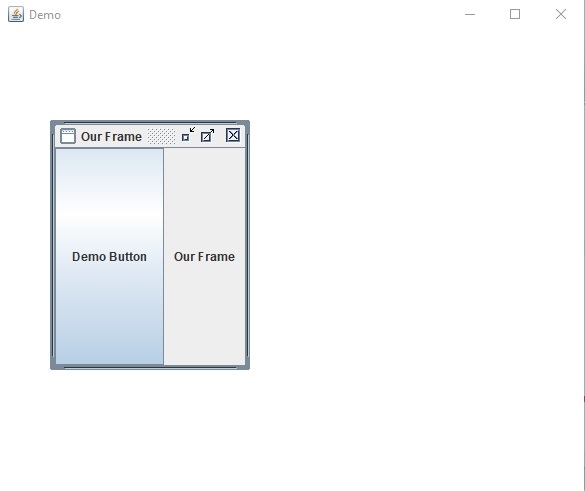
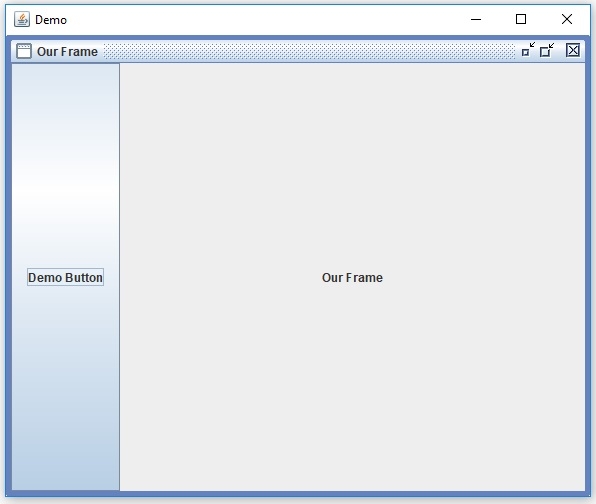
以下是在上面显示的内部窗格上单击最大化按钮后的结果 -

更新于:30-Jul-2019
373 次浏览

广告