
- .NET Core 教程
- .NET Core - 主页
- .NET Core - 概览
- .NET Core - 先决条件
- .NET Core - 环境设置
- .NET Core - 入门
- .NET Core - 数值
- .NET Core - 垃圾回收
- .NET Core - 代码执行
- .NET Core - 模块化
- .NET Core - 项目文件
- .NET Core - 程序包引用
- 使用 .NET Core 创建 UWP 应用
- .NET Core - MSBuild
- .NET Core - 元包
- Windows 运行时和扩展 SDK
- 创建 .NET 标准库
- .NET Core - 可移植类库
- 添加对库的引用
- 共享 .NET Core 库
- 创建 Xamarin.Forms 项目
- .NET Core - PCL 故障排除
- .NET Core - 创建测试项目
- 在 Visual Studio 中运行测试
- .NET Core - 测试库
- 托管可扩展性框架
- .NET Core - SDK
- .NET Core - MSBuild 和 project.json
- 还原、构建和 MSBuild
- .NET Core - 迁移
- .NET Core 有用资源
- .NET Core - 快速指南
- .NET Core - 有用资源
- .NET Core - 讨论
.NET Core - 入门
Visual Studio 2015 为开发 .NET Core 应用程序提供了全功能的开发环境。在本章中,我们将在 Visual Studio 中创建一个新项目。一旦安装了 Visual Studio 2015 工具,就可以开始构建新的 .NET Core 应用程序。
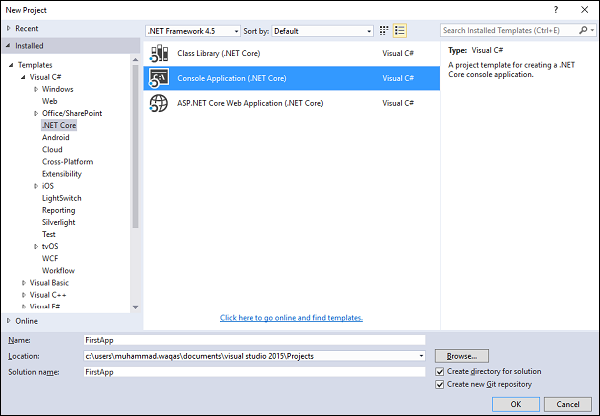
在 新建项目 对话框中,在模板列表中,展开 Visual C# 节点,选择 .NET Core,然后你应该会看到以下三个新项目模板
- 类库(.NET Core)
- 控制台应用程序(.NET Core)
- ASP.NET Core Web 应用程序(.NET Core)
在新建项目对话框的中间窗格中,选择控制台应用程序(.NET Core),将其命名为“FirstApp”,然后单击确定。
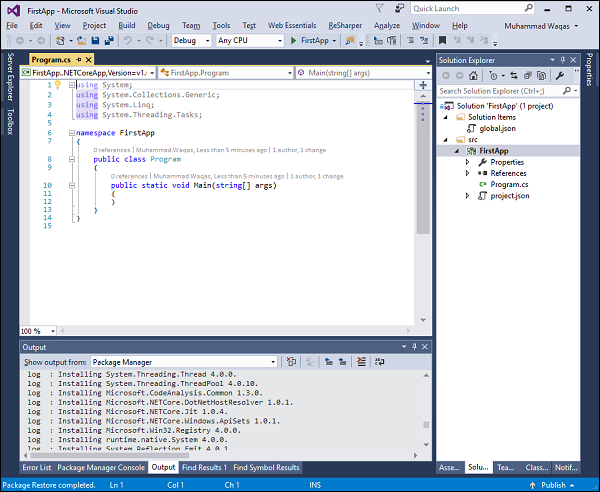
Visual Studio 将打开新创建的项目,你将在解决方案资源管理器窗口中看到此项目中的所有文件。
为了测试 .NET core 控制台应用程序是否正常工作,让我们添加以下行。
using System;
using System.Collections.Generic;
using System.Linq;
using System.Threading.Tasks;

namespace FirstApp {
   public class Program {
      public static void Main(string[] args) {
         Console.WriteLine("Hello guys, welcome to .NET Core world!");
      }
   }
}
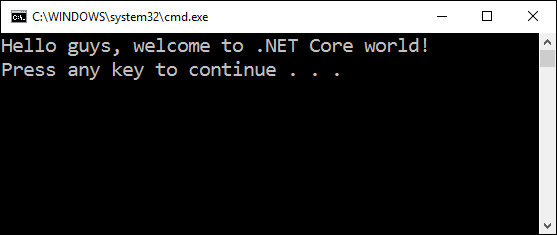
现在,运行该应用程序。你应该会看到以下输出。
广告