
 数据结构
数据结构 网络
网络 关系型数据库管理系统
 操作系统
操作系统 Java
Java MS Excel
 iOS
iOS HTML
HTML CSS
CSS Android
 Python
 C 编程
C 编程 C++
C++ C#
C# MongoDB
 MySQL
MySQL Javascript
 PHP
PHP 物理
物理 化学
化学 生物
生物 数学
数学 英语
英语 经济学
经济学 心理学
心理学 社会学
社会学 时尚研究
时尚研究 法律研究
法律研究使用 react-archer 在 React JS 中绘制 DOM 元素之间的箭头
在本文中,我们将了解如何在 React JS 中绘制流程图状的箭头来连接不同的 DOM 元素。您可以使用此功能创建独特的网页设计。这里我们将使用 **react-archer** 包来绘制连接 DOM 元素的箭头。
DOM 元素类似于页面上的 DIV、HTML、BODY 元素。您可以使用 CSS 为所有这些元素添加类,或使用 JS 与它们交互。
示例
首先创建一个 React 项目 -
npx create-react-app tutorialpurpose
现在转到项目目录 -
cd tutorialpurpose
下载并安装 **react-archer** 包 -
npm install react-archer
我们将使用 **react-archer** 包添加箭头并连接不同的 DOM 元素。
现在,在 **App.js** 中插入以下代码行:-
import { ArcherContainer, ArcherElement } from "react-archer";

const rootStyle = { display: "flex", justifyContent: "center" };
const rowStyle = {
   margin: "200px 0",
   display: "flex",
   justifyContent: "space-between",
};

const boxStyle = { padding: "10px", border: "1px solid black" };

const App = () => {
   return (
      <div style={{ height: "500px", margin: "50px" }}>
         <ArcherContainer strokeColor="red">
            <div style={rootStyle}>
               <ArcherElement
                   id="root"
                   relations={[
                     {
                        targetId: "element2",
                        targetAnchor: "top",
                        sourceAnchor: "bottom",
                        style: { strokeDasharray: "5,5" },
                      },
                  ]}
                >
                <div style={boxStyle}>Root</div>
               </ArcherElement>
            </div>
            <div style={rowStyle}>
               <ArcherElement
               id="element2"
               relations={[
                  {
                     targetId: "element3",
                     targetAnchor: "left",
                     sourceAnchor: "right",
                     style: { strokeColor: "blue", strokeWidth: 1 },
                     label: <div style={{ marginTop: "-20px"}}>Arrow 2</div>,
                  },
               ]}
            >
            <div style={boxStyle}>Element 2</div>
                </ArcherElement>
                <ArcherElement id="element3">
                   <div style={boxStyle}>Element 3</div>
               </ArcherElement>

              <ArcherElement
                 id="element4"
                 relations={[
                    {
                       targetId: "root",
                       targetAnchor: "right",
                       sourceAnchor: "left",
                       label: "Arrow 3",
                   },
               ]}
            >
            <div style={boxStyle}>Element 4</div>
            </ArcherElement>
         </div>
      </ArcherContainer>
   </div>
   );
};
export default App;
解释
概念很简单。我们在其中包含 DOM 元素,创建了一个 **Archer** 元素。
每个 **Archer** 元素都将具有 **唯一的 ID** 和一个 **relation** 属性,该属性将指示许多内容,例如 -
箭头应从源 DOM 的哪个部分生成,
箭头应指向的目标 DOM,以及
箭头应指向哪一侧等。
所有这些内容都将在 **relation** 属性中定义。
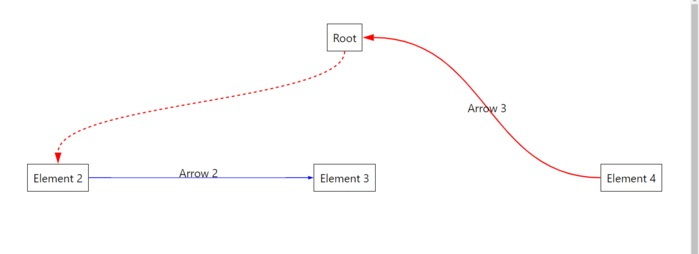
输出
执行后,它将生成以下输出 -

更新于: 2021 年 9 月 29 日
2K+ 次查看

广告