
 数据结构
数据结构 网络
网络 RDBMS
RDBMS 操作系统
操作系统 Java
Java MS Excel
 iOS
iOS HTML
HTML CSS
CSS Android
 Python
 C 编程
C 编程 C++
C++ C#
C# MongoDB
 MySQL
MySQL JavaScript
 PHP
PHP 物理学
物理学 化学
化学 生物学
生物学 数学
数学 英语
英语 经济学
经济学 心理学
心理学 社会研究
社会研究 时装研究
时装研究 法律研究
法律研究在 Matplotlib 中绘制作图中的平均线
我们可以使用 hist 方法绘制一些表达式。然后,我们将使用 plot 方法和在创建 hist 时返回的 bin 来绘制表达式的平均图。
步骤
使用一些方程式获取 x 的数据,设置 num_bins = 50。
使用 subplots 方法创建 fig 和 ax 变量,其中默认 nrows 和 ncols 为 1。
使用 ax.hist() 方法获取 n、bin、patches 值。
使用 bin 和通过一些方程式获得的 y 数据绘制平均线。
使用 plt.xlabel() 方法设置 X 轴标签。
使用 plt.ylabel() 方法设置 Y 轴标签。
设置轴标题。
使用 tight_layout(),我们可以调整子图之间以及周围的留白。
要显示图片,请使用 plt.show() 方法。
示例
import numpy as np
import matplotlib.pyplot as plt

np.random.seed(19680801)

# example data
mu = 100 # mean of distribution
sigma = 15 # standard deviation of distribution
x = mu + sigma * np.random.randn(437)

num_bins = 50

fig, ax = plt.subplots()

# the histogram of the data
n, bins, patches = ax.hist(x, num_bins, density=True)

# add a 'best fit' line
y = ((1 / (np.sqrt(2 * np.pi) * sigma)) *
np.exp(-0.5 * (1 / sigma * (bins - mu))**2))
ax.plot(bins, y, '--')
ax.set_xlabel('Smarts')
ax.set_ylabel('Probability density')
ax.set_title(r'Histogram of IQ: $\mu=100$, $\sigma=15$')

fig.tight_layout()
plt.show()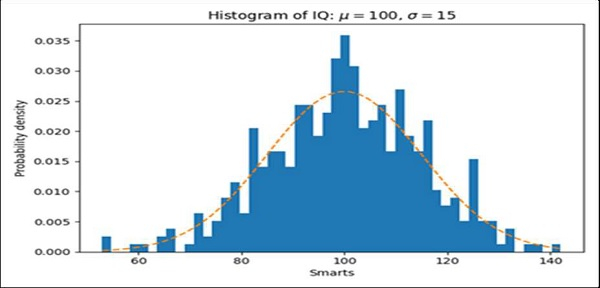

更新时间:17-Mar-2021
2K+ 浏览量

广告