
 数据结构
数据结构 网络
网络 关系数据库管理系统 (RDBMS)
 操作系统
操作系统 Java
Java MS Excel
 iOS
iOS HTML
HTML CSS
CSS Android
 Python
 C语言编程
C语言编程 C++
C++ C#
C# MongoDB
 MySQL
MySQL Javascript
 PHP
PHP 物理学
物理学 化学
化学 生物学
生物学 数学
数学 英语
英语 经济学
经济学 心理学
心理学 社会学
社会学 服装学
服装学 法学
法学使用PowerShell进行安全密码加密
很多时候我们需要在PowerShell中使用密码,并将其传递给凭据参数,而密码应该始终是安全字符串,而不是纯文本。下面介绍几种加密密码的方法。
a) Get-Credential 格式
我们有一种方法可以使用cmdlet **Get-Credential**存储用户名和密码。它将提供一个GUI提示。您可以将此密码存储到变量中,并在以后的命令中使用它。
$cred = Get-Credential
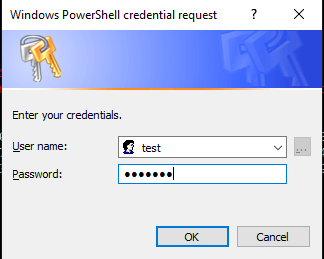
凭据存储在**$cred**变量中。以下是变量的值。输出如下。
PS C:\WINDOWS\system32> $cred
UserName       Password
--------       --------
test       System.Security.SecureString
您可以看到密码存储在安全字符串中。您可以将上述变量与cmdlet支持的凭据参数一起使用。
例如:
Invoke-Command -ComputerName Test-PC -ScriptBlock {Get-Service} -
Credential $cred
您可以看到这个密码的加密形式,为此,您需要使用**ConvertFrom-SecureString**命令。
PS C:\WINDOWS\system32> $cred.Password | ConvertFrom-SecureString 01000000d08c9ddf0115d1118c7a00c04fc297eb01000000fe83583138f0ce4bb0e3654f0529948100000000020000000000
106600000001000020000000cf8760de4e2ca7a28c8efd055c578dc7779f3984f25c1f9bc8c7a8ec50d97aa1000000000e80
00000002000020000000fb33efe90790e302ee738ad245b0b256d34e49728a08dfd2ef524da22f9bccaf100000003cf7a899
ea4c75edd7b4e418351f686040000000b21de677725588fb8f8bd589de058247171c103b48a50d06f152f25c8196935ca78f
f7b1909bc5e76ad5c9cf1e2df497769aed3c1bb2f4035c26e6bdd7aa3875
b) 安全字符串格式
另一种获取安全字符串中密码的方法是使用**Read-Host**命令和–**AsSecureString**参数。
PS C:\WINDOWS\system32> $passwd = Read-Host "Enter Password" -AsSecureString Enter Password: *******
您可以通过创建新的**PSCredential**对象,直接在支持**Credential**参数的cmdlet中使用此密码,如下例所示。
$username = Read-Host "Enter UserName"
$passwd = Read-Host "Enter Password" -AsSecureString

$creds = New-Object -TypeName System.Management.Automation.PSCredential -ArgumentList

$username,$passwd Connect-VIServer -Server TestvCenter.lab -Credential $creds
当您检查此密码变量时,它也处于**Secure.String**格式,并且您可以再次使用**ConvertFrom-SecureString**管道命令检索加密的密码。
PS C:\WINDOWS\system32> $passwd
System.Security.SecureString

PS C:\WINDOWS\system32> $passwd | ConvertFrom-SecureString
01000000d08c9ddf0115d1118c7a00c04fc297eb01000000fe83583138f0ce4bb0e3654f05299481000000000200000000001
06600000001000020000000d5439c95404cc4e81dbb83b557e58cec12b5047e441b22bd3dabca96bc231d39000000000e8000
000002000020000000a9c2b95f3363ecbd46beaf927a1779ff2f43e17fb0e3aadf0d2c9c3dedc5fb1e10000000439a72d5bd9
97aacd529f49425909151400000008ad5e497b74e054e21ea1232c6ae45a64af302d91df09c0768eacd57b08f6b86f9bc4244
75c2e14173edd287e8a9304c570104475d09ebd9ab4c419167222260
一旦您的密码字符串安全,您可以直接将其用作密码。您不需要使用ConvertFrom-SecureString获取加密的密码。这只是为了查看密码安全字符串。
c) 明文格式
如果**密码**是**明文**格式,您可以直接在支持**Password**参数的命令中使用明文密码,但不推荐以下方法,因为它采用明文格式,可能造成严重的安全漏洞。请参见以下示例。
Connect-VIServer -Server TestvCenter.lab -User "Testadmin" -
Password "PowerShell"
您可以将明文密码转换为安全字符串格式。当您在安全位置放置了一个包含密码的文本文件,而PowerShell需要在不使用明文的情况下使用该密码时,这很有用。过程如下所示。
$passwd = "Test@123" | ConvertTo-SecureString -AsPlainText -Force
PS C:\WINDOWS\system32> $passwd
System.Security.SecureString
现在我们的密码是安全的,我们可以将其用作凭据中的密码。在这里,我们使用**$cred**参数连接名为**TestvCenter.lab**的vCenter服务器。
$creds = New-Object -TypeName System.Management.Automation.PSCredential -ArgumentList “test”,$passwd

Connect-VIServer -Server TestvCenter.lab -Credential $creds
您可以使用以下方法查看加密的密码。它是文本编码格式,而不是原始密码。
PS C:\WINDOWS\system32> $passwd | ConvertFrom-SecureString 01000000d08c9ddf0115d1118c7a00c04fc297eb01000000fe83583138f0ce4bb0e3654f052994810000000002
0000000000106600000001000020000000358daf9fec158cf68ccf5e06bf0eb829953553f5e703df2ce0d97e8a
95f5761f000000000e8000000002000020000000cf65dea31f8f4082392f958cd836b22cff2b6d86c3ab29d235
2f56aa757300b520000000f9626238a73c899ebf61bd935651a8deb391e2615164779d461c679ad04bc1264000
00007050962ea9d8c67f051b9fcbdbee953dffa2cc2377905911814a8d87d3e7678914a3e0292cb24977767881
6391919c5518d6251a78f87b6efd990cb3eabe96e4
如果您需要将此密码存储在文件中,则可以使用上述命令。
PS C:\WINDOWS\system32> $passwd | ConvertFrom-SecureString | Out-File C:\Passwd.txt
但是,当您取回密码时,需要再次将其转换为安全字符串格式,因为**credential**参数只接受安全字符串。
PS C:\WINDOWS\system32> $passwd = (Get-Content C:\Passwd.txt) | ConvertTo-SecureString
PS C:\WINDOWS\system32> $passwd
System.Security.SecureString
您可以在支持的cmdlet的credential参数中使用此密码。

358 次查看
