
 数据结构
数据结构 网络
网络 关系数据库管理系统(RDBMS)
 操作系统
操作系统 Java
Java MS Excel
 iOS
iOS HTML
HTML CSS
CSS Android
 Python
 C语言编程
C语言编程 C++
C++ C#
C# MongoDB
 MySQL
MySQL Javascript
 PHP
PHP 物理
物理 化学
化学 生物
生物 数学
数学 英语
英语 经济学
经济学 心理学
心理学 社会学
社会学 服装设计
服装设计 法学
法学在Arduino中获取ASCII表
在本文中,我们将逐步讲解Arduino中的示例代码,该代码有助于在串口监视器输出中生成ASCII表。供您参考,这就是ASCII表的样子:http://www.asciitable.com/
它包含字符,后跟其十进制、十六进制的ASCII码,有时甚至还有八进制和二进制表示。在这个例子中,我们将打印出所有可打印ASCII字符的这些表示。请记住,第一个可打印的ASCII字符从数字33开始,可打印字符一直到数字126。由于我们将在串口监视器上打印ASCII表,因此我们只关注可打印字符。
要访问此示例,请转到**文件 → 示例 → 04 通信 → ASCII 表**。

让我们开始逐步讲解这段代码。如您所见,我们首先在setup中初始化Serial,然后等待Serial端口连接。之后,我们只需打印草图的标题。
void setup() {
   //Initialize serial and wait for port to open:
   Serial.begin(9600);
   while (!Serial) {
      ; // wait for serial port to connect. Needed for native USB port only
   }
   // prints title with ending line break
   Serial.println("ASCII Table ~ Character Map");
}
接下来,定义全局变量thisByte。它被初始化为33。记住33等于第一个可打印的ASCII字符。
int thisByte = 33;
在循环中,我们首先以字符的形式打印thisByte的值(使用Serial.write()),然后打印其十进制值(使用Serial.print()),然后使用Serial.print()中的格式说明符打印其十六进制、八进制和二进制表示。
之后,我们将thisByte的值递增,直到达到126的值,之后进入无限循环,基本上什么也不做。
示例
void loop() {
   // prints value unaltered, i.e. the raw binary version of the byte.
   // The Serial Monitor interprets all bytes as ASCII, so 33, the first number will show up as '!'
   Serial.write(thisByte);

   Serial.print(", dec: ");
   // prints value as string as an ASCII-encoded decimal (base 10).
   // Decimal is the default format for Serial.print() and Serial.println(),
   // so no modifier is needed:
   Serial.print(thisByte);
   // But you can declare the modifier for decimal if you want to.
   // this also works if you uncomment it:
   // Serial.print(thisByte, DEC);

   Serial.print(", hex: ");
   // prints value as string in hexadecimal (base 16):
   Serial.print(thisByte, HEX);

   Serial.print(", oct: ");
   // prints value as string in octal (base 8);
   Serial.print(thisByte, OCT);
   Serial.print(", bin: ");
   // prints value as string in binary (base 2) also prints ending line break:
   Serial.println(thisByte, BIN);

   // if printed last visible character '~' or 126, stop:
   if (thisByte == 126) { // you could also use if (thisByte == '~')
   {
      // This loop loops forever and does nothing
      while (true) {
         continue;
      }
   }
   // go on to the next character
   thisByte++;
}
输出
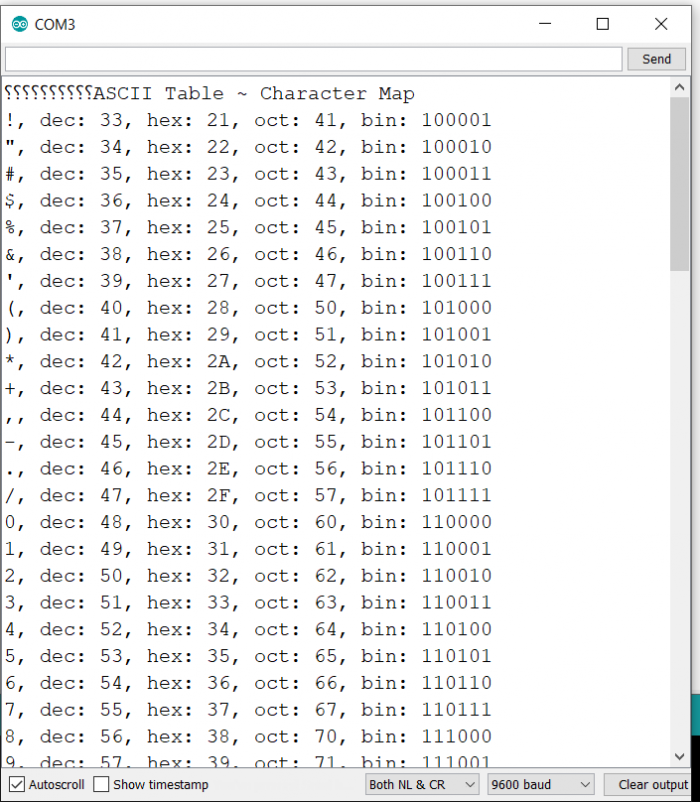
串口监视器输出如下所示:

更新于:2021年5月29日
2K+ 次浏览

广告