
 数据结构
数据结构 网络
网络 RDBMS
RDBMS 操作系统
操作系统 Java
Java MS Excel
 iOS
iOS HTML
HTML CSS
CSS Android
 Python
 C 编程
C 编程 C++
C++ C#
C# MongoDB
 MySQL
MySQL Javascript
 PHP
PHP 物理
物理 化学
化学 生物学
生物学 数学
数学 英语
英语 经济学
经济学 心理学
心理学 社会研究
社会研究 时装研究
时装研究 法律研究
法律研究如何在 Android Studio 中添加依赖项
此示例演示如何在 Android studio 中添加依赖项
步骤 1 − 在 Android Studio 中创建新项目,转至文件 ⇒ 新项目,填写所有必需的详细信息以创建新项目。
步骤 2 − 将以下代码添加到 res/layout/activity_main.xml。
<?xml version="1.0" encoding="utf-8"?>
<LinearLayout xmlns:android="http://schemas.android.com/apk/res/android"
   xmlns:tools="http://schemas.android.com/tools"
   android:layout_width="match_parent"
   android:layout_height="match_parent"
   android:gravity="center_horizontal"
   android:orientation="vertical"
   tools:context=".MainActivity">
<Button
   android:id="@+id/btn_start_location_updates"
   android:layout_width="wrap_content"
   android:layout_height="wrap_content"
   android:layout_marginTop="40dp"
   android:onClick="startLocationButtonClick"
   android:text="@string/start_updates" />
<Button
   android:id="@+id/btn_stop_location_updates"
   android:layout_width="wrap_content"
   android:layout_height="wrap_content"
   android:layout_marginTop="10dp"
   android:enabled="false"
   android:onClick="stopLocationButtonClick"
   android:text="@string/stop_updates" />
<Button
   android:id="@+id/btn_get_last_location"
   android:layout_width="wrap_content"
   android:layout_height="wrap_content"
   android:layout_marginTop="10dp"
   android:onClick="showLastKnownLocation"
   android:text="@string/get_last_location" />
<TextView
   android:layout_width="wrap_content"
   android:layout_height="wrap_content"
   android:layout_marginTop="50dp"
   android:gravity="center_horizontal"
   android:text="Location updates will be received only when app is foreground" />
<TextView
   android:id="@+id/location_result"
   android:layout_width="wrap_content"
   android:layout_height="wrap_content"
   android:layout_marginTop="20dp"
   android:textColor="#333"
   android:textSize="18sp" />
<TextView
   android:id="@+id/updated_on"
   android:layout_width="wrap_content"
   android:layout_height="wrap_content"
   android:layout_marginTop="30dp"
   android:textSize="12sp" />
</LinearLayout>
步骤 3 − 将以下代码添加到 src/MainActivity.java
package app.com.sample;
import androidx.annotation.NonNull;
import androidx.appcompat.app.AppCompatActivity;
import androidx.core.app.ActivityCompat;
import android.Manifest;
import android.annotation.SuppressLint;
import android.app.Activity;
import android.content.Intent;
import android.content.IntentSender;
import android.content.pm.PackageManager;
import android.location.Location;
import android.net.Uri;
import android.os.Bundle;
import android.os.Looper;
import android.provider.Settings;
import android.util.Log;
import android.view.View;
import android.widget.Button;
import android.widget.TextView;
import android.widget.Toast;
import com.google.android.gms.common.api.ApiException;
import com.google.android.gms.common.api.ResolvableApiException;
import com.google.android.gms.location.FusedLocationProviderClient;
import com.google.android.gms.location.LocationCallback;
import com.google.android.gms.location.LocationRequest;
import com.google.android.gms.location.LocationResult;
import com.google.android.gms.location.LocationServices;
import com.google.android.gms.location.LocationSettingsRequest;
import com.google.android.gms.location.LocationSettingsResponse;
import com.google.android.gms.location.LocationSettingsStatusCodes;
import com.google.android.gms.location.SettingsClient;
import com.google.android.gms.tasks.OnCompleteListener;
import com.google.android.gms.tasks.OnFailureListener;
import com.google.android.gms.tasks.OnSuccessListener;
import com.google.android.gms.tasks.Task;
import com.karumi.dexter.Dexter;
import com.karumi.dexter.PermissionToken;
import com.karumi.dexter.listener.PermissionDeniedResponse;
import com.karumi.dexter.listener.PermissionGrantedResponse;
import com.karumi.dexter.listener.PermissionRequest;
import com.karumi.dexter.listener.single.PermissionListener;
import java.text.DateFormat;
import java.util.Date;
public class MainActivity extends AppCompatActivity {
   private static final String TAG = MainActivity.class.getSimpleName();
   TextView txtLocationResult;
   TextView txtUpdatedOn;
   Button btnStartUpdates;
   Button btnStopUpdates;
   // location last updated time
   private String mLastUpdateTime;
   // location updates interval - 10sec
   private static final long UPDATE_INTERVAL_IN_MILLISECONDS = 10000;
   // fastest updates interval - 5 sec
   // location updates will be received if another app is requesting the locations
   // than your app can handle
   private static final long FASTEST_UPDATE_INTERVAL_IN_MILLISECONDS = 5000;
   private static final int REQUEST_CHECK_SETTINGS = 100;
   // bunch of location related apis
   private FusedLocationProviderClient mFusedLocationClient;
   private SettingsClient mSettingsClient;
   private LocationRequest mLocationRequest;
   private LocationSettingsRequest mLocationSettingsRequest;
   private LocationCallback mLocationCallback;
   private Location mCurrentLocation;
   // boolean flag to toggle the ui
   private Boolean mRequestingLocationUpdates;
   @Override
   protected void onCreate(Bundle savedInstanceState) {
      super.onCreate(savedInstanceState);
      setContentView(R.layout.activity_main);
      // initialize the necessary libraries
      init();
      // restore the values from saved instance state
      restoreValuesFromBundle(savedInstanceState);
   }
   private void init() {
      txtLocationResult = findViewById(R.id.location_result);
      txtUpdatedOn = findViewById(R.id.updated_on);
      btnStartUpdates = findViewById(R.id.btn_start_location_updates);
      btnStopUpdates = findViewById(R.id.btn_stop_location_updates);
      mFusedLocationClient = LocationServices.getFusedLocationProviderClient(this);
      mSettingsClient = LocationServices.getSettingsClient(this);
      mLocationCallback = new LocationCallback() {
         @Override
         public void onLocationResult(LocationResult locationResult) {
            super.onLocationResult(locationResult);
            // location is received
            mCurrentLocation = locationResult.getLastLocation();
            mLastUpdateTime = DateFormat.getTimeInstance().format(new Date());
            updateLocationUI();
         }
      };
      mRequestingLocationUpdates = false;
      mLocationRequest = new LocationRequest();
      mLocationRequest.setInterval(UPDATE_INTERVAL_IN_MILLISECONDS);
      mLocationRequest.setFastestInterval(FASTEST_UPDATE_INTERVAL_IN_MILLISECONDS);
      mLocationRequest.setPriority(LocationRequest.PRIORITY_HIGH_ACCURACY);
      LocationSettingsRequest.Builder builder = new LocationSettingsRequest.Builder();
      builder.addLocationRequest(mLocationRequest);
      mLocationSettingsRequest = builder.build();
   }
/**
* Restoring values from saved instance state
*/
   private void restoreValuesFromBundle(Bundle savedInstanceState) {
      if (savedInstanceState != null) {
         if (savedInstanceState.containsKey("is_requesting_updates")) {
            mRequestingLocationUpdates = savedInstanceState.getBoolean("is_requesting_updates");
         }
         if (savedInstanceState.containsKey("last_known_location")) {
            mCurrentLocation = savedInstanceState.getParcelable("last_known_location");
         }
         if (savedInstanceState.containsKey("last_updated_on")) {
            mLastUpdateTime = savedInstanceState.getString("last_updated_on");
         }
      }
      updateLocationUI();
   }
/**
* Update the UI displaying the location data
* and toggling the buttons
*/
   private void updateLocationUI() {
      if (mCurrentLocation != null) {
         txtLocationResult.setText(
            "Lat: " + mCurrentLocation.getLatitude() + ", " + "Lng: " + mCurrentLocation.getLongitude()
         );
         // giving a blink animation on TextView
         txtLocationResult.setAlpha(0);
         txtLocationResult.animate().alpha(1).setDuration(300);
         // location last updated time
         txtUpdatedOn.setText("Last updated on: " + mLastUpdateTime);
      }
      toggleButtons();
   }
   @Override
   public void onSaveInstanceState(Bundle outState) {
      super.onSaveInstanceState(outState);
      outState.putBoolean("is_requesting_updates", mRequestingLocationUpdates);
      outState.putParcelable("last_known_location", mCurrentLocation);
      outState.putString("last_updated_on", mLastUpdateTime);
   }
   private void toggleButtons() {
      if (mRequestingLocationUpdates) {
         btnStartUpdates.setEnabled(false);
         btnStopUpdates.setEnabled(true);
      }
       else {
         btnStartUpdates.setEnabled(true);
         btnStopUpdates.setEnabled(false);
      }
   }
/**
* Starting location updates
* Check whether location settings are satisfied and then
* location updates will be requested
*/
   private void startLocationUpdates() {
      mSettingsClient
      .checkLocationSettings(mLocationSettingsRequest)
      .addOnSuccessListener(this, new OnSuccessListener<LocationSettingsResponse>() {
         @SuppressLint("MissingPermission")
         @Override
         public void onSuccess(LocationSettingsResponse locationSettingsResponse) {
            Log.i(TAG, "All location settings are satisfied.");
            Toast.makeText(getApplicationContext(), "Started location updates!",
            Toast.LENGTH_SHORT).show();
            //noinspection MissingPermission
            mFusedLocationClient.requestLocationUpdates(mLocationRequest,
            mLocationCallback, Looper.myLooper());
            updateLocationUI();
         }
      })
      .addOnFailureListener(this, new OnFailureListener() {
         @Override
         public void onFailure(@NonNull Exception e) {
            int statusCode = ((ApiException) e).getStatusCode();
            switch (statusCode) {
               case LocationSettingsStatusCodes.RESOLUTION_REQUIRED:
               Log.i(TAG, "Location settings are not satisfied. Attempting to upgrade " +
"location settings ");
            try {
               // Show the dialog by calling startResolutionForResult(), and check the
               // result in onActivityResult().
               ResolvableApiException rae = (ResolvableApiException) e;
               rae.startResolutionForResult(MainActivity.this, REQUEST_CHECK_SETTINGS);
            }
             catch (IntentSender.SendIntentException sie) {
               Log.i(TAG, "PendingIntent unable to execute request.");
            }
            break;
            case LocationSettingsStatusCodes.SETTINGS_CHANGE_UNAVAILABLE:
            String errorMessage = "Location settings are inadequate, and cannot be " + "fixed here. Fix in Settings.";
         Log.e(TAG, errorMessage);
         Toast.makeText(MainActivity.this, errorMessage, Toast.LENGTH_LONG).show();
      }
      updateLocationUI();
      }
   });
}
public void startLocationButtonClick(View view) {
   // Requesting ACCESS_FINE_LOCATION using Dexter library
   Dexter.withActivity(this)
   .withPermission(Manifest.permission.ACCESS_FINE_LOCATION)
   .withListener(new PermissionListener() {
      @Override
      public void onPermissionGranted(PermissionGrantedResponse response) {
         mRequestingLocationUpdates = true;
         startLocationUpdates();
      }
      @Override
      public void onPermissionDenied(PermissionDeniedResponse response) {
         if (response.isPermanentlyDenied()) {
            // open device settings when the permission is
            // denied permanently
            openSettings();
         }
      }
      @Override
      public void onPermissionRationaleShouldBeShown(PermissionRequest permission, PermissionToken token) {
   token.continuePermissionRequest();
   }
   }).check();
}
public void stopLocationButtonClick(View view) {
   mRequestingLocationUpdates = false;
   stopLocationUpdates();
}
public void stopLocationUpdates() {
   // Removing location updates
   mFusedLocationClient
   .removeLocationUpdates(mLocationCallback)
   .addOnCompleteListener(this, new OnCompleteListener() {
      @Override
      public void onComplete(@NonNull Task task) {
         Toast.makeText(getApplicationContext(), "Location updates stopped!",
         Toast.LENGTH_SHORT).show();
         toggleButtons();
      }
   });
}
public void showLastKnownLocation(View view) {
   if (mCurrentLocation != null) {
      Toast.makeText(getApplicationContext(), "Lat: " + mCurrentLocation.getLatitude() + ", Lng: " + mCurrentLocation.getLongitude(), Toast.LENGTH_LONG).show();
   }
   else {
      Toast.makeText(getApplicationContext(), "Last known location is not available!",
      Toast.LENGTH_SHORT).show();
   }
}
@Override
protected void onActivityResult(int requestCode, int resultCode, Intent data) {
   // Check for the integer request code originally supplied to startResolutionForResult().
   if (requestCode == REQUEST_CHECK_SETTINGS) {
      switch (resultCode) {
         case Activity.RESULT_OK:
         Log.e(TAG, "User agreed to make required location settings changes.");
      // Nothing to do. startLocationupdates() gets called in onResume again.
      break;
      case Activity.RESULT_CANCELED:
      Log.e(TAG, "User chose not to make required location settings changes.");
      mRequestingLocationUpdates = false;
      break;
      }
   }
}
private void openSettings() {
   Intent intent = new Intent();
   intent.setAction(
   Settings.ACTION_APPLICATION_DETAILS_SETTINGS);
   Uri uri = Uri.fromParts("package",
   BuildConfig.APPLICATION_ID, null);
   intent.setData(uri);
   intent.setFlags(Intent.FLAG_ACTIVITY_NEW_TASK);
   startActivity(intent);
}
@Override
public void onResume() {
   super.onResume();
   // Resuming location updates depending on button state and
   // allowed permissions
   if (mRequestingLocationUpdates && checkPermissions()) {
      startLocationUpdates();
   }
   updateLocationUI();
}
private boolean checkPermissions() {
   int permissionState = ActivityCompat.checkSelfPermission(this,
   Manifest.permission.ACCESS_FINE_LOCATION);
   return permissionState == PackageManager.PERMISSION_GRANTED;
}
@Override
   protected void onPause() {
      super.onPause();
      if (mRequestingLocationUpdates) {
         // pausing location updates
         stopLocationUpdates();
   }
}
步骤 4 − 将以下代码添加到 build.gradle(应用层)
// location play services
implementation 'com.google.android.gms:play-services-location:17.0.0'
// dexter runtime permissions
implementation 'com.karumi:dexter:4.2.0'
步骤 5 − 将以下代码添加到 androidManifest.xml
<?xml version="1.0" encoding="utf-8"?>
<manifest xmlns:android="http://schemas.android.com/apk/res/android"
   package="app.com.sample">
   <uses-permission android:name="android.permission.ACCESS_FINE_LOCATION"/>
   <application
      android:allowBackup="true"
      android:icon="@mipmap/ic_launcher"
      android:label="@string/app_name"
      android:roundIcon="@mipmap/ic_launcher_round"
      android:supportsRtl="true"
      android:theme="@style/AppTheme">
      <activity android:name=".MainActivity">
         <intent-filter>
            <action android:name="android.intent.action.MAIN" />
            <category android:name="android.intent.category.LAUNCHER" />
         </intent-filter>
      </activity>
   </application>
</manifest>
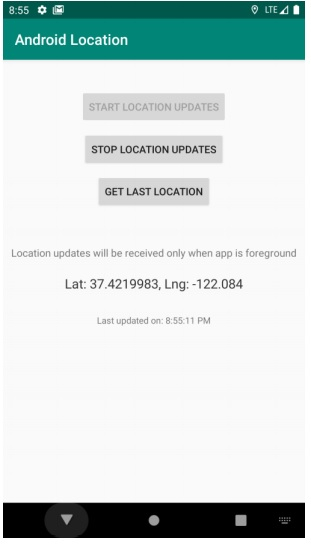
让我们尝试运行您的应用程序。我假设您已将实际安卓移动设备与您的计算机连接起来。要从 Android Studio 运行此应用程序,请打开项目中某个 activity 文件,然后单击工具栏中的运行 图标。选择您的移动设备作为选项,然后检查您的移动设备,它将显示您的默认屏幕 -

更新于: 2020-07-07
超过 1K 的浏览量

广告