
 数据结构
数据结构 网络
网络 RDBMS
RDBMS 操作系统
操作系统 Java
Java MS Excel
 iOS
iOS HTML
HTML CSS
CSS Android
 Python
 C编程
C编程 C++
C++ C#
C# MongoDB
 MySQL
MySQL Javascript
 PHP
PHP 物理
物理 化学
化学 生物
生物 数学
数学 英语
英语 经济
经济 心理学
心理学 社会学
社会学 时尚设计
时尚设计 法律研究
法律研究Java中可以创建多少种类型的JDialog框?
JDialog是Dialog类的子类,它不会在窗口的右上角显示最小化和最大化按钮。在 Java 中,我们可以创建两种类型的 JDialog 对话框。
- 模态对话框
- 非模态对话框
模态 JDialog
在 Java 中,在模态对话框窗口处于活动状态时,所有用户输入都会直接到这个窗口,并且此模态对话框关闭之前,应用程序的其他部分都无法访问。
非模态 JDialog
在 Java 中,在非模态对话框窗口处于活动状态时,应用程序的其他部分仍然可以正常访问,并且可以将输入直接到这些部分,而无需关闭此非模态对话框窗口。
示例
import javax.swing.*;
import java.awt.*;
import java.awt.Dialog.ModalityType;
public class Modal_NonModal_Dialog {
   public static void main(String[] args) {
      JFrame frame = new JFrame();
      frame.setTitle("Modal and Non-Modal Dialog");
      frame.setSize(350, 300);
      frame.setLocationRelativeTo(null);
      frame.setDefaultCloseOperation(JFrame.EXIT_ON_CLOSE);
      frame.setVisible(true);
      // modal dialog
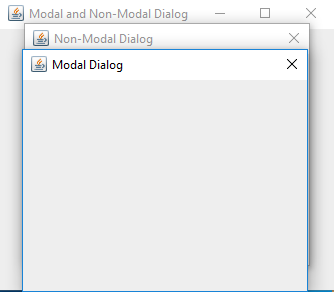
      JDialog nonModalDialog = new JDialog(frame, "Non-Modal Dialog", ModalityType.MODELESS);
      nonModalDialog.setSize(300, 250);
      nonModalDialog.setLocationRelativeTo(null);
      nonModalDialog.setVisible(true);
      // non-modal dialog
      JDialog modalDialog = new JDialog(frame, "Modal Dialog", ModalityType.APPLICATION_MODAL);
      modalDialog.setSize(300, 250);
      modalDialog.setLocationRelativeTo(null);
      modalDialog.setVisible(true);
   }
}
输出

更新于: 2020 年 2 月 7 日
124 views

广告