
 数据结构
数据结构 网络
网络 RDBMS
RDBMS 操作系统
操作系统 Java
Java MS Excel
 iOS
iOS HTML
HTML CSS
CSS Android
 Python
 C 编程
C 编程 C++
C++ C#
C# MongoDB
 MySQL
MySQL Javascript
 PHP
PHP 物理
物理 化学
化学 生物
生物 数学
数学 英语
英语 经济学
经济学 心理学
心理学 社会研究
社会研究 时装研究
时装研究 法律研究
法律研究如何添加 Selenium 的自定义 ExpectedConditions?
我们可以为 Selenium 网页驱动程序添加自定义 ExpectedConditions。当网路驱动程序提供的默认预期条件不足以满足某些场景时,我们需要此自定义 ExpectedConditions。
这里使用 WebDriverWait 类中的 until 方法。在此处,ExpectedConditions 用于等待满足特定条件。只要发生以下情况之一,此方法就会暂停 −
已过指定的超时持续时间。
定义的条件不为 false 也不为 null。
我们可以通过创建预期条件的对象并借助 apply 方法来获取自定义 ExpectedCondition。
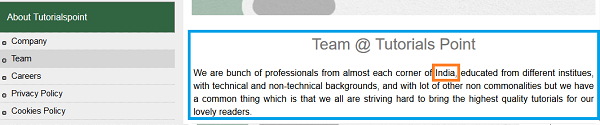
让我们以以下页面为例。让我们点击 Team 链接。

在单击团队后,相应的一段文字将出现在右侧。让我们验证该段落是否已显示,并验证文本 India 出现该段落中。
示例
import org.openqa.selenium.WebDriver;
import org.openqa.selenium.WebElement;
import org.openqa.selenium.chrome.ChromeDriver;
import java.util.concurrent.TimeUnit;
import org.openqa.selenium.support.ui.ExpectedConditions;
import org.openqa.selenium.support.ui.WebDriverWait;
public class CustomExpCondition{
   public static void main(String[] args)
      throws InterruptedException{
      System.setProperty("webdriver.chrome.driver",
      "C:\Users\ghs6kor\Desktop\Java\chromedriver.exe");
      WebDriver driver = new ChromeDriver();
      driver.manage().timeouts().implicitlyWait(4, TimeUnit.SECONDS);
      driver.get("https://tutorialspoint.com/about/about_careers.htm");
      // identify element
      WebElement l=driver.findElement(By.linkText("Team"));
      l.click();
      //object of WebDriverWait class with wait time
      WebDriverWait w = new WebDriverWait(driver,7);
      //custom expected condition with until method
      w.until(new ExpectedCondition <Boolean> (){
         public Boolean apply(WebDriver driver) {
            //identify paragraph
            WebElement e= driver.findElement(By.tagName("p"));
            if (e!= null){
               //to check if paragraph is displayed and has text India
               if (e.isDisplayed() && e.getText().contains("India")) {
                  System.out.println("Element found");
                  return true;
               }
               else {
                  System.out.println("Element not found");
                  return false;
               }
            }
            return false;
         }
      });
      driver.close();
   }
}
输出


更新时间:01-Feb-2021
1 千个 + 浏览

广告