
 数据结构
数据结构 网络
网络 关系型数据库管理系统
 操作系统
操作系统 Java
Java MS Excel
 iOS
iOS HTML
HTML CSS
CSS Android
 Python
 C 语言编程
 C++
C++ C#
C# MongoDB
 MySQL
MySQL Javascript
 PHP
PHP 物理
物理 化学
化学 生物
生物 数学
数学 英语
英语 经济学
经济学 心理学
心理学 社会学
社会学 时尚研究
时尚研究 法律研究
法律研究如何在 Tkinter 中绑定 shift+tab 组合键?
在需要执行特定任务或操作的任何应用程序中,Tkinter 事件都非常有用。在 Tkinter 中,通常通过定义一个包含代码片段和特定事件的逻辑的函数来创建事件。要调用事件,我们通常将事件与某些键或按钮小部件绑定。bind 函数采用两个参数 ('<Key-Combination>', callback) 使按钮能够触发事件。
在以下示例中使用相同的方法,我们将通过按快捷键 <Shift + Tab> 触发弹出消息。
示例
# Import the required libraries
from tkinter import *
from tkinter import messagebox

# Create an instance of tkinter frame
win= Tk()

# Set the size of the tkinter window
win.geometry("700x350")

# Define a function to show the popup message
def show_msg(e):
   messagebox.showinfo("Message","Hey There! I hope you are doing well.")

# Add an optional Label widget
Label(win, text = "Admin Has Sent You a Message. " "Press <Shift+Tab> to View the Message.", font = ('Aerial 15')).pack(pady= 40)

# Bind the Shift+Tab key with the event
win.bind('<Shift-Tab>', lambda e: show_msg(e))
win.mainloop()
输出
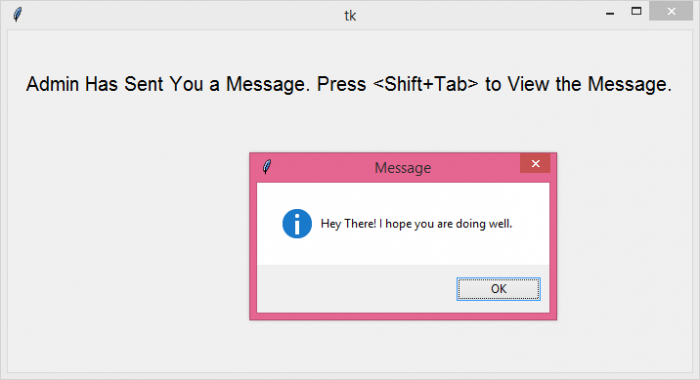
执行以上程序时,它将显示一个包含一个标签小部件的窗口。当我们按下按键组合 <Shift + Tab> 时,它将在屏幕上弹出消息。

更新时间:08-Jun-2021
2K+ 次浏览

广告