
 数据结构
数据结构 网络
网络 关系数据库管理系统 (RDBMS)
 操作系统
操作系统 Java
Java MS Excel
 iOS
iOS HTML
HTML CSS
CSS Android
 Python
 C语言编程
C语言编程 C++
C++ C#
C# MongoDB
 MySQL
MySQL Javascript
 PHP
PHP 物理学
物理学 化学
化学 生物学
生物学 数学
数学 英语
英语 经济学
经济学 心理学
心理学 社会学
社会学 时尚研究
时尚研究 法律研究
法律研究如何在Android SQLite中检查游标数组列表是否为空?
在进入示例之前,我们应该了解 Android 中的 SQLite 数据库是什么。SQLite 是一个开源的 SQL 数据库,它将数据存储到设备上的文本文件中。Android 自带内置的 SQLite 数据库实现。SQLite 支持所有关系数据库功能。要访问此数据库,您无需像 JDBC、ODBC 等那样为此建立任何类型的连接。
此示例演示如何在 Android SQLite 中检查游标数组列表是否为空。
步骤 1 − 在 Android Studio 中创建一个新项目,转到文件 ⇒ 新建项目,并填写所有必需的详细信息以创建新项目。
步骤 2 − 将以下代码添加到 res/layout/activity_main.xml。
<?xml version="1.0" encoding="utf-8"?>
<LinearLayout xmlns:android="http://schemas.android.com/apk/res/android"
   xmlns:tools="http://schemas.android.com/tools"
   android:layout_width="match_parent"
   android:layout_height="match_parent"
   tools:context=".MainActivity"
   android:orientation="vertical">
   <EditText
      android:id="@+id/name"
      android:layout_width="match_parent"
      android:hint="Enter Name"
      android:layout_height="wrap_content" />
   <EditText
      android:id="@+id/salary"
      android:layout_width="match_parent"
      android:inputType="numberDecimal"
      android:hint="Enter Salary"
      android:layout_height="wrap_content" />
   <LinearLayout
      android:layout_width="wrap_content"
      android:layout_height="wrap_content"><Button
      android:id="@+id/save"
      android:text="Save"
      android:layout_width="wrap_content"
      android:layout_height="wrap_content" />
      <Button
         android:id="@+id/refresh"
         android:text="Refresh"
         android:layout_width="wrap_content"
         android:layout_height="wrap_content" />
      <Button
         android:id="@+id/udate"
         android:text="Update"
         android:layout_width="wrap_content"
         android:layout_height="wrap_content" />
      <Button
         android:id="@+id/Delete"
         android:text="DeleteALL"
         android:layout_width="wrap_content"
         android:layout_height="wrap_content" />
   </LinearLayout>

   <ListView
      android:id="@+id/listView"
      android:layout_width="match_parent"
      android:layout_height="wrap_content">
   </ListView>
</LinearLayout>
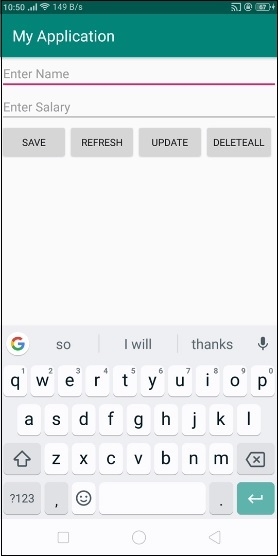
在上面的代码中,我们使用了姓名和薪水作为 EditText,当用户点击保存按钮时,它会将数据存储到 SQLite 数据库中。点击刷新按钮以获取 ListView。
步骤 3 − 将以下代码添加到 src/MainActivity.java
package com.example.andy.myapplication;

import android.os.Bundle;
import android.support.v7.app.AppCompatActivity;
import android.view.View;
import android.widget.ArrayAdapter;
import android.widget.Button;
import android.widget.EditText;
import android.widget.ListView;
import android.widget.Toast;

import java.util.ArrayList;

public class MainActivity extends AppCompatActivity {
   Button save, refresh;
   EditText name, salary;
   private ListView listView;
   ArrayAdapter arrayAdapter;

   @Override
   protected void onCreate(Bundle readdInstanceState) {
      super.onCreate(readdInstanceState);
      setContentView(R.layout.activity_main);
      final DatabaseHelper helper = new DatabaseHelper(this);
      final ArrayList array_list = helper.getAllCotacts();
      name = findViewById(R.id.name);
      salary = findViewById(R.id.salary);
      listView = findViewById(R.id.listView);
      if(!array_list.isEmpty()) {
         arrayAdapter = new ArrayAdapter(MainActivity.this, android.R.layout.simple_list_item_1, array_list);
         listView.setAdapter(arrayAdapter);
      }
      findViewById(R.id.Delete).setOnClickListener(new View.OnClickListener() {
         @Override
         public void onClick(View v) {
            if (helper.delete()) {
               Toast.makeText(MainActivity.this, "Deleted", Toast.LENGTH_LONG).show();
            } else {
               Toast.makeText(MainActivity.this, "NOT Deleted", Toast.LENGTH_LONG).show();
            }
         }
      });
      findViewById(R.id.udate).setOnClickListener(new View.OnClickListener() {
         @Override
         public void onClick(View v) {
            if (!name.getText().toString().isEmpty() && !salary.getText().toString().isEmpty()) {
               if (helper.update(name.getText().toString(), salary.getText().toString())) {
                  Toast.makeText(MainActivity.this, "Updated", Toast.LENGTH_LONG).show();
               } else {
                  Toast.makeText(MainActivity.this, "NOT Updated", Toast.LENGTH_LONG).show();
               }
            } else {
               name.setError("Enter NAME");
               salary.setError("Enter Salary");
            }
         }
      });
      findViewById(R.id.refresh).setOnClickListener(new View.OnClickListener() {
         @Override
         public void onClick(View v) {
            if(!array_list.isEmpty()) {
               array_list.clear();
               array_list.addAll(helper.getAllCotacts());
               arrayAdapter.notifyDataSetChanged();
               listView.invalidateViews();
               listView.refreshDrawableState();
            }
         }
      });
      findViewById(R.id.save).setOnClickListener(new View.OnClickListener() {
         @Override
         public void onClick(View v) {
            if (!name.getText().toString().isEmpty() && !salary.getText().toString().isEmpty()) {
               if (helper.insert(name.getText().toString(), salary.getText().toString())) {
                  Toast.makeText(MainActivity.this, "Inserted", Toast.LENGTH_LONG).show();
               } else {
                  Toast.makeText(MainActivity.this, "NOT Inserted", Toast.LENGTH_LONG).show();
               }
            } else {
               name.setError("Enter NAME");
               salary.setError("Enter Salary");
            }
         }
      });
   }
}
步骤 4 − 将以下代码添加到 src/DatabaseHelper.java
package com.example.andy.myapplication;

import android.content.ContentValues;
import android.content.Context;
import android.database.Cursor;
import android.database.sqlite.SQLiteDatabase;
import android.database.sqlite.SQLiteException;
import android.database.sqlite.SQLiteOpenHelper;

import java.io.IOException;
import java.util.ArrayList;

class DatabaseHelper extends SQLiteOpenHelper {
   public static final String DATABASE_NAME = "salaryDatabase6";
   public static final String CONTACTS_TABLE_NAME = "SalaryDetails";
   public DatabaseHelper(Context context) {
      super(context,DATABASE_NAME,null,1);
   }

   @Override
   public void onCreate(SQLiteDatabase db) {
      try {
         db.execSQL(
            "create table "+ CONTACTS_TABLE_NAME +"(id INTEGER PRIMARY KEY, name text,salary int,datetime default current_timestamp )"
         );
      } catch (SQLiteException e) {
         try {
            throw new IOException(e);
         } catch (IOException e1) {
            e1.printStackTrace();
         }
      }
   }

   @Override
   public void onUpgrade(SQLiteDatabase db, int oldVersion, int newVersion) {
      db.execSQL("DROP TABLE IF EXISTS "+CONTACTS_TABLE_NAME);
      onCreate(db);
   }

   public boolean insert(String s, String s1) {
      SQLiteDatabase db = this.getWritableDatabase();

      ContentValues contentValues = new ContentValues();
      contentValues.put("name", s);
      contentValues.put("salary", s1);
      db.replace(CONTACTS_TABLE_NAME, null, contentValues);
      return true;
   }

   public ArrayList getAllCotacts() {
      SQLiteDatabase db = this.getReadableDatabase();
      ArrayList<String> array_list = new ArrayList<String>();
      Cursor res = db.rawQuery( "select (id ||' : '||name || ' : ' || salary || ' : '|| datetime) as fullname from "+CONTACTS_TABLE_NAME, null );
      res.moveToFirst();

      while(res.isAfterLast() == false) {
         array_list.add(res.getString(res.getColumnIndex("HighestNumber")));
         res.moveToNext();
      }
      return array_list;
   }

   public boolean update(String s, String s1) {
      SQLiteDatabase db = this.getWritableDatabase();
      db.execSQL("UPDATE "+CONTACTS_TABLE_NAME+" SET name = "+"'"+s+"', "+ "salary = "+"'"+s1+"'");
      return true;
   }

   public boolean delete() {
      SQLiteDatabase db = this.getWritableDatabase();
      db.execSQL("DELETE from "+CONTACTS_TABLE_NAME);
      return true;
   }
}
让我们尝试运行您的应用程序。我假设您已将您的实际 Android 移动设备连接到您的计算机。要从 Android Studio 运行应用程序,请打开您的项目活动文件之一,然后单击工具栏中的运行  图标。选择您的移动设备作为选项,然后检查您的移动设备,它将显示您的默认屏幕 −
点击这里下载项目代码

更新于:2019年7月30日
585 次浏览

广告