
 数据结构
数据结构 网络
网络 关系数据库管理系统 (RDBMS)
 操作系统
操作系统 Java
Java MS Excel
 iOS
iOS HTML
HTML CSS
CSS Android
 Python
 C语言编程
C语言编程 C++
C++ C#
C# MongoDB
 MySQL
MySQL Javascript
 PHP
PHP 物理学
物理学 化学
化学 生物学
生物学 数学
数学 英语
英语 经济学
经济学 心理学
心理学 社会学
社会学 服装设计
服装设计 法律研究
法律研究如何在Android中检查EditText中的文本是否为邮箱地址?
在进入示例之前,我们应该了解测试场景。在登录页面中,通常我们从EditText中获取邮箱ID和密码。从EditText获取邮箱ID时,我们应该知道它是否为有效格式。
此示例演示如何检查EditText中的文本是否为邮箱地址。
步骤1 − 在Android Studio中创建一个新项目,转到文件 ⇒ 新建项目,并填写所有必需的详细信息以创建新项目。
步骤2 − 将以下代码添加到res/layout/activity_main.xml。
<?xml version="1.0" encoding="utf-8"?>
<LinearLayout xmlns:android="http://schemas.android.com/apk/res/android"
   xmlns:app="http://schemas.android.com/apk/res-auto"
   xmlns:tools="http://schemas.android.com/tools"
   android:layout_width="match_parent"
   android:layout_height="match_parent"
   android:orientation="vertical"
   android:gravity="center_horizontal"
   tools:context=".MainActivity">
   <EditText
      android:id="@+id/email"
      android:hint="Email id"
      android:layout_width="match_parent"
      android:layout_height="wrap_content" />
   <Button
      android:id="@+id/valid"
      android:layout_width="wrap_content"
      android:layout_height="wrap_content"
      android:text="Check validation" />
</LinearLayout>
在上面的布局中,我们添加了EditText和按钮,用户应该在EditText中输入邮箱ID或字符串,当用户点击按钮时,将检查EditText中输入字符串的有效性。
步骤3 − 将以下代码添加到src/MainActivity.java
import android.os.Bundle;
import android.support.v7.app.AppCompatActivity;
import android.view.View;
import android.widget.Button;
import android.widget.EditText;
import android.widget.Toast;
import java.util.regex.Matcher;
import java.util.regex.Pattern;
public class MainActivity extends AppCompatActivity {
   String emailRegEx;
   @Override
   protected void onCreate(Bundle savedInstanceState) {
      super.onCreate(savedInstanceState);
      setContentView(R.layout.activity_main);
      emailRegEx = "^[A-Za-z0-9._%+\-]+@[A-Za-z0-9.\-]+\.[A-Za-z]{2,4}$";
      final EditText email = findViewById(R.id.email);
      Button valid = findViewById(R.id.valid);
      valid.setOnClickListener(new View.OnClickListener() {
         @Override
         public void onClick(View v) {
            Pattern pattern = Pattern.compile(emailRegEx);
            Matcher matcher = pattern.matcher(email.getText().toString());
            if (email.getText().toString().isEmpty()) {
               Toast.makeText(MainActivity.this, "please enter email id", Toast.LENGTH_LONG).show();
            } else if (!matcher.find()) {
               Toast.makeText(MainActivity.this, "Not an email id", Toast.LENGTH_LONG).show();
            } else {
               Toast.makeText(MainActivity.this, "email id is valid", Toast.LENGTH_LONG).show();
            }
         }
      });
   }
}
在上面的代码中,使用模式和匹配器,它将查找给定的字符串是否有效。
步骤4 − 无需更改manifest.xml文件
让我们尝试运行您的应用程序。我假设您已将实际的Android移动设备连接到您的计算机。要在Android Studio中运行应用程序,请打开项目的其中一个活动文件,然后单击运行  工具栏中的图标。选择您的移动设备作为选项,然后检查您的移动设备,它将显示您的默认屏幕 −
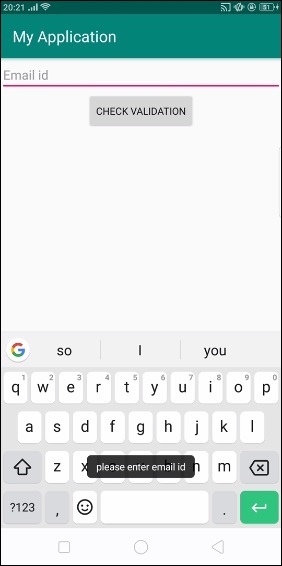
在上面的示例中,我们在EditText中没有任何内容,并点击了按钮,它显示警告“请填写邮箱ID”。
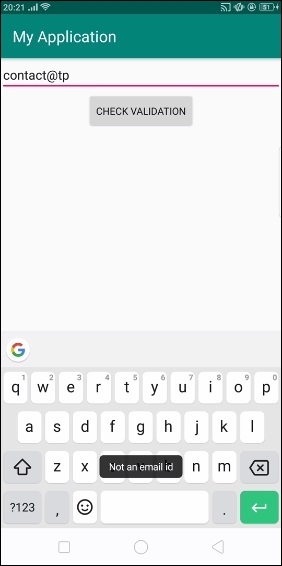
在上面的示例中,我们输入了错误的邮箱ID,它显示警告“无效邮箱ID”。
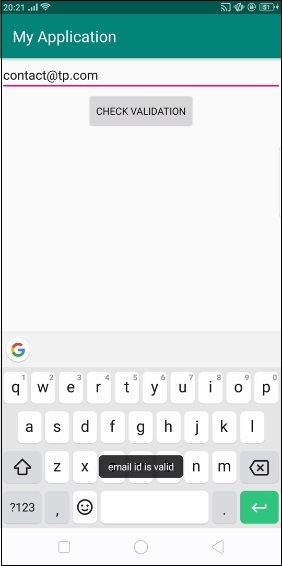
在上面的示例中,我们输入了正确的邮箱ID,它输出“邮箱ID有效”。

更新于:2019年7月30日
241 次浏览

广告