
 数据结构
数据结构 网络
网络 关系型数据库管理系统
 操作系统
操作系统 Java
Java MS Excel
 iOS
iOS HTML
HTML CSS
CSS Android
 Python
 C 编程
C 编程 C++
C++ C#
C# MongoDB
 MySQL
MySQL Javascript
 PHP
PHP 物理
物理 化学
化学 生物
生物 数学
数学 英语
英语 经济学
经济学 心理学
心理学 社会学
社会学 时尚研究
时尚研究 法律研究
法律研究如何使用 Tkinter 将 Python 3 应用程序编译成 .exe 文件?
Python 以其丰富的扩展库和包而闻名。我们可以从库中导入并安装必要的包。但是,如果我们需要在 Windows 操作系统中使用可执行文件运行 Tkinter 应用程序,则可以使用 Python 中的 Pyinstaller 包。它将基于 Python 的应用程序转换为本地可执行文件(或 .exe)。
请按照以下步骤将基于 Tkinter 的应用程序编译成可执行文件:
使用“pip install pyinstaller”安装 Pyinstaller。
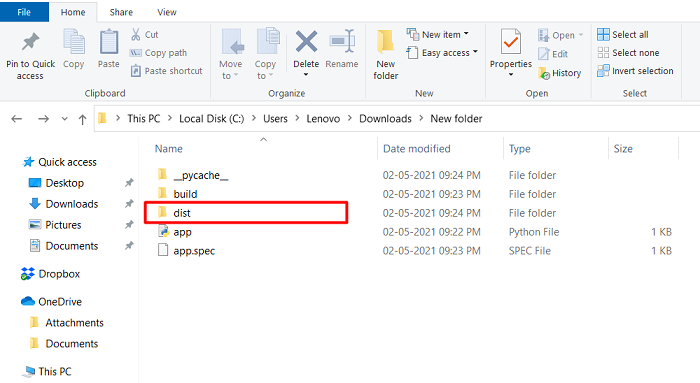
在应用程序文件所在的同一目录中打开命令或 Shell,并使用以下命令运行该文件:pyinstaller --onefile app.py。它将创建必要的文件夹,例如二进制文件和其他源文件。
转到 > dist 文件夹,应用程序的可执行文件位于此处。
运行 .exe 文件。
示例
app.py
#Import the required libraries
from tkinter import *

#Create an instance of Tkinter Frame
win = Tk()

#Set the geometry
win.geometry("750x350")

def display_text():
   Label(win, text= "Hey There! Welcome to TutorialsPoint", font= ('Helvetica 22 bold'), foreground="navy").pack()

#Create a Button
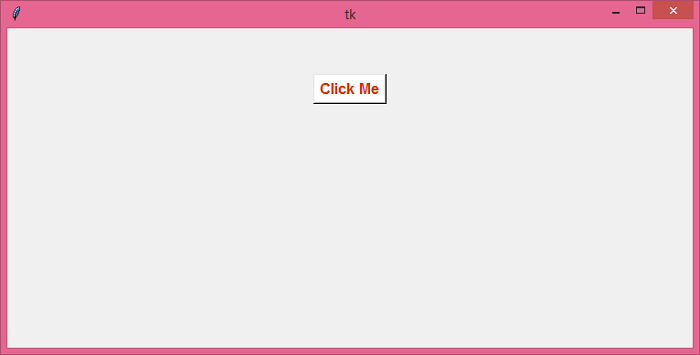
Button(win, text= "Click Me", font= ('Helvetica 13 bold'), foreground= "OrangeRed3", background= "White", command= display_text).pack(pady=50)
win.mainloop()
输出
将在 dist 文件夹中创建 .exe 文件,如下所示。
运行应用程序的可执行文件将显示一个带有按钮的窗口。
单击“Click Me”按钮后,它将在同一窗口中显示一个文本标签。


更新于:2021年5月25日
3K+ 次查看

广告