
 数据结构
数据结构 网络
网络 关系数据库管理系统
 操作系统
操作系统 Java
Java MS Excel
 iOS
iOS HTML
HTML CSS
CSS Android
 Python
 C语言编程
C语言编程 C++
C++ C#
C# MongoDB
 MySQL
MySQL Javascript
 PHP
PHP 物理学
物理学 化学
化学 生物学
生物学 数学
数学 英语
英语 经济学
经济学 心理学
心理学 社会学
社会学 时尚研究
时尚研究 法律研究
法律研究如何使用Python(Tkinter)创建直接可执行的跨平台GUI应用程序?
Python是一种编程语言,可用于创建跨平台应用程序,这些应用程序在各种操作系统(如Microsoft Windows、Mac OS和Linux)中受支持。
要创建基于GUI的应用程序,我们可以使用Tkinter库。但是,Python提供了不同的模块和扩展,可以将程序转换为可执行应用程序。
对于Windows可执行文件 - PyInstaller、py2exe
对于Linux可执行文件 - Freeze
对于Max可执行文件 - py2app
示例
对于此示例,我们首先将使用pip在Windows操作系统中安装PyInstaller模块。可以使用以下命令安装该模块:
pip install pyInstaller
使用此模块,我们将应用程序转换为可执行文件。
app.py
在此应用程序中,我们将要求用户从列表中选择特定日期。
# Import the required libraries
from tkinter import *

# Create an instance of tkinter frame
win = Tk()

# Set the size of the tkinter window
win.geometry("700x350")

# Add a Label
Label(win, text="Select a Day from the Menu",
   font=('Aerial 13')).pack(pady=10)

# Create a Variable to store the selection
var = StringVar()

# Create an OptionMenu Widget and add choices to it
option = OptionMenu(win, var, "Sunday", "Monday", "Tuesday", "Wednesday", "Thursday", "Friday", "Saturday")
option.config(bg="gray81", fg="white")
option['menu'].config(bg="green3")
option.pack(padx=20, pady=30)

win.mainloop()
输出
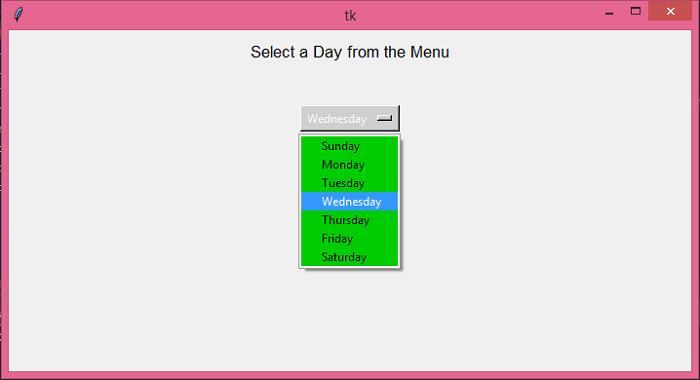
在Python中创建可执行文件的步骤
在目录中打开命令提示符,并编写创建可执行文件的命令:
pyinstaller app.py
它将创建一个包含可执行文件app.exe的文件夹。打开文件以运行应用程序。

更新于: 2021年6月18日
1K+ 浏览量

广告