
 数据结构
数据结构 网络
网络 RDBMS
RDBMS 操作系统
操作系统 Java
Java MS Excel
 iOS
iOS HTML
HTML CSS
CSS Android
 Python
 C 语言
C 语言 C++
C++ C#
C# MongoDB
 MySQL
MySQL Javascript
 PHP
PHP 物理
物理 化学
化学 生物
生物 数学
数学 英语
英语 经济学
经济学 心理学
心理学 社会科学
社会科学 时尚研究
时尚研究 法律研究
法律研究如何使用 CSS 创建黑白图像
通过指定 CSS 的 filter 属性的灰度值,我们可以创建一个黑白图像。filter 属性可用于对图像应用特殊效果,如模糊、阴影等。
语法
CSS 过滤属性的语法如下 −
Selector {
   filter: grayscale(100%);
   -webkit-filter: grayscale(100%);
}
示例
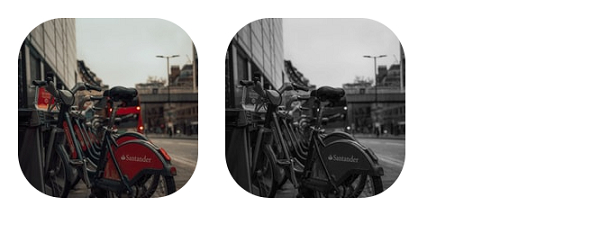
以下示例说明了 CSS 的 filter 属性。
<!DOCTYPE html>
<html>
   <head>
      <style>
         img {
            margin: 2%;
            border-radius: 25%;
         }
         img:nth-of-type(even) {
            filter: grayscale(100%);
            -webkit-filter: grayscale(100%);
         }
      </style>
   </head>
   <body>
      <img src="https://images.unsplash.com/photo-1611825715408-826f2b19c43f?crop=entropy&cs=tinysrgb&fit=crop&fm=jpg&h=200&ixlib=rb-1.2.1&q=80&w=200" alt="img from unsplash">
      <img src="https://images.unsplash.com/photo-1611825715408-826f2b19c43f?crop=entropy&cs=tinysrgb&fit=crop&fm=jpg&h=200&ixlib=rb-1.2.1&q=80&w=200" alt="img from unsplash">
   </body>
</html>
输出结果如下
示例
<!DOCTYPE html>
<html>
   <head>
      <style>
         img {
            margin: 2%;
         }
         img:nth-of-type(odd) {
            filter: grayscale(100%);
            -webkit-filter: grayscale(100%);
         }
      </style>
   </head>
   <body>
      <img src="https://images.unsplash.com/photo-1611781750917-8777ab68668a?crop=entropy&cs=tinysrgb&fit=crop&fm=jpg&h=256&ixlib=rb-1.2.1&q=80&w=256">
      <img src="https://images.unsplash.com/photo-1611781750917-8777ab68668a?crop=entropy&cs=tinysrgb&fit=crop&fm=jpg&h=256&ixlib=rb-1.2.1&q=80&w=256">
   </body>
</html>
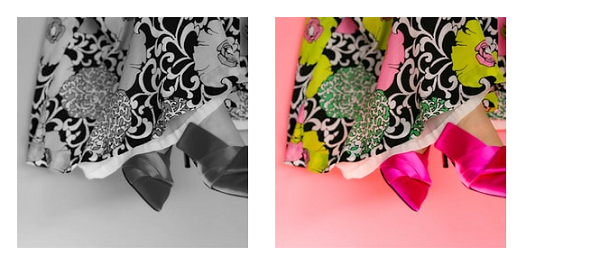
输出结果如下

更新于:2021 年 2 月 10 日
8k+ 次浏览

广告