
 Data Structure
 Networking
 RDBMS
RDBMS Operating System
 Java
Java MS Excel
 iOS
iOS HTML
HTML CSS
CSS Android
 Python
 C Programming
 C++
C++ C#
C# MongoDB
 MySQL
MySQL Javascript
 PHP
PHP Physics
 Chemistry
 Biology
 Mathematics
 English
 Economics
 Psychology
 Social Studies
 Fashion Studies
 Legal Studies
如何用 CSS 创建一个带有内文文本框
可以使用 clip-path 属性创建文本框
语法
CSS clip-path 属性的语法如下 −
Selector {
   clip-path: /*value*/
}
示例
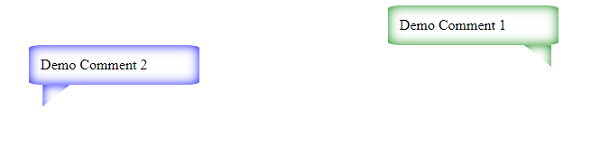
以下示例展示了如何使用 CSS 创建文本框。
<!DOCTYPE html>
<html>
   <head>
      <style>
         .cb {
            position: relative;
            padding: 2%;
            border-radius: 8%;
            width:25%;
         }
         .cb::after {
            content: "";
            position: absolute;
            height: 30px;
            width: 30px;
            bottom: -30px;
            left: 80%;
         }
         #one {
            box-shadow: inset 0 0 12px green;
            left: 65%;
         }
         #two {
            box-shadow: inset 0 0 12px blue;
            left: 4%;
         }
         #one::after {
            left: 80%;
            box-shadow: inset 0 0 12px green;
            clip-path: polygon(0 0, 100% 0, 100% 80%);
         }
         #two::after{
            left: 8%;
            box-shadow: inset 0 0 12px blue;
            clip-path: polygon(0 0, 100% 0, 0 80%);
         }
      </style>
   </head>
   <body>
      <div class="cb" id="one">
         Demo Comment 1
      </div>
      <div class="cb" id="two">
         Demo Comment 2
      </div>
   </body>
</html>
结果如下
示例
<!DOCTYPE html>
<html>
   <head>
      <style>
         .cb {
            position: relative;
            padding: 2%;
            border-radius: 8%;
            width:15%;
            box-shadow: inset 0 0 12px orange;
         }
         .cb::after {
            content: "";
            position: absolute;
            height: 30px;
            width: 30px;
            bottom: -30px;
            left: 80%;
            box-shadow: inset 0 0 12px orange;
         }
         #one {
            left: 65%;
         }
         #one::after {
            left: 10%;
            clip-path: polygon(0 0, 100% 0, 0 80%);
         }
         span{
            background-color: lightblue;
         }
      </style>
   </head>
   <body>
      <div class="cb" id="one">
         accumsan
      </div>
      <p>
            Aenean tempor lobortis porttitor. Nulla erat purus, commodo <span>accumsan</span> viverra id, sollicitudin eget dui. Curabitur mollis scelerisque quam, vitae dictum diam dictum in. Aenean fermentum efficitur suscipit. Donec non ligula purus.
      </p>
   </body>
</html>
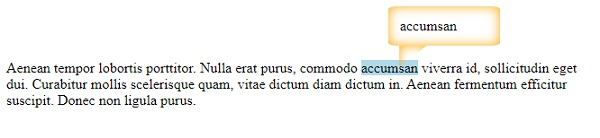
结果如下

更新时间:2021 年 2 月 10 日
539 次浏览

广告