
 数据结构
数据结构 网络
网络 RDBMS
RDBMS 操作系统
操作系统 Java
Java MS Excel
 iOS
iOS HTML
HTML CSS
CSS Android
 Python
 C 编程
C 编程 C++
C++ C#
C# MongoDB
 MySQL
MySQL Javascript
 PHP
PHP 物理学
物理学 化学
化学 生物学
生物学 数学
数学 英语
英语 经济学
经济学 心理学
心理学 社会学
社会学 时尚学
时尚学 法律研究
法律研究如何在 Cypress 中创建 Junit 报告?
我们可以在 Cypress 中创建一个 Junit 报告。要安装用于 JUnit 报告的程序包,运行命令 −
npm install cypress-junit-reporter --save-dev

示例
在 cypress.json 中实现
{
   "reporter": "junit",
   "reporterOptions": {
      "mochaFile": "cypress/results/results.xml",
      "toConsole": true
   }
}
如果我们在一次运行中运行多个测试,并且希望为每个 spec 文件生成一个唯一的报告,我们必须在 cypress.json 中的 mochaFile 参数中添加 [hash]。
示例
在 cypress.json 中实现以避免报告覆盖
{
   "reporter": "junit",
   "reporterOptions": {
      "mochaFile": "cypress/results/results-[hash].xml",
      "toConsole": true
   }
}
要为 Cypress 项目的 integration 文件夹中的所有规范生成报告,请运行命令 −
npx cypress run --reporter junit
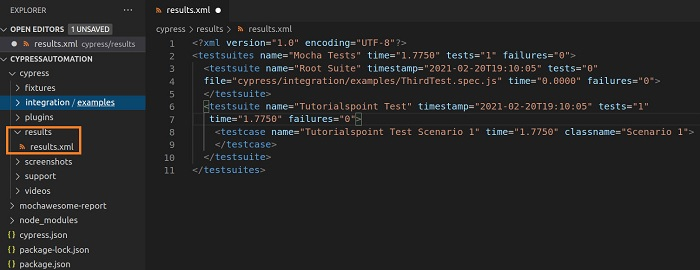
执行完成后,结果文件夹将在 Cypress 项目中生成包含 xml 格式报告。

更新于:19-11-2021
3K+ 查看次数

广告