
 数据结构
数据结构 网络
网络 关系型数据库管理系统
 操作系统
操作系统 Java
Java MS Excel
 iOS
iOS HTML
HTML CSS
CSS Android
 Python
 C 编程
C 编程 C++
C++ C#
C# MongoDB
 MySQL
MySQL Javascript
 PHP
PHP 物理学
物理学 化学
化学 生物学
生物学 数学
数学 英语
英语 经济学
经济学 心理学
心理学 社会学
社会学 时尚研究
时尚研究 法律研究
法律研究如何使用 Python 中的 Plotly 创建人口金字塔?
人口金字塔是人口年龄和性别分布的图形表示。它由两个背靠背的条形图组成,一个显示男性的分布,另一个显示女性在不同年龄组中的分布。人口金字塔是一种强大的可视化工具,可以帮助我们了解人口的构成,并识别趋势和模式。
在本文中,我们将探讨如何使用 Python 中的 Plotly 创建人口金字塔。Plotly 是一个强大的可视化库,它允许我们在 Python 中创建交互式和动态图表。
我们将使用 Plotly 创建一个显示人口年龄和性别分布的人口金字塔。我们将首先将数据加载到 pandas DataFrame 中,然后使用 Plotly 创建人口金字塔。
使用 Plotly Express
Plotly Express 是 Plotly 的高级 API,它可以轻松创建多种类型的图表,包括人口金字塔。我们可以使用 px.bar() 函数创建构成人口金字塔的两个背靠背的条形图。
请考虑以下代码。
示例
import plotly.express as px
import pandas as pd

# Load the data into a pandas DataFrame
df = pd.read_csv("population_data.csv")

# Create the population pyramid using Plotly Express
fig = px.bar(df, x="count", y="age", orientation="h", color="gender",
         	barmode="relative", range_x=[-1, 1])

# Show the plot
fig.show()
解释
我们首先导入库,包括用于创建图表的 plotly.express 和用于将数据加载到 DataFrame 中的 pandas。
接下来,我们使用 read_csv() 函数将人口数据从 CSV 文件加载到 pandas DataFrame 中。
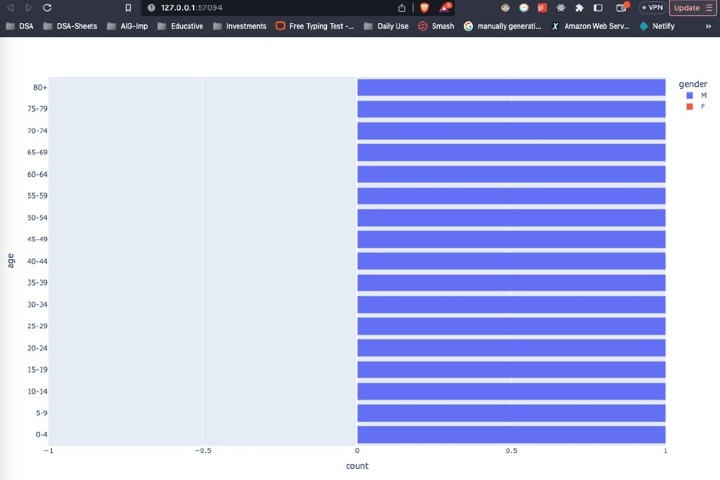
然后,我们创建 px.bar() 函数,它将 DataFrame 作为第一个参数,以及其他几个参数来指定图表的布局和样式。
x 参数指定用于条形长度的变量,即每个年龄组中的人数。
y 参数指定用于条形高度的变量,即年龄组。
orientation 参数指定条形应为水平方向。
color 参数指定条形应按性别着色。
barmode 参数指定条形应彼此堆叠。
range_x 参数指定 x 轴的范围,这决定了金字塔的大小。
最后,我们使用 show() 方法打印图表。
输出
使用 Plotly 图形对象
Plotly 图形对象是 Plotly 的低级 API,它提供了更多灵活性和对图表布局和样式的控制。我们可以使用 Plotly 图形对象通过创建两个条形轨迹(一个用于男性,另一个用于女性),然后将它们组合成一个图形来创建人口金字塔。
请考虑以下代码。
示例
import plotly.graph_objs as go
import pandas as pd

# Load the data into a pandas DataFrame
df = pd.read_csv("population_data.csv")

# Create the male and female bar traces
trace_male = go.Bar(x=df[df["gender"]=="M"]["count"],
                	y=df[df["gender"]=="M"]["age"],
                	orientation="h",
                	name="Male",
                	marker=dict(color="#1f77b4"))

trace_female = go.Bar(x=df[df["gender"]=="F"]["count"]*(-1),
                  	y=df[df["gender"]=="F"]["age"],
                  	orientation="h",
                  	name="Female",
                  	marker=dict(color="#d62728"))

# Create the layout
layout = go.Layout(title="Population Pyramid",
               	xaxis=dict(title="Count"),
               	yaxis=dict(title="Age"),
               	barmode="overlay",
               	bargap=0.1)

# Create the figure
fig = go.Figure(data=[trace_male, trace_female], layout=layout)

# Show the plot
fig.show()
解释
第一步是导入必要的模块:plotly.graph_objs 和 pandas。
数据使用 pd.read_csv 方法加载到 pandas DataFrame 中。
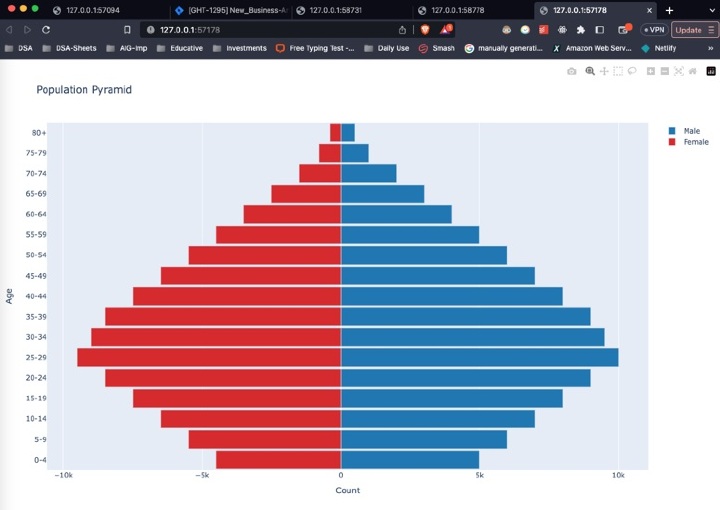
使用 go.Bar 方法为男性和女性人口创建两个条形图轨迹,分别使用计数和年龄组作为 x 和 y 值。方向设置为水平方向,每个轨迹使用 name 和 marker 参数分别指定名称和颜色。
为图表创建布局,包括标题以及 x 轴和 y 轴的标签。
使用 go.Figure 方法使用两个轨迹和布局创建图形。
最后,使用 fig.show() 方法显示图表。
输出
结论
在本文中,我们学习了如何使用 Python 中的 Plotly 创建人口金字塔。我们探索了两种不同的方法来实现这一点,一种使用 pandas 透视表,另一种使用 Plotly 图形对象。我们讨论了每种方法的优缺点,并提供了每种方法中使用的代码的详细解释。
通过遵循本文中提供的步骤和示例,您可以使用 Python 中的 Plotly 创建自己的金字塔,并探索各种自定义和分析数据的方法。

790 次查看
