
 数据结构
数据结构 网络
网络 关系型数据库管理系统
 操作系统
操作系统 Java
Java MS Excel
 iOS
iOS HTML
HTML CSS
CSS Android
 Python
 C 编程
C 编程 C++
C++ C#
C# MongoDB
 MySQL
MySQL JavaScript
 PHP
PHP 物理
物理 化学
化学 生物
生物 数学
数学 英语
英语 经济学
经济学 心理学
心理学 社会科学
社会科学 时尚研究
时尚研究 法律研究
法律研究在 JavaFX 中如何创建一个文本区域?
文本区域是一个多行编辑器,你可以输入文本。与旧版本不同,在最新版本的 JavaFX 中,TextArea 不允许其包含单行。你可以通过实例化**javafx.scene.control.TextArea 类**来创建一个文本区域。
示例
以下示例演示如何创建**TextArea**。
import javafx.application.Application;
import javafx.geometry.Insets;
import javafx.scene.Group;
import javafx.scene.Scene;
import javafx.scene.control.Label;
import javafx.scene.control.TextArea;
import javafx.scene.layout.HBox;
import javafx.scene.paint.Color;
import javafx.scene.text.Font;
import javafx.scene.text.FontPosture;
import javafx.scene.text.FontWeight;
import javafx.stage.Stage;
public class TextAreaExample extends Application {
   public void start(Stage stage) {
      //Setting the label
      Label label = new Label("Address");
      Font font = Font.font("verdana", FontWeight.BOLD, FontPosture.REGULAR, 12);
      label.setFont(font);
      //Creating a pagination
      TextArea area = new TextArea();
      //Setting number of pages
      area.setText("Enter your address here");
      area.setPrefColumnCount(15);
      area.setPrefHeight(120);
      area.setPrefWidth(300);
      //Creating a hbox to hold the pagination
      HBox hbox = new HBox();
      hbox.setSpacing(20);
      hbox.setPadding(new Insets(20, 50, 50, 60));
      hbox.getChildren().addAll(label, area);
      //Setting the stage
      Group root = new Group(hbox);
      Scene scene = new Scene(root, 595, 200, Color.BEIGE);
      stage.setTitle("Text Area");
      stage.setScene(scene);
      stage.show();
   }
   public static void main(String args[]){
      launch(args);
   }
}
输出
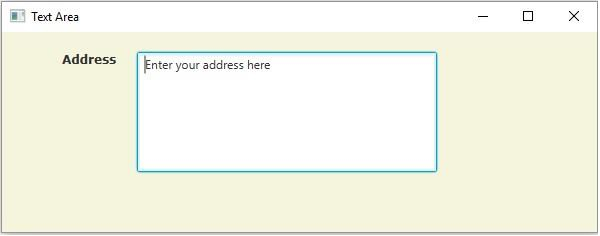

更新时间: 19-5-2020
3000+ 次浏览

广告