
 数据结构
数据结构 网络
网络 关系数据库管理系统 (RDBMS)
 操作系统
操作系统 Java
Java MS Excel
 iOS
iOS HTML
HTML CSS
CSS Android
 Python
 C 编程
C 编程 C++
C++ C#
C# MongoDB
 MySQL
MySQL Javascript
 PHP
PHP 物理学
物理学 化学
化学 生物学
生物学 数学
数学 英语
英语 经济学
经济学 心理学
心理学 社会学
社会学 服装设计
服装设计 法学
法学如何使用 JavaFX 创建堆叠区域图?
区域图接收一系列数据点 (x, y) 作为输入值,使用线连接它们,并将获得的线与轴之间的区域映射。
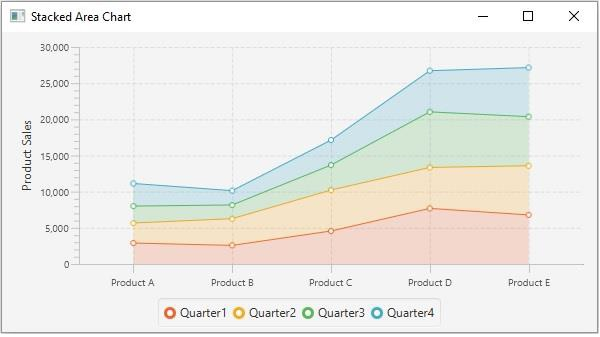
堆叠区域图是区域图的一个变体,其中区域堆叠在一起,以便每个系列都与前一个系列相邻,但不重叠。
在 JavaFX 中,您可以通过实例化 **javafx.scene.chart.StackedAreaChart** 类来创建堆叠区域图。
实例化此类时,必须传递 Axis 类的两个对象,分别表示 x 轴和 y 轴(作为构造函数的参数)。由于 Axis 类是抽象类,因此您需要传递其具体子类的对象,例如 NumberAxis(用于数值)或 CategoryAxis(用于字符串值)。
创建轴后,您可以使用 **setLabel()** 方法为其设置标签。
设置数据
**XYChart.Series** 表示数据项序列。您可以通过实例化此类来创建线的点序列。此类包含一个可观察列表,其中包含序列中的所有点。
**XYChart.Data** 表示 x-y 平面中的特定数据点。要创建一个点,您需要通过传递该点的 x 和 y 值来实例化此类。
示例
import javafx.application.Application;
import javafx.scene.Scene;
import javafx.scene.chart.CategoryAxis;
import javafx.stage.Stage;
import javafx.scene.chart.NumberAxis;
import javafx.scene.chart.StackedAreaChart;
import javafx.scene.chart.XYChart;
import javafx.scene.layout.StackPane;
public class StackedAreaChartExample extends Application {
   public void start(Stage stage) {
      //Defining the axes
      CategoryAxis xAxis = new CategoryAxis();
      NumberAxis yAxis = new NumberAxis(0, 30000, 5000);
      yAxis.setLabel("Product Sales");
      //Creating the Area chart
      StackedAreaChart<String, Number> areaChart = new StackedAreaChart(xAxis, yAxis);
      //Prepare XYChart.Series objects by setting data
      XYChart.Series series1 = new XYChart.Series();
      series1.setName("Quarter1");
      series1.getData().add(new XYChart.Data("Product A", 2898));
      series1.getData().add(new XYChart.Data("Product B", 2577));
      series1.getData().add(new XYChart.Data("Product C", 4566));
      series1.getData().add(new XYChart.Data("Product D", 7689));
      series1.getData().add(new XYChart.Data("Product E", 6788));
      XYChart.Series series2 = new XYChart.Series();
      series2.setName("Quarter2");
      series2.getData().add(new XYChart.Data("Product A", 2768));
      series2.getData().add(new XYChart.Data("Product B", 3687));
      series2.getData().add(new XYChart.Data("Product C", 5656));
      series2.getData().add(new XYChart.Data("Product D", 5658));
      series2.getData().add(new XYChart.Data("Product E", 6790));
      XYChart.Series series3 = new XYChart.Series();
      series3.setName("Quarter3");
      series3.getData().add(new XYChart.Data("Product A", 2342));
      series3.getData().add(new XYChart.Data("Product B", 1898));
      series3.getData().add(new XYChart.Data("Product C", 3455));
      series3.getData().add(new XYChart.Data("Product D", 7689));
      series3.getData().add(new XYChart.Data("Product E", 6788));
      XYChart.Series series4 = new XYChart.Series();
      series4.setName("Quarter4");
      series4.getData().add(new XYChart.Data("Product A", 3123));
      series4.getData().add(new XYChart.Data("Product B", 1978));
      series4.getData().add(new XYChart.Data("Product C", 3454));
      series4.getData().add(new XYChart.Data("Product D", 5686));
      series4.getData().add(new XYChart.Data("Product E", 6790));
      areaChart.getData().addAll(series1, series2, series3, series4);
      //Creating a Group object
      StackPane pane = new StackPane(areaChart);
      //Setting the scene
      Scene scene = new Scene(pane, 595, 300);
      stage.setTitle("Stacked Area Chart");
      stage.setScene(scene);
      stage.show();
   }
   public static void main(String args[]){
      launch(args);
   }
}
输出

更新于:2020年5月19日
145 次查看

广告