
 数据结构
数据结构 网络
网络 RDBMS
RDBMS 操作系统
操作系统 Java
Java MS Excel
 iOS
iOS HTML
HTML CSS
CSS 安卓
安卓 Python
 C 编程
C 编程 C++
C++ C#
C# MongoDB
 MySQL
MySQL Javascript
 PHP
PHP 物理
物理 化学
化学 生物
生物 数学
数学 英语
英语 经济
经济 心理学
心理学 社会学科
社会学科 时装学科
时装学科 法律学科
法律学科如何使用 JavaFX 创建一个 HBox?
创建完所需的应用程序节点后,你可以使用布局来排列它们。其中一个布局是计算出在给定空间中对象位置的过程。JavaFX 在 javafx.scene.layout 包中提供了各种布局。
hbox
在此布局中,节点被布置在单一的水平行中。你可以在应用程序中通过实例化 javafx.scene.layout.HBox 类来创建一个 hbox。你可以使用 setPadding() 方法来设置 hbox 周围的内边距。
要将节点添加到此窗格,你可以将它们作为构造函数的参数传递,也可以将它们添加到如下所示的窗格的可观察列表中:
getChildren().addAll();
示例
import javafx.application.Application;
import javafx.geometry.Insets;
import javafx.scene.Scene;
import javafx.scene.control.Label;
import javafx.scene.control.PasswordField;
import javafx.scene.control.TextField;
import javafx.scene.layout.HBox;
import javafx.scene.paint.Color;
import javafx.stage.Stage;
public class HBoxExample extends Application {
   public void start(Stage stage) {
      //Creating labels
      Label label1 = new Label("User Name: ");
      Label label2 = new Label("Password: ");
      //Creating text and password fields
      TextField textField = new TextField();
      PasswordField pwdField = new PasswordField();
      //Adding labels for nodes
      HBox box = new HBox(5);
      box.setPadding(new Insets(50, 5 , 5, 50));
      box.getChildren().addAll(label1, textField, label2, pwdField);
      //Setting the stage
      Scene scene = new Scene(box, 595, 150, Color.BEIGE);
      stage.setTitle("HBox Example");
      stage.setScene(scene);
      stage.show();
   }
   public static void main(String args[]){
      launch(args);
   }
}
输出
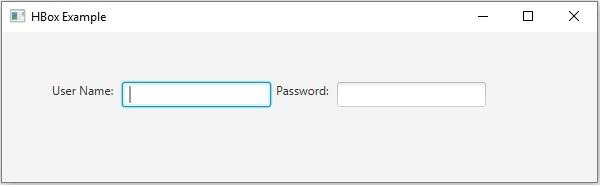

更新于:19-5-2020
265 浏览量

广告