
 数据结构
数据结构 网络
网络 RDBMS
RDBMS 操作系统
操作系统 Java
Java MS Excel
 iOS
iOS HTML
HTML CSS
CSS Android
 Python
 C编程
C编程 C++
C++ C#
C# MongoDB
 MySQL
MySQL Javascript
 PHP
PHP 物理
物理 化学
化学 生物
生物 数学
数学 英语
英语 经济
经济 心理学
心理学 社会科学
社会科学 时尚研究
时尚研究 法律研究
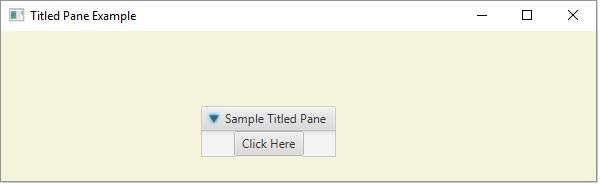
法律研究如何使用JavaFx创建标题窗格?
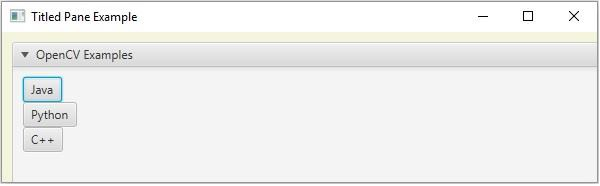
标题窗格只是带有标题的窗格。它包含一个或多个用户界面元素,如按钮、标签等,你可以展开和折叠它。
你可以通过实例化javafx.scene.control.TitledPane类在JavaFX中创建一个标题窗格。创建它之后,你可以使用setText()方法为窗格添加标题,并可以使用setContent()方法为其添加内容。
示例
import javafx.application.Application;
import javafx.scene.Group;
import javafx.scene.Scene;
import javafx.scene.control.Button;
import javafx.scene.control.TitledPane;
import javafx.scene.paint.Color;
import javafx.stage.Stage;
public class TitledPaneExample extends Application {
   @Override
   public void start(Stage stage) {
      //Creating a Button
      Button button = new Button();
      //Setting the title of the button
      button.setText("Click Here");
      //Creating the TitlePane
      TitledPane pane = new TitledPane();
      pane.setLayoutX(200);
      pane.setLayoutY(75);
      pane.setText("Sample Titled Pane");
      //Setting contents to the titled pane
      pane.setContent(button);
      //Setting the stage
      Group root = new Group(pane);
      Scene scene = new Scene(root, 595, 150, Color.BEIGE);
      stage.setTitle("Titled Pane Example");
      stage.setScene(scene);
      stage.show();
   }
   public static void main(String args[]){
      launch(args);
   }
}
输出
示例
import javafx.application.Application;
import javafx.scene.Scene;
import javafx.scene.control.TitledPane;
import javafx.scene.control.ToggleButton;
import javafx.scene.control.ToggleGroup;
import javafx.scene.layout.VBox;
import javafx.scene.paint.Color;
import javafx.stage.Stage;
public class TiledPane2 extends Application {
   @Override
   public void start(Stage stage) {
      //Creating toggle buttons
      ToggleButton button1 = new ToggleButton("Java");
      ToggleButton button2 = new ToggleButton("Python");
      ToggleButton button3 = new ToggleButton("C++");
      //Toggle button group
      ToggleGroup group = new ToggleGroup();
      button1.setToggleGroup(group);
      button2.setToggleGroup(group);
      button3.setToggleGroup(group);
      //Adding the toggle button to the pane
      VBox box = new VBox();
      box.getChildren().addAll(button1, button2, button3);
      //Creating the TitlePane
      TitledPane pane = new TitledPane();
      pane.setLayoutX(10);
      pane.setLayoutY(10);
      pane.setText("OpenCV Examples");
      //Adding the toggle button to the pane
      pane.setContent(box);
      //Setting the stage
      Scene scene = new Scene(pane, 595, 150, Color.BEIGE);
      stage.setTitle("Titled Pane Example");
      stage.setScene(scene);
      stage.show();
   }
   public static void main(String args[]){
      launch(args);
   }
}
输出

更新于:16-May-2020
711次浏览

广告