
 数据结构
数据结构 网络
网络 关系数据库管理系统 (RDBMS)
 操作系统
操作系统 Java
Java MS Excel
 iOS
iOS HTML
HTML CSS
CSS Android
 Python
 C 编程
C 编程 C++
C++ C#
C# MongoDB
 MySQL
MySQL Javascript
 PHP
PHP 物理学
物理学 化学
化学 生物学
生物学 数学
数学 英语
英语 经济学
经济学 心理学
心理学 社会学
社会学 服装学
服装学 法学
法学如何使用 OpenCV Python 检测人脸并在其周围绘制边界框?
我们使用 Haar 级联分类器来检测图像中的人脸。Haar 级联分类器是一种有效的基于机器学习的对象检测方法。我们可以针对训练数据训练我们自己的 Haar 级联,但在这里我们使用已经训练好的 Haar 级联进行人脸检测。
我们将使用 **haarcascade_frontalface_alt.xml** 作为人脸检测的“Haar 级联”XML 文件。
如何下载 Haar 级联?
您可以访问以下 GitHub 网站地址找到不同的 Haar 级联:
https://github.com/opencv/opencv/tree/master/data/haarcascades要下载用于人脸检测的 Haar 级联,请点击 **haarcascade_frontalface_alt.xml** 文件。以原始格式打开它,右键单击并保存。
**注意** - 将所有 Haar 级联 XML 文件保存在 **haarcascades** 文件夹中。
步骤
我们可以按照以下步骤检测图像中的人脸并在其周围绘制边界框:
导入所需的库。在以下所有示例中,所需的 Python 库是 **OpenCV**。确保您已经安装了它。
使用 **cv2.imread()** 读取输入图像。指定完整的图像路径。
为进行人脸检测,初始化 Haar 级联分类器对象 **face_cascade = cv2.CascadeClassifier()**。传递 Haar 级联 xml 文件的完整路径。您可以使用 Haar 级联文件 **haarcascade_frontalface_alt.xml** 来检测图像中的人脸。
使用 **face_cascade.detectMultiScale()** 检测输入图像中的人脸。它返回以 **(x,y,w,h)** 格式检测到的人脸的坐标。
使用 **cv2.rectangle()** 在原始图像中绘制检测到的人脸周围的边界矩形。
显示带有绘制在人脸周围的边界矩形的图像。
让我们来看一些示例,以便更好地理解。
示例
在这个 Python 程序中,我们检测人脸并在检测到的人脸周围绘制边界框。
# import required library
import cv2

# read the input image
img = cv2.imread('people.jpg')

# convert to grayscale of each frames
gray = cv2.cvtColor(img, cv2.COLOR_BGR2GRAY)

# read haacascade to detect faces in input image
face_cascade = cv2.CascadeClassifier('haarcascades\haarcascade_frontalface_alt.xml')

# detects faces in the input image
faces = face_cascade.detectMultiScale(gray, 1.1, 2)
print('Number of detected faces:', len(faces))\

# loop over all the detected faces
for (x,y,w,h) in faces:

   # To draw a rectangle around the detected face
   cv2.rectangle(img,(x,y),(x+w,y+h),(0,255,255),2)

# Display an image in a window
cv2.imshow('Face Detection',img)
cv2.waitKey(0)
cv2.destroyAllWindows()
将以下图像视为该程序的 **输入文件**:

输出
运行上述 Python 程序后,它将生成以下 **输出** 窗口:
Number of detected faces: 1
我们将得到以下 **输出** 窗口:

人脸周围的边界框以黄色绘制。
示例
在这个 Python 程序中,我们检测人脸并在输入图像中检测到的人脸周围绘制边界框。
import cv2
img = cv2.imread('window1.jpg')
img1 =cv2.cvtColor(img, cv2.COLOR_BGR2GRAY)
ret,thresh = cv2.threshold(img1,170,255,0)

# draw different shapes of ellipses
img = cv2.ellipse(img,(368,250),(100,40),30,0,180,(0,255,255),-1)
img = cv2.ellipse(img,(150,170),(86,45),-30,0,360,(0,255,0),-1)
img = cv2.ellipse(img,(578,250),(60,130),0,0,340,(0,0,255),-1)

# display the image with drawn ellipses
cv2.imshow("Ellipses", img)
cv2.waitKey(0)
cv2.destroyAllWindows()
我们将使用此图像作为该程序的 **输入文件**:

输出
运行上述 Python 程序后,它将生成以下 **输出** 窗口:
Number of detected faces: 15
我们将得到以下输出窗口:
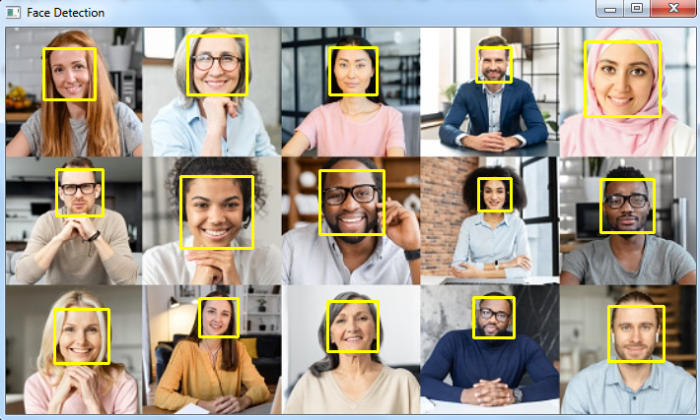
人脸周围的边界框以黄色绘制。

5K+ 次浏览
