
 数据结构
数据结构 网络
网络 RDBMS
RDBMS 操作系统
操作系统 Java
Java MS Excel
 iOS
iOS HTML
HTML CSS
CSS Android
 Python
 C 编程
C 编程 C++
C++ C#
C# MongoDB
 MySQL
MySQL Javascript
 PHP
PHP 物理学
物理学 化学
化学 生物学
生物学 数学
数学 英语
英语 经济学
经济学 心理学
心理学 社会学
社会学 时尚学
时尚学 法律
法律如何使用 OpenCV Java 库检测图像的关键点?
org.opencv.features2d.Feature2D(抽象)类的detect()方法检测给定图像的关键点。对该方法,你需要传入一个表示源图像的Mat对象和一个空的MatOfKeyPoint对象以保存读取到的关键点。
你可以使用org.opencv.features2d.Features2d类的drawKeypoints()方法在图像上绘制关键点。
注意
由于 Feature2D 是一个抽象类,你需要实例化其子类之一来调用 detect() 方法。此处我们使用了 FastFeatureDetector 类。
Features2D和Features2d是 features2d 包的两个不同的类,不要弄混了...
示例
import org.opencv.core.Core;
import org.opencv.core.Mat;
import org.opencv.core.MatOfKeyPoint;
import org.opencv.core.Scalar;
import org.opencv.features2d.FastFeatureDetector;
import org.opencv.features2d.Features2d;
import org.opencv.highgui.HighGui;z
import org.opencv.imgcodecs.Imgcodecs;
public class DetectingKeyPoints{
   public static void main(String args[]) throws Exception {
      //Loading the OpenCV core library
      System.loadLibrary( Core.NATIVE_LIBRARY_NAME );
      //Reading the contents of the image
      String file ="D:\Images\javafx_graphical.jpg";
      Mat src = Imgcodecs.imread(file);
      //Reading the key points of the image
      Mat dst = new Mat();
      MatOfKeyPoint matOfKeyPoints = new MatOfKeyPoint();
      FastFeatureDetector featureDetector = FastFeatureDetector.create();
      featureDetector.detect(src, matOfKeyPoints);
      //Drawing the detected key points
      Features2d.drawKeypoints(src, matOfKeyPoints, dst, new Scalar(0, 0, 255));
      HighGui.imshow("Feature Detection", dst);
      HighGui.waitKey();
   }
}
输入图像

输出
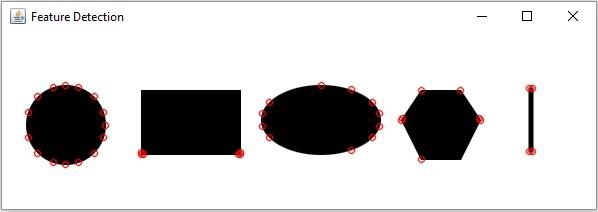

更新于: 10-Apr-2020
825 次浏览

广告