
 数据结构
数据结构 网络
网络 关系数据库管理系统 (RDBMS)
 操作系统
操作系统 Java
Java MS Excel
 iOS
iOS HTML
HTML CSS
CSS Android
 Python
 C语言编程
C语言编程 C++
C++ C#
C# MongoDB
 MySQL
MySQL Javascript
 PHP
PHP 物理学
物理学 化学
化学 生物学
生物学 数学
数学 英语
英语 经济学
经济学 心理学
心理学 社会学
社会学 服装学
服装学 法学
法学如何使用Java OpenCV库获取图像的像素(RGB值)?
数字图像存储为像素的二维数组,像素是数字图像的最小元素。
每个像素包含alpha、红、绿、蓝的值,每个颜色的值介于0到255之间,占用8位(2^8)。
ARGB值按相同的顺序(从右到左)存储在4个字节的内存中,蓝色值在0-7位,绿色值在8-15位,红色值在16-23位,alpha值在24-31位。
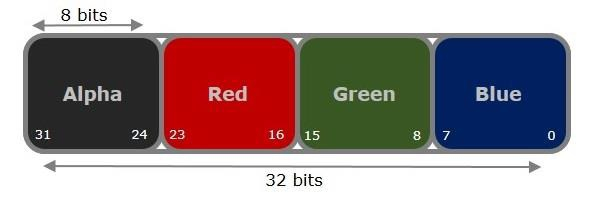
检索图像的像素内容(ARGB值) -
要从图像中获取像素值 -
遍历图像中的每个像素。即运行嵌套循环遍历图像的高度和宽度。
使用getRGB()方法获取每个点的像素值。
通过将像素值作为参数传递来实例化Color对象。
分别使用getRed()、getGreen()和getBlue()方法获取红色、绿色、蓝色值。
示例
下面的Java示例读取图像的每个像素的内容,并将RGB值写入文件 -
import java.io.File;
import java.io.FileWriter;
import java.awt.Color;
import java.awt.image.BufferedImage;
import javax.imageio.ImageIO;
public class GetPixels {
   public static void main(String args[])throws Exception {
      FileWriter writer = new FileWriter("D:\Images\pixel_values.txt");
      //Reading the image
      File file= new File("D:\Images\cat.jpg");
      BufferedImage img = ImageIO.read(file);
      for (int y = 0; y < img.getHeight(); y++) {
         for (int x = 0; x < img.getWidth(); x++) {
            //Retrieving contents of a pixel
            int pixel = img.getRGB(x,y);
            //Creating a Color object from pixel value
            Color color = new Color(pixel, true);
            //Retrieving the R G B values
            int red = color.getRed();
            int green = color.getGreen();
            int blue = color.getBlue();
            writer.append(red+":");
            writer.append(green+":");
            writer.append(blue+"");
            writer.append("\n");
            writer.flush();
         }
      }
      writer.close();
      System.out.println("RGB values at each pixel are stored in the specified file");
   }
}
输出
RGB values at each pixel are stored in the specified file
您还可以使用移位运算符从像素中检索RGB值 -
为此 -
将每个颜色右移到起始位置,即alpha为24,红色为16,等等。
右移运算可能会影响其他通道的值,为避免这种情况,需要对0Xff执行按位与运算。这将屏蔽变量,只保留最后8位,忽略其余所有位。
int p = img.getRGB(x, y);
//Getting the A R G B values from the pixel value
int a = (p>>24)&0xff;
int r = (p>>16)&0xff;
int g = (p>>8)&0xff;
int b = p&0xff;

更新于:2020年4月10日
8K+ 浏览量

广告