
 数据结构
数据结构 网络
网络 关系型数据库管理系统
 操作系统
操作系统 Java
Java MS Excel
 iOS
iOS HTML
HTML CSS
CSS Android
 Python
 C 编程
C 编程 C++
C++ C#
C# MongoDB
 MySQL
MySQL Javascript
 PHP
PHP 物理学
物理学 化学
化学 生物学
生物学 数学
数学 英语
英语 经济学
经济学 心理学
心理学 社会学
社会学 时尚研究
时尚研究 法律研究
法律研究如何在 PyTorch 中在图像上绘制边界框?
torchvision.utils 包提供了 draw_bounding_boxes() 函数,用于在图像上绘制边界框。它支持形状为 (C x H x W) 的 torch 张量类型的图像,其中 C 是通道数,W 和 H 分别是图像的宽度和高度。
如果我们使用 Pillow 或 OpenCV 读取图像,则需要先将其转换为 torch 张量。我们可以在图像上绘制一个或多个边界框。此函数返回一个 dtype 为 uint8 的图像张量,其中绘制了边界框。
边界框应为大小为 [N,4] 的 torch 张量,其中 N 是要绘制的边界框的数量。每个边界框应包含 (xmin, ymin, xmax, ymax) 格式的四个点。换句话说:0 ≤ xmin < xmax < W,且 0 ≤ ymin < ymax < H。
我们也可以在边界框上添加标签。我们可以调整边界框的颜色和宽度。此外,我们还可以使用指定的颜色填充边界框区域。
语法
torch.utils.draw_bounding_boxes(image, boxes)
参数
image - 形状为 (C x H x W) 的张量类型图像。
boxes - 大小为 [N,4] 的张量,包含 (xmin, ymin, xmax, ymax) 格式的边界框坐标。
它还接受更多可选参数,例如 labels、colors、fill、width 等。
输出
它返回一个大小为 [C,H,W] 的图像张量,其中绘制了边界框。
步骤
导入所需的库。在以下所有示例中,所需的 Python 库为 torch 和 torchvision。确保您已安装它们。
import torch
import torchvision
from torchvision.io import read_image
from torchvision.utils import draw_bounding_boxes
使用 image_read() 函数读取 JPEG 或 PNG 图像。使用图像类型 (.jpg 或 .png) 指定完整的图像路径。此函数的输出是一个大小为 [image_channels, image_height, image_width] 的 torch 张量。
img = read_image('cat.png')将边界框定义为 torch 张量。边界框张量的 dtype 应为 torch.int。如果只需要绘制一个边界框,则对张量进行 unsqueeze 操作。
bbox = [290, 115, 405, 385]
bbox = torch.tensor(bbox, dtype=torch.int)
使用 draw_bounding_boxes() 函数在图像上绘制边界框。可以选择将绘制了边界框的图像分配给一个新变量。
img=draw_bounding_boxes(img, bbox, width=3, colors=(255,255,0))
将绘制了边界框的图像张量转换为 PIL 图像并显示它。
img = torchvision.transforms.ToPILImage()(img)
img.show()
输入图像
我们将在以下示例中使用这些图像作为输入文件。


示例 1
以下程序演示了如何在图像上绘制边界框。
# Import the required libraries
import torch
import torchvision
from torchvision.io import read_image
from torchvision.utils import draw_bounding_boxes

# read input image
img = read_image('cat.png')

# bounding box in (xmin, ymin, xmax, ymax) format
# top-left point=(xmin, ymin), bottom-right point = (xmax, ymax)
bbox = [290, 115, 405, 385]
bbox = torch.tensor(bbox, dtype=torch.int)
print(bbox)
print(bbox.size())
bbox = bbox.unsqueeze(0)
print(bbox.size())

# draw bounding box on the input image
img=draw_bounding_boxes(img, bbox, width=3, colors=(255,255,0))

# transform it to PIL image and display
img = torchvision.transforms.ToPILImage()(img)
img.show()
输出
tensor([290, 115, 405, 385], dtype=torch.int32)
torch.Size([4])
torch.Size([1, 4])

示例 2
以下程序演示了如何在图像上绘制多个边界框。
import torch
import torchvision
from torchvision.io import read_image
from torchvision.utils import draw_bounding_boxes

img = read_image('catndog.png')

# bounding box in (xmin, ymin, xmax, ymax) format
bbox1 = [30, 45, 330, 450]
bbox2 = [320, 150, 690, 460]
bbox = [bbox1, bbox2]
bbox = torch.tensor(bbox, dtype=torch.int)
print(bbox)
print(bbox.size())

# draw bounding boxes on the input image
img=draw_bounding_boxes(img, bbox, width=3,
colors=[(255,0,0),(0,255,0)])
img = torchvision.transforms.ToPILImage()(img)
img.show()
输出
tensor([[ 30, 45, 330, 450],
   [320, 150, 690, 460]], dtype=torch.int32)
torch.Size([2, 4])

示例 3
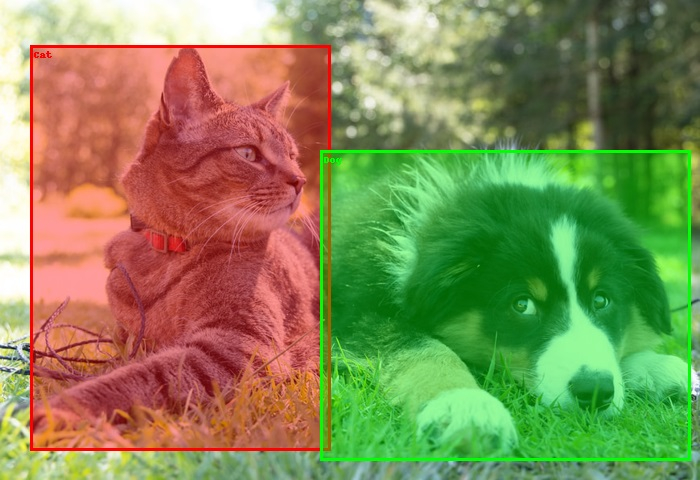
以下程序演示了如何在图像上绘制和填充多个边界框。
import torch
import torchvision
from torchvision.io import read_image
from torchvision.utils import draw_bounding_boxes
img = read_image('catndog.png')

# bounding box in (xmin, ymin, xmax, ymax) format
bbox1 = [30, 45, 330, 450]
bbox2 = [320, 150, 690, 460]
bbox = [bbox1, bbox2]
labels = ['Cat', 'Dog']
bbox = torch.tensor(bbox, dtype=torch.int)
print(bbox)
print(bbox.size())

# draw bounding boxes with fill color
img=draw_bounding_boxes(img, bbox,width=3,labels= labels,colors=[(255,0,0),(0,255,0)],fill =True,font_size=20)
img = torchvision.transforms.ToPILImage()(img)
img.show()
输出
tensor([[ 30, 45, 330, 450],
   [320, 150, 690, 460]], dtype=torch.int32)
torch.Size([2, 4])

7K+ 次浏览
