
 数据结构
数据结构 网络
网络 RDBMS
RDBMS 操作系统
操作系统 Java
Java MS Excel
 iOS
iOS HTML
HTML CSS
CSS Android
 Python
 C 编程
C 编程 C++
C++ C#
C# MongoDB
 MySQL
MySQL Javascript
 PHP
PHP 物理
物理 化学
化学 生物
生物 数学
数学 英语
英语 经济学
经济学 心理学
心理学 社会研究
社会研究 时尚研究
时尚研究 法律研究
法律研究如何使用 webdriver 来获取元素的所有后代?
我们可以使用 Selenium webdriver 获取一个元素的所有后代。首先,我们需要使用任何定位符(如 id、类、名称、xpath 或 css)来识别父元素。然后我们必须用 **findElements(By.xpath())** 方法来识别后代。
我们可以通过用父元素对其进行本地化,然后将 ( .//*) 作为参数传递给 **findElements(By.xpath())** 来从父元素中找出后代。
语法
element.findElements(By.xpath(".//*"))让我们在下面的 html 代码中识别 ul 元素后代的标签名称 -
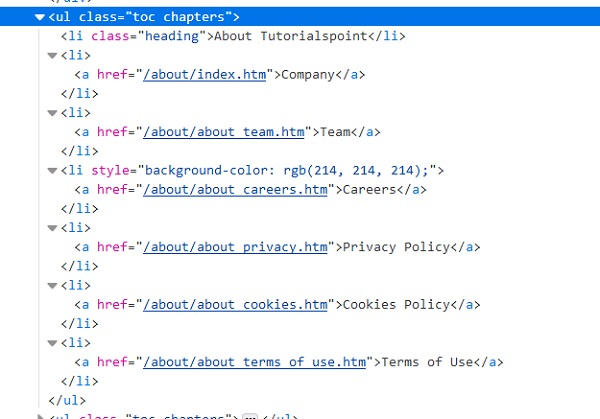
示例
import org.openqa.selenium.By;
import org.openqa.selenium.WebDriver;
import org.openqa.selenium.WebElement;
import org.openqa.selenium.chrome.ChromeDriver;
import java.util.concurrent.TimeUnit;

public class DescendantElements{
   public static void main(String[] args) {
System.setProperty("webdriver.chrome.driver","C:\Users\ghs6kor\Desktop\Java\chromedriver.exe");
      WebDriver driver = new ChromeDriver();
      driver.manage().timeouts().implicitlyWait(5, TimeUnit.SECONDS);
      driver.get("https://tutorialspoint.com/about/about_careers.htm");
      // identify element
      WebElement p=driver.findElement(By.xpath("//ul[@class='toc chapters']"));
      //identify descendants with .//* expression in xpath
      List d = p.findElements(By.xpath(".//*"));
      // iterate descendants
      for ( WebElement j : d ) {
         //getTagName() to descendant tags
         System.out.println(j.getTagName());
      }
      driver.close();
   }
}
输出
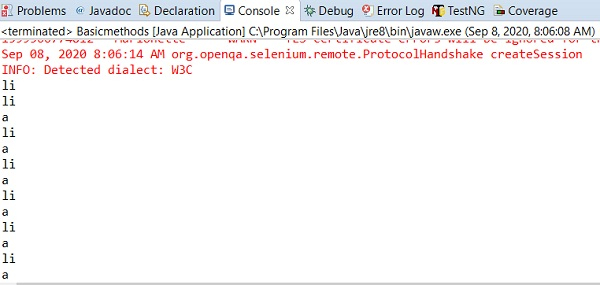

更新于:18-Sep-2020
1K+ 浏览

广告