
 数据结构
数据结构 网络
网络 RDBMS
RDBMS 操作系统
操作系统 Java
Java MS Excel
 iOS
iOS HTML
HTML CSS
CSS 安卓
安卓 Python
 C 编程
C 编程 C++
C++ C#
C# MongoDB
 MySQL
MySQL Javascript
 PHP
PHP 物理
物理 化学
化学 生物
生物 数学
数学 英语
英语 经济
经济 心理学
心理学 社会研究
社会研究 时尚研究
时尚研究 法律研究
法律研究使用 JavaScript、操作类或 Web 驱动程序在元素上单击?
我们可以使用 javascript、操作类和 Web 驱动程序方法点击一个元素。Selenium 可以借助 execute_script() 方法执行 Javascript 中的命令。
我们必须在我们的代码中导入 org.openqa.selenium.JavascriptExecutor 以使用 javascript 执行器。为了点击一个元素,我们首先必须使用鼠标移动来移动到该元素。我们可以借助 Selenium 中的 操作 类执行鼠标移动。
我们必须使用 moveToElement() 方法。此方法将执行鼠标移动,直到元素中间,然后执行点击,后跟构建() 和执行() 方法。我们必须在我们的代码中导入 org.openqa.selenium.interactions.Actions 作为操作类。为了使用 Web 驱动程序方法点击一个元素,我们可以使用 click() 方法。
示例
使用 click() 方法的代码实现。
import org.openqa.selenium.By;
import org.openqa.selenium.WebDriver;
import org.openqa.selenium.WebElement;
import org.openqa.selenium.chrome.ChromeDriver;
import java.util.concurrent.TimeUnit;
public class ElementClk{
   public static void main(String[] args) {
      System.setProperty("webdriver.chrome.driver", "C:\Users\ghs6kor\Desktop\Java\chromedriver.exe");
      WebDriver driver = new ChromeDriver();
      String url = "https://tutorialspoint.com/about/about_careers.htm";
      driver.get(url);
      driver.manage().timeouts().implicitlyWait(5, TimeUnit.SECONDS);
      // identify element and click()
      WebElement l=driver.findElement(By.linkText("Terms of Use"));
      l.click();
      System.out.println("Current page title:" + driver.getTitle());
      driver.quit();
   }
}
示例
使用 Javascript 执行器的代码实现。
import org.openqa.selenium.By;
import org.openqa.selenium.WebDriver;
import org.openqa.selenium.WebElement;
import org.openqa.selenium.chrome.ChromeDriver;
import java.util.concurrent.TimeUnit;
import org.openqa.selenium.JavascriptExecutor;
public class ElementClkJs{
   public static void main(String[] args) {
      System.setProperty("webdriver.chrome.driver", "C:\Users\ghs6kor\Desktop\Java\chromedriver.exe");
      WebDriver driver = new ChromeDriver();
      String url = "https://tutorialspoint.com/about/about_careers.htm";
      driver.get(url);
      driver.manage().timeouts().implicitlyWait(5, TimeUnit.SECONDS);
      // identify element
      WebElement l=driver.findElement(By.linkText("Terms of Use"));
      // click with Javascript Executor
      JavascriptExecutor j = (JavascriptExecutor) driver;
      j.executeScript("arguments[0].click();", l);
      System.out.println("Current page title:" + driver.getTitle());
      driver.quit();
   }
}
示例
使用操作类的代码实现。
import org.openqa.selenium.By;
import org.openqa.selenium.WebDriver;
import org.openqa.selenium.WebElement;
import org.openqa.selenium.chrome.ChromeDriver;
import java.util.concurrent.TimeUnit;
import org.openqa.selenium.interactions.Action;
import org.openqa.selenium.interactions.Actions
public class ElementClkActs{
   public static void main(String[] args) {
      System.setProperty("webdriver.chrome.driver",
      "C:\Users\ghs6kor\Desktop\Java\chromedriver.exe");
      WebDriver driver = new ChromeDriver();
      String url = "https://tutorialspoint.com/about/about_careers.htm";
      driver.get(url);
      driver.manage().timeouts().implicitlyWait(5, TimeUnit.SECONDS);
      // identify element
      WebElement l=driver.findElement(By.linkText("Terms of Use"));
      // Actions class with moveToElement() and click()
      Actions a = new Actions(driver);
      a.moveToElement(l).click();
      a.build().perform();
      System.out.println("Current page title:" + driver.getTitle());
      driver.quit();
   }
}
输出
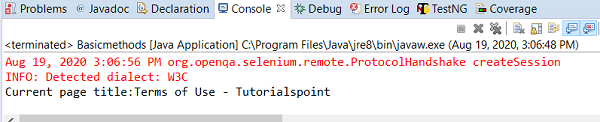

更新于: 2020-08-28
658 次查看

广告