
 数据结构
数据结构 网络
网络 RDBMS
RDBMS 操作系统
操作系统 Java
Java MS Excel
 iOS
iOS HTML
HTML CSS
CSS Android
 Python
 C 编程
C 编程 C++
C++ C#
C# MongoDB
 MySQL
MySQL Javascript
 PHP
PHP 物理
物理 化学
化学 生物
生物 数学
数学 英语
英语 经济学
经济学 心理学
心理学 社会研究
社会研究 时装研究
时装研究 法律研究
法律研究如何使用 PowerShell 获取 IIS 应用程序池回收设置?
若要通过 GUI 获取 IIS 应用程序池回收设置,您需要检查应用程序池高级设置。
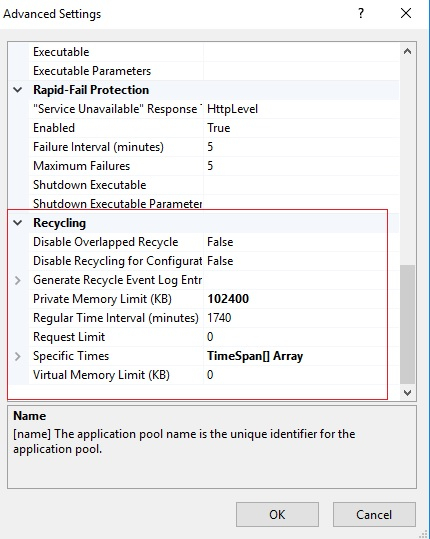
要使用 PowerShell 检索上述设置,我们可以将 Get-IISAppPool 命令与特定的应用程序池名称一起使用。我们有应用程序池 DefaultAppPool,我们需要检索其 Recycling 设置。
PS C:\> (Get-IISAppPool -Name DefaultAppPool).Recycling
输出
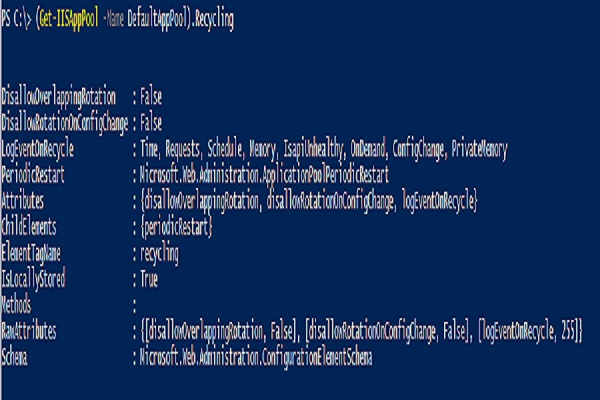
以下设置将针对定期重启。
PS C:\> (Get-IISAppPool -Name DefaultAppPool).Recycling.PeriodicRestart
输出
Memory          : 0
PrivateMemory   : 102400
Requests        : 0
Schedule        : {add}
Time            : 1.05:00:00
Attributes      : {memory, privateMemory, requests, time}
ChildElements   : {schedule}
ElementTagName  : periodicRestart
IsLocallyStored : True
Methods         :
RawAttributes   : {[memory, 0], [privateMemory, 102400], [requests, 0], [time, 1.05:00:00]}
Schema          : Microsoft.Web.Administration.ConfigurationElementSchema
在进一步展开时,您可以添加 Privatememory、Time 等属性。

更新于: 28-4 月-2021
2K+ 浏览

广告