
 数据结构
数据结构 网络
网络 RDBMS
RDBMS 操作系统
操作系统 Java
Java MS Excel
 iOS
iOS HTML
HTML CSS
CSS Android
 Python
 C 编程
C 编程 C++
C++ C#
C# MongoDB
 MySQL
MySQL Javascript
 PHP
PHP 物理
物理 化学
化学 生物
生物 数学
数学 英语
英语 经济学
经济学 心理学
心理学 社会学
社会学 时尚研究
时尚研究 法律研究
法律研究如何使用 PowerShell 获取 Windows 防火墙配置文件设置?
Windows 10、Windows Server 2008 等最新的 Windows 客户端和服务器操作系统支持高级防火墙版本,且主要有 3 个配置文件。
域
公用
专用配置文件。
要使用 GUI 获取设置,则需要在框中搜索高级安全 Windows 防火墙或高级安全 Windows Defender 防火墙。随后你可以在控制台中看到 3 个可用的配置文件。
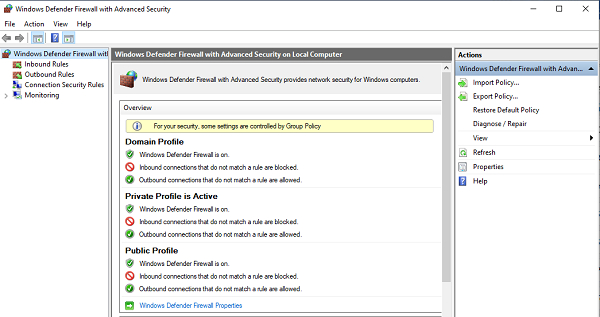
同上个设置,可以使用 PowerShell Get-NetFirewallProfile 命令查看。
PS C:\> Get-NetFirewallProfile
Name : Domain
Enabled : True
DefaultInboundAction : NotConfigured
DefaultOutboundAction : NotConfigured
AllowInboundRules : NotConfigured
AllowLocalFirewallRules : NotConfigured
AllowLocalIPsecRules : NotConfigured
AllowUserApps : NotConfigured
AllowUserPorts : NotConfigured
AllowUnicastResponseToMulticast : NotConfigured
NotifyOnListen : True
EnableStealthModeForIPsec : NotConfigured
LogFileName : %systemroot%\system32\LogFiles\Firewall\pfirewall.log
LogMaxSizeKilobytes : 4096
LogAllowed : NotConfigured
LogBlocked : NotConfigured
LogIgnored : NotConfigured
DisabledInterfaceAliases : {NotConfigured}
Name : Private
Enabled : True
DefaultInboundAction : NotConfigured
DefaultOutboundAction : NotConfigured
AllowInboundRules : NotConfigured
AllowLocalFirewallRules : NotConfigured
AllowLocalIPsecRules : NotConfigured
AllowUserApps : NotConfigured
AllowUserPorts : NotConfigured
AllowUnicastResponseToMulticast : NotConfigured
NotifyOnListen : True
EnableStealthModeForIPsec : NotConfigured
LogFileName : %systemroot%\system32\LogFiles\Firewall\pfirewall.log
LogMaxSizeKilobytes : 4096
LogAllowed : NotConfigured
LogBlocked : NotConfigured
LogIgnored : NotConfigured
DisabledInterfaceAliases : {NotConfigured}
Name : Public Enabled : True
DefaultInboundAction : NotConfigured
DefaultOutboundAction : NotConfigured
AllowInboundRules : NotConfigured
AllowLocalFirewallRules : NotConfigured
AllowLocalIPsecRules : NotConfigured
AllowUserApps : NotConfigured
AllowUserPorts : NotConfigured
AllowUnicastResponseToMulticast : NotConfigured
NotifyOnListen : True
EnableStealthModeForIPsec : NotConfigured
LogFileName : %systemroot%\system32\LogFiles\Firewall\pfirewall.log
LogMaxSizeKilobytes : 4096
LogAllowed : NotConfigured
LogBlocked : NotConfigured
LogIgnored : NotConfigured
DisabledInterfaceAliases : {NotConfigured}
输出为详细信息视图。如果你只需要查看配置文件名称和是否启用,则使用 select 命令即可。
Get-NetFirewallProfile | Select Name, Enabled
输出
Name Enabled ---- ------- Domain True Private True Public True
同样地,你可以根据你的要求过滤上述输出中的不同参数。
若要在远程计算机上获取设置,则需要使用Invoke-Command或PSSession,因为此命令不支持直接使用-ComputerName参数。
Invoke-Command -ComputerName RemoteServerName -ScriptBlock{ Get-NetFirewallProfile | Select Name, Enabled}

更新于: 2020-09-28
2K+ 浏览量

广告