
 数据结构
数据结构 网络
网络 关系型数据库管理系统
 操作系统
操作系统 Java
Java MS Excel
 iOS
iOS HTML
HTML CSS
CSS Android
 Python
 C 编程
C 编程 C++
C++ C#
C# MongoDB
 MySQL
MySQL Javascript
 PHP
PHP 物理学
物理学 化学
化学 生物学
生物学 数学
数学 英语
英语 经济学
经济学 心理学
心理学 社会学
社会学 时尚研究
时尚研究 法律研究
法律研究如何使用 PowerShell 获取 Windows 功能?
要使用 PowerShell 获取可用的或已安装的 Windows 功能和角色,您需要使用 **Get-WIndowsFeature** cmdlet。很明显,Windows 功能和角色仅在服务器操作系统上可用,而不是在客户端操作系统上可用。
从 Windows Server 2008 开始,在服务器操作系统上使用 PowerShell 运行 **Get-WindowsFeature** 时,您将获得如下输出。
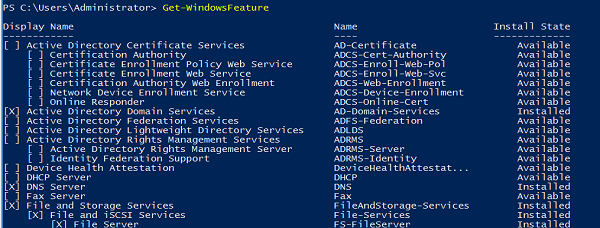
方框中的叉号表示该功能已安装。您还可以使用 **“安装状态”** 检查相同内容。要仅获取服务器上已安装的功能,您需要筛选安装状态功能。
Get-WindowsFeature | where{$_.InstallState -eq "Installed"}输出
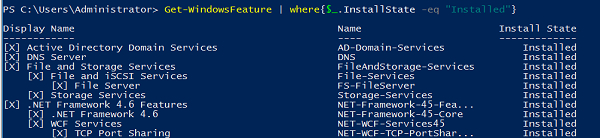
要获取未安装的 Windows 功能/角色,您需要使用属性值 **“Available”** 筛选安装状态,或者使用 **NOT** 运算符和 **INSTALLED** 值。
Get-WindowsFeature | where{!($_.InstallState -eq "Installed")}输出
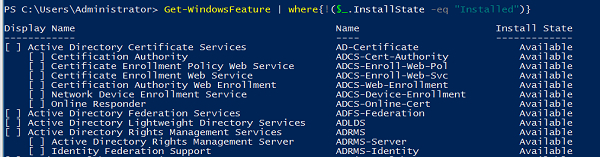
如果您需要查找特定功能/角色,您只需键入名称或显示名称即可。如果您不知道功能/角色的完整名称,则允许使用通配符来完成搜索操作。例如,
Get-WindowsFeature *Remote*
输出

要检查远程服务器上的已安装功能,您需要使用 -**ComputerName** 参数运行上述命令。例如,我们需要检索两个功能 **RemoteAccess** 和 **ADRMS**,然后我们可以使用以下命令。
Get-WindowsFeature -ComputerName Test1-Win2k16 -Name ADRMS,Remoteaccess
输出

如果您需要从多个远程服务器检索 Windows 功能信息,则可以使用 **Invoke-Command**,因为使用 **-ComputerName** 参数的 **Get-WindowsFeature** 命令不支持数组,并且使用 Invoke-Command,您还可以获取安装了特定功能的计算机名称。例如,
Invoke-Command -ComputerName Test1-Win2k16,Test1-Win2k12 -ScriptBlock{Get- WindowsFeature ADRMS,RemoteAccess}输出

您还可以使用通配符字符 (*) 搜索 Windows 功能。例如,
Invoke-Command -ComputerName Test1-win2k16 -ScriptBlock{Get-WindowsFeature *Backup*}

更新于: 2020-08-26
10K+ 浏览量

广告