
 数据结构
数据结构 网络
网络 RDBMS
RDBMS 操作系统
操作系统 Java
Java MS Excel
 iOS
iOS HTML
HTML CSS
CSS Android
 Python
 C 编程
C 编程 C++
C++ C#
C# MongoDB
 MySQL
MySQL Javascript
 PHP
PHP 物理学
物理学 化学
化学 生物
生物 数学
数学 英语
英语 经济学
经济学 心理学
心理学 社会科学
社会科学 时尚研究
时尚研究 法律研究
法律研究如何在 Windows 操作系统中使用 PowerShell 获取空文件?
若要使用 PowerShell 获取 Windows 操作系统中的空文件列表,有两种方法,
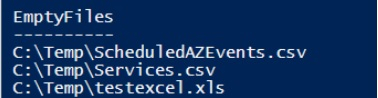
a) 使用 Length 参数。我们将计算文件的长度。如果长度为 0,则文件为空,如下图所示。
Get-ChildItem C:\Temp\ -Recurse | where{$_.Length -eq 0} |
Select @{N='EmptyFiles';E={$_.FullName}}
输出
b) 另一种方法比较繁琐,我们不想深入研究。我们需要检查每个文件的内容,如果为空,则将该文件声明为一个空文件。
Get-ChildItem C:\Temp -Recurse -File | foreach{
   if((Get-Content $_.FullName) -eq $null){
      $_.FullName
   }
此方法非常慢,因为它扫描了每个文件的所有内容。始终建议使用第一种方法。

更新于:30-Mar-2021
1K+ 浏览量

广告