
 数据结构
数据结构 网络
网络 关系数据库管理系统
 操作系统
操作系统 Java
Java MS Excel
 iOS
iOS HTML
HTML CSS
CSS Android
 Python
 C 编程
C 编程 C++
C++ C#
C# MongoDB
 MySQL
MySQL Javascript
 PHP
PHP 物理学
物理学 化学
化学 生物学
生物学 数学
数学 英语
英语 经济学
经济学 心理学
心理学 社会学
社会学 时尚研究
时尚研究 法律研究
法律研究如何在 Java 中使用 OpenCV 实现双边模糊?
您可以使用低通滤波器对图像进行滤波以模糊图像,这将从图像中去除高频成分(噪声、边缘)。双边滤波是 OpenCV 提供的一种模糊技术,它 −
可有效去除噪声
保持边缘清晰
相对较慢
您可以使用 bilateralFilter() 方法对图像应用双边滤波,该方法接受
两个表示源图像和目标图像的 Mat 对象。
一个表示像素邻域直径的整数。
两个表示颜色空间和坐标空间中滤波 sigma 的整数变量。
一个表示所用边框类型的整数对象。
示例
import java.awt.Image;
import java.awt.image.BufferedImage;
import java.io.IOException;
import javafx.application.Application;
import javafx.embed.swing.SwingFXUtils;
import javafx.scene.Group;
import javafx.scene.Scene;
import javafx.scene.image.ImageView;
import javafx.scene.image.WritableImage;
import javafx.stage.Stage;
import org.opencv.core.Core;
import org.opencv.core.Mat;
import org.opencv.highgui.HighGui;
import org.opencv.imgcodecs.Imgcodecs;
import org.opencv.imgproc.Imgproc;
public class BilateralFilterExample extends Application {
   public void start(Stage stage) throws IOException {
      //Loading the OpenCV core library
      System.loadLibrary( Core.NATIVE_LIBRARY_NAME );
      //Reading image data
      String file ="D:\Images\window.jpg";
      Mat src = Imgcodecs.imread(file);
      //Creating destination matrix
      Mat dst = new Mat(src.rows(), src.cols(), src.type());
      //Applying Bilateral filter
      Imgproc.bilateralFilter(src, dst, 25, 75, 75, Core.BORDER_DEFAULT);
      //Converting matrix to JavaFX writable image
      Image img = HighGui.toBufferedImage(dst);
      WritableImage writableImage= SwingFXUtils.toFXImage((BufferedImage) img, null);
      //Setting the image view
      ImageView imageView = new ImageView(writableImage);
      imageView.setX(10);
      imageView.setY(10);
      imageView.setFitWidth(575);
      imageView.setPreserveRatio(true);
      //Setting the Scene object
      Group root = new Group(imageView);
      Scene scene = new Scene(root, 595, 400);
      stage.setTitle("Bilateral Filter Example");
      stage.setScene(scene);
      stage.show();
   }
   public static void main(String args[]) {
      launch(args);
   }
}
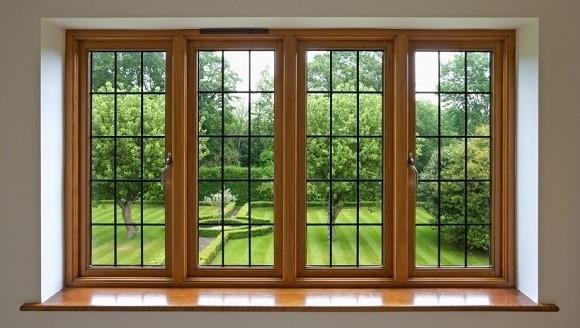
输入图像
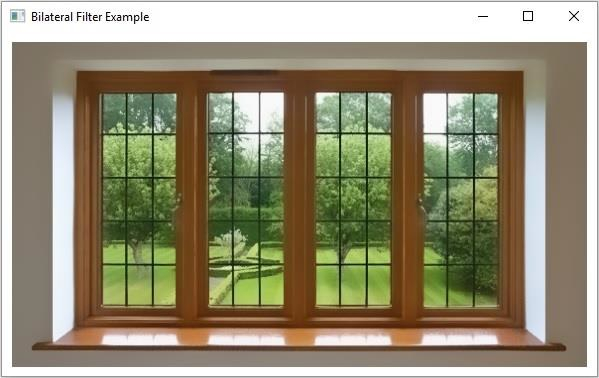
输出
执行上述程序将生成以下输出 −

更新于: 2020 年 4 月 9 日
297 次浏览

广告