
 数据结构
数据结构 网络
网络 关系数据库管理系统 (RDBMS)
 操作系统
操作系统 Java
Java MS Excel
 iOS
iOS HTML
HTML CSS
CSS Android
 Python
 C语言编程
C语言编程 C++
C++ C#
C# MongoDB
 MySQL
MySQL Javascript
 PHP
PHP 物理学
物理学 化学
化学 生物学
生物学 数学
数学 英语
英语 经济学
经济学 心理学
心理学 社会研究
社会研究 时尚研究
时尚研究 法律研究
法律研究如何使Tkinter画布矩形透明?
canvas部件是Tkinter库中最通用的部件之一。通常,它用于在任何应用程序中绘制形状、动画对象和创建复杂的图形。要创建像矩形这样的形状,我们使用create_rectangle(x,y, x+ width, y+ height, **options)方法。我们可以通过添加诸如宽度、高度、填充和背景、边框宽度等属性来配置画布上的项目。
画布中的alpha属性定义了画布项目的透明度。但是,此属性在Tkinter库中不可用;因此,我们必须定义一个函数来为形状提供透明度属性。创建透明度属性函数的步骤如下:
- 定义一个内置函数create_rectangle(x,y,a,b, **options)。
- 计算必须提供给形状的每种颜色(RGB)的alpha值。
- 使用pop()删除形状中预定义的alpha值(如果适用)。
- 使用winfo_rgb()计算区域中的形状颜色,并将alpha值添加到形状中。
- 由于新创建的形状将具有不同的颜色和背景,因此必须将其用作图像。
- 图像可以轻松地显示在画布上。
示例
# Import the required libraries
from tkinter import *
from PIL import Image, ImageTk

# Create an instance of tkinter frame
win= Tk()

# Set the size of the tkinter window
win.geometry("700x350")

# Store newly created image
images=[]

# Define a function to make the transparent rectangle
def create_rectangle(x,y,a,b,**options):
   if 'alpha' in options:
      # Calculate the alpha transparency for every color(RGB)
      alpha = int(options.pop('alpha') * 255)
      # Use the fill variable to fill the shape with transparent color
      fill = options.pop('fill')
      fill = win.winfo_rgb(fill) + (alpha,)
      image = Image.new('RGBA', (a-x, b-y), fill)
      images.append(ImageTk.PhotoImage(image))
      canvas.create_image(x, y, image=images[-1], anchor='nw')
      canvas.create_rectangle(x, y,a,b, **options)
# Add a Canvas widget
canvas= Canvas(win)

# Create a rectangle in canvas
create_rectangle(50, 110,300,280, fill= "blue", alpha=.3)
create_rectangle(40, 90, 420, 250, fill= "red", alpha= .1)
canvas.pack()

win.mainloop()
输出
运行以上代码将在画布上显示多个透明矩形。
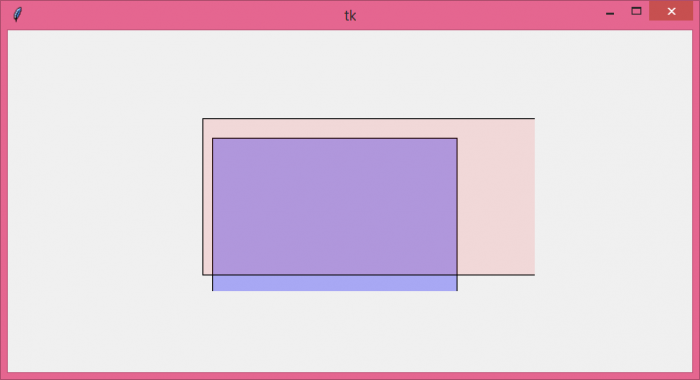

更新于:2021年6月8日
9K+ 次浏览

广告