
 数据结构
数据结构 网络
网络 关系型数据库管理系统
 操作系统
操作系统 Java
Java MS Excel
 iOS
iOS HTML
HTML CSS
CSS Android
 Python
 C 编程
C 编程 C++
C++ C#
C# MongoDB
 MySQL
MySQL Javascript
 PHP
PHP 物理学
物理学 化学
化学 生物学
生物学 数学
数学 英语
英语 经济学
经济学 心理学
心理学 社会学
社会学 时尚研究
时尚研究 法律研究
法律研究如何使用 Python Matplotlib 绘制饼图,并突出显示单个饼块?
简介..
你最喜欢的图表类型是什么?如果你问管理层或商业分析师这个问题,他们会立即回答:饼图!它是展示百分比的一种非常常见的方式。
操作方法..
1. 使用以下命令安装 matplotlib。
pip install matplotlib
2. 导入 matplotlib
import matplotlib.pyplot as plt
3. 准备临时数据。
tennis_stats = (('Federer', 20),('Nadal', 20),('Djokovic', 17),('Murray', 3),)4. 下一步是准备数据。
titles = [title for player, title in tennis_stats]
players = [player for player, title in tennis_stats]
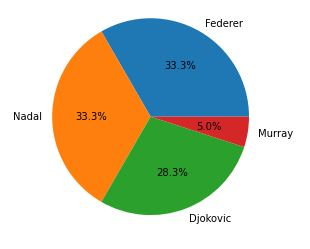
5. 使用值作为标题,标签作为玩家姓名创建饼图。
autopct 参数 - 用于格式化值,使其以小数点后一位的百分比显示。axis('equals') - 确保饼图看起来是圆形的。.show - 显示生成的图形。
注意- 执行 .show 会阻塞程序的执行。当您关闭窗口时,程序将继续执行。
plt.pie(titles, labels=players, autopct='%1.1f%%')
plt.gca().axis('equal')
(-1.1000000175619362, 1.1000000072592333, -1.1090350248729983, 1.100430247887797)
6. 显示图形。
plt.show()
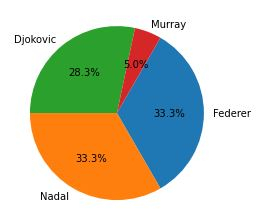
7. 有几个有趣的参数可以用来调整饼图/饼块。startangle - 旋转饼块/饼图的起始位置。
counterclock - 您想要设置的方向,默认为 True。
plt.pie(titles, labels=players, startangle=60, counterclock=False,autopct='%1.1f%%')
plt.show()
8. 对于某些人(比如我),百分比没有任何意义。请记住,输出图形会发送给一些对隐藏在您代码深处的值一无所知的人。因此,除了百分比之外(显然,从饼图的分割方式可以看出),我们能否显示实际的标题?
嗯,这有点棘手,因为您需要编写一个自定义函数。请查看以下内容。
我将创建一个自定义函数 - format_values 来创建一个字典,其中键为百分比,以便我们可以检索引用的值。
示例
from matplotlib.ticker import FuncFormatter
total = sum(title for player, title in tennis_stats)
print(total)
values = {int(100 * title / total): title for player, title in tennis_stats}
print(values)

def format_values(percent, **kwargs):
value = values[int(percent)]
return '{}'.format(value)

# explode to seperate the pie/wedges.
explode = (0, 0, 0.1, 0.0)
plt.pie(titles, labels=players, explode=explode, autopct=format_values)

plt.show()

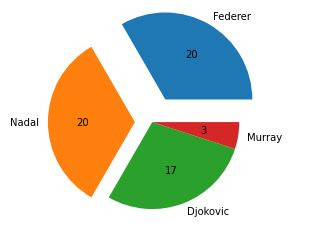
# the more the value the more farther it will be seperated.
explode = (0.3, 0.2, 0.0, 0.0)
plt.pie(titles, labels=players, explode=explode, autopct=format_values)
60
{33: 20, 28: 17, 5: 3}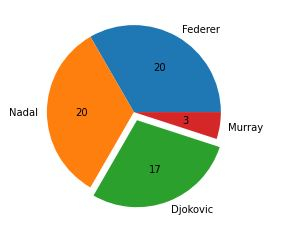
([<matplotlib.patches.Wedge at 0x2279cf8dd00>,
<matplotlib.patches.Wedge at 0x2279cf9b1f0>,
<matplotlib.patches.Wedge at 0x2279cf9b8b0>,
<matplotlib.patches.Wedge at 0x2279cf9bf70>],
[Text(0.6999999621611965, 1.2124355871444568, 'Federer'),
Text(-1.2999999999999945, -1.2171478395895002e-07, 'Nadal'),
Text(0.39420486628845763, -1.0269384223966398, 'Djokovic'),
Text(1.086457194390738, -0.17207778693546258, 'Murray')],
[Text(0.44999997567505484, 0.7794228774500078, '20'),
Text(-0.7999999999999966, -7.490140551320001e-08, '20'),
Text(0.2150208361573405, -0.5601482303981671, '17'),
Text(0.5926130151222206, -0.09386061105570685, '3')])
最后,将所有内容整合在一起。
示例
# imports
import matplotlib.pyplot as plt
from matplotlib.ticker import FuncFormatter

# prepare data
tennis_stats = (('Federer', 20),('Nadal', 20),('Djokovic', 17),('Murray', 3),)

titles = [title for player, title in tennis_stats]
players = [player for player, title in tennis_stats]

total = sum(title for player, title in tennis_stats)
values = {int(100 * title / total): title for player, title in tennis_stats}

# custom function
def format_values(percent, **kwargs):
value = values[int(percent)]
return '{}'.format(value)

# explode to seperate the pie/wedges.
explode = (0, 0, 0.1, 0.0)
plt.pie(titles, labels=players, explode=explode, autopct=format_values)

plt.show()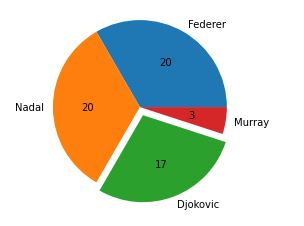

更新于: 2020年11月10日
810 次浏览

广告