
 数据结构
数据结构 网络
网络 RDBMS
RDBMS 操作系统
操作系统 Java
Java MS Excel
 iOS
iOS HTML
HTML CSS
CSS Android
 Python
 C 编程
C 编程 C++
C++ C#
C# MongoDB
 MySQL
MySQL Javascript
 PHP
PHP 物理
物理 化学
化学 生物
生物 数学
数学 英语
英语 经济
经济 心理学
心理学 社会研究
社会研究 时尚研究
时尚研究 法律研究
法律研究如何使用 PowerShell 检索 MSI 包产品代码?
你可以使用 Get-Package 或 Get-WmiObject 命令,通过 PowerShell 在 Windows 操作系统中检索已安装的 MSI 打包产品代码。
在此示例中,我们将检索 7-zip. 的产品代码。
Get-Package -Name '7-Zip 19.00 (x64 edition)' | fl *
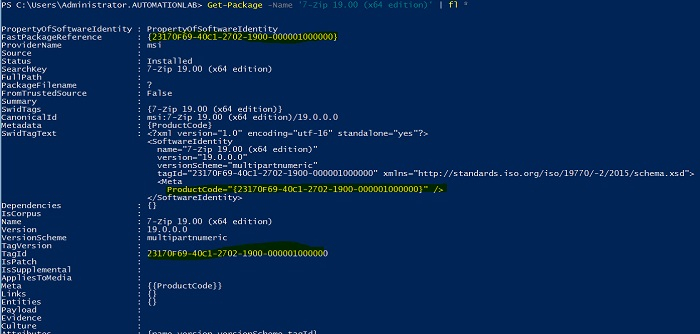
你可以使用 tagid 或提到的属性来筛选产品代码。
要使用 Get-Package 方法从远程计算机检索包,请使用 InvokeCommand。
Invoke-Command -ComputerName TestMachine -ScriptBlock{
   (Get-Package -Name '7-Zip 19.00 (x64 edition)').TagID
}
另一种检索产品代码的方法是使用 WMI 方法,如下所示。
PS C:\> $product = Get-WmiObject win32_product | where{$_.name -
eq "7-Zip 19.00 (x64 edition)"}
PS C:\> $product.IdentifyingNumber
输出

若要从远程计算机获取输出,只需指定 -ComputerName 参数。
$product = Get-WmiObject win32_product -ComputerName
TestMachine1, Testmachine2 | where{$_.name -eq "7-Zip 19.00 (x64 edition)"}
$product.IdentifyingNumber

更新日期:2021-08-31
超过 12,000 次浏览

广告